Quick answer
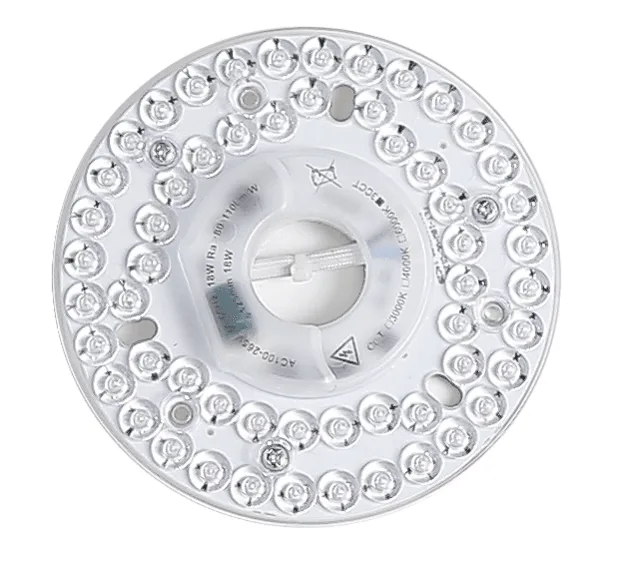
To replace a ceiling fan light kit with an LED source, turn off power at the breaker, remove the old light kit, disconnect the wiring, and install a compatible LED module that matches your fan's connector and wattage. For Sofucor fans, the 18W 3CCT non-dimmable module fits many current models, while the Legacy 1C LED is for older single-color fans. Always match the module to your fan's original type.
Match the LED module to your fan before you start
Not all ceiling fan light sources are interchangeable. The two main variables are wattage and color temperature control. A 3CCT module lets you choose between warm white, neutral, and cool white at installation, while a single-color module is fixed. If your fan originally used a single-color LED, a 3CCT module may not work even if the connector fits. Check your fan's manual or the old module's label for wattage and CCT type. If you are unsure, contact the manufacturer with your fan's model number. This step prevents buying a module that physically fits but does not light correctly.
Safety and tools you will need
Turn off the circuit breaker that controls your ceiling fan, not just the wall switch. Use a non-contact voltage tester to confirm power is off at the fan's wires. You will need a screwdriver that matches your fan's screws (often Phillips), wire strippers if you are replacing the entire light kit rather than just the LED module, and a ladder rated for your working height. Work with a partner if possible, and never rely on the wall switch alone to cut power.
Remove the old light kit or LED module
If you are replacing only the LED module, twist or unclip it from its socket according to your fan's design. For a full light kit replacement, remove the screws holding the glass shade, then the screws or nut securing the light kit to the fan's bottom housing. Support the kit with one hand as you remove the last screw to avoid dropping it. Disconnect the wiring by unscrewing the wire nuts or unplugging the connector. Note how the wires are paired—usually white to white and black or blue to black—before you separate them.
Install the new LED light source
If you are installing a replacement LED module, align its connector with the socket and push or twist until it seats fully. Do not force it; if it does not seat easily, check that you have the correct module for your fan. For a complete light kit, connect the new kit's wires to the fan's wires using the same color pairing you noted during removal. Secure the light kit to the fan housing with its screws, then attach the glass shade. Hand-tighten screws to avoid cracking plastic housings.
Test and troubleshoot
Restore power at the breaker and turn on the wall switch. If the light does not come on, turn power off again and check that all wire connections are tight and that the LED module is fully seated. If you installed a 3CCT module, cycle the wall switch to confirm the color temperature memory function works as expected. Some non-dimmable modules may flicker if used with a dimmer switch; if that happens, replace the dimmer with a standard switch or choose a dimmable module if your fan supports it.
Step-by-step: replacing your ceiling fan light kit with LED
- Turn off power at the breaker: Flip the breaker that controls the fan and use a voltage tester to confirm no power at the fan's wires. Common mistake: relying on the wall switch, which may not cut power to the light kit. Checkpoint: tester shows no voltage before you touch any wires.
- Remove the old light kit or module: Take off the glass shade, then unscrew or unclip the light kit or LED module. Note the wire colors and connections as you disconnect them. Checkpoint: keep the old module or take a photo of the wiring for reference.
- Match and install the new LED source: Confirm your fan's original type (3CCT or 1C) and wattage, then connect the new module or kit using the same color pairing. Secure all screws and the shade. Checkpoint: the new module seats fully without force and wires are tight.
- Restore power and test: Turn the breaker back on and test the light. If using a 3CCT module, cycle the switch to verify color memory. If the light flickers, check for a dimmer switch and replace it if needed. Checkpoint: light works steadily and color temperature changes as expected.
Sofucor replacement LED options
- Sofucor 18W 3CCT Non-Dimmable Replacement LED Light Source: Genuine Sofucor 18W non-dimmable LED light source with 3 selectable color temperatures (Warm White, Neutral White, Cool White) and built-in memory function. If your Sofucor fan uses a 3CCT module, this direct replacement restores adjustable color temperature and remembers your last setting after power cycles.
- Sofucor Legacy Single Color (1C LED) Replacement Light Source: Genuine Sofucor Legacy single-color (1C LED) replacement light source, designed only for older Sofucor ceiling fans originally equipped with a single-color LED. Older Sofucor fans need this specific 1C module; using a 3CCT module may not work, so verify your fan's original light type before ordering.