Quick Answer
To set up a 4-light softbox kit for product video, assemble the stands, attach the softboxes, install daylight CFL bulbs, and position the lights for even coverage. The HS4 kit from ephotoinc provides four bulbs and two switches for independent control.
Why a 4-light setup works for product video
A 4-light softbox kit gives you more control over shadows and highlights than a single light. You can use two lights as key and fill, one as a rim light, and one to brighten the background—without mixing color temperatures if all bulbs are daylight-balanced.
The trade-off is space and power. Four stands and softboxes need a roomy shooting area, and four 45-watt CFL bulbs draw more electricity than a two-light setup. Check your outlet capacity before plugging everything in.
Step-by-step setup
- Unpack and inventory: Lay out all components from the carrying case: light heads, softboxes, bulbs, stands, and any included accessories. Check that nothing is damaged before assembly. Missing or broken parts are easier to address before you start building.
- Assemble the light stands: Extend each stand to a stable height, typically 5 to 6 feet, and lock the leg spread. Ensure the stands are on a flat surface to prevent tipping. Always lock the leg spread before mounting any light head.
- Attach the light head to the stand: Mount the light head onto the stand's stud and tighten the locking knob. Confirm it is secure before adding the softbox. A loose head can rotate and cause an uneven light pattern.
- Assemble the softbox: Open the softbox and attach it to the light head using the speed ring or mounting bracket. Ensure the fabric is taut and the inner baffle is in place. A loose or wrinkled softbox will create hotspots and uneven diffusion.
- Install the bulbs: Screw the four daylight CFL bulbs into the sockets. Use a cloth or glove to avoid touching the glass, and ensure they are snug but not over-tightened. Overtightening can crack the bulb; always handle with care.
- Connect power and test switches: Plug the light head into a power outlet and use the two on/off switches to turn on groups of bulbs. Verify all four bulbs illuminate. If a bulb doesn't light, check the socket connection before swapping it.
- Position the lights for product video: Place two lights at 45-degree angles as key and fill, one behind the product as a rim light, and one to illuminate the background. Adjust distances to control brightness and shadow softness. Start with lights 3-4 feet from the product, then fine-tune based on your camera's exposure.
Product facts
-
Photograpy Video DSLR Camera Lighting Kit Studio Photo Softbox Lighting HS4: The HS4 kit includes a light head that holds 4 bulbs, a 16" x 24" softbox, four 45-watt daylight CFL bulbs, a 6.5-foot light stand, and a carrying case. It operates with two on/off switches. This kit gives you a complete 4-light setup in one package, and the two switches let you control groups of lights independently for quick adjustments.
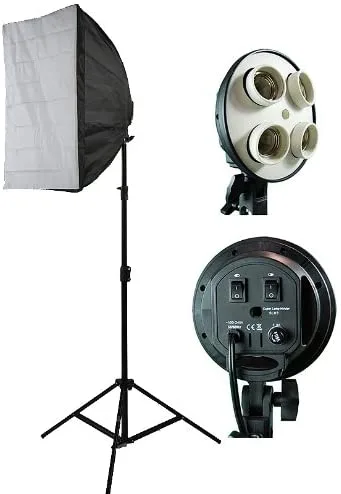
Photograpy Video DSLR Camera Lighting Kit Studio Photo Softbox Lighting HS4