What You Need to Know Before You Start
Setting up a wireless button plate on your sim racing rig can simplify your controls and reduce cable clutter. The Ascher Racing Button Plate B24L-SC is a popular choice, offering 24 inputs, magnetic paddle shifters, and a robust wireless connection. Before mounting, focus on two key areas: wheel rim compatibility and mounting hardware.
This guide walks through the steps supported by the product's supplied information, so you can install the plate confidently without guesswork.
Ascher Racing Button Plate B24L-SC at a Glance
-
Ascher Racing Button Plate B24L-SC [Wireless]: Compatible with many popular wheel rims, including Porsche 911 GT3 Cup, Fanatec, Simucube 2, and many more. You need to check your wheel rim against the supported list before ordering to avoid compatibility issues.
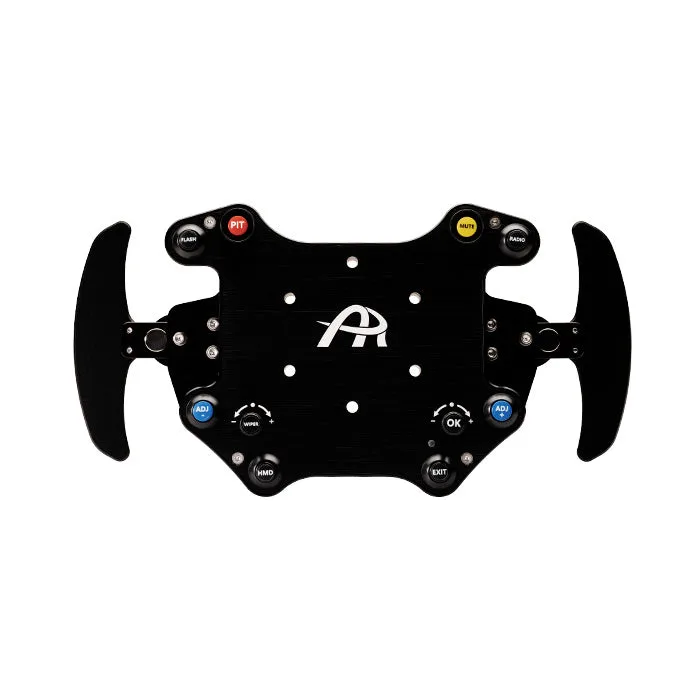
Ascher Racing Button Plate B24L-SC [Wireless]
-
Ascher Racing Button Plate B24L-SC [Wireless]: Uses a 6 x 70 mm bolt pattern and includes M5 x 35/40 mm screws, nuts, and washers for mounting the Q1R quick release (not included). Ensure your wheel base has the 70 mm bolt pattern; if not, you may need an adapter. The quick release is sold separately.
-
Ascher Racing Button Plate B24L-SC [Wireless]: The L model has buttons moved downwards for rims with a curved shaped center; the M model moves buttons upwards for rims with a horizontal shaped center. Selecting the correct model (B24L vs B24M) ensures the buttons align properly with your wheel rim's shape.
Step 1: Check Your Wheel Rim Compatibility
- Verify your wheel rim model: The B24L-SC is compatible with many rims, but not all. Heavily dished steering wheel rims are not suitable. Check the supplied list for models like JET, Mod 30, Fanatec GT, OMP, SPARCO, and others.
- Choose the correct model (B24L vs B24M): The L model fits rims with a curved center (e.g., many racing wheels). If your rim has a horizontal center, the M model is better. If unsure, measure your rim's curvature.
- Check bolt pattern and clearance: The plate uses a 6 x 70 mm bolt pattern. A spacer may be needed to clear the wheel base. The coiled cable connector is about 64 mm long.
Step 2: Mount the Button Plate to Your Wheel Base
- Attach the quick release (not included): The quick release is required for mounting but is sold separately. Use the included M5 screws, nuts, and washers to secure it to your wheel base.
- Position the button plate: Align the plate so the buttons and joysticks are within easy reach. The plate weighs 700 g, so ensure your rig can support it securely.
- Secure the plate: Tighten the quick release mechanism until the plate is firmly attached. Do not overtighten; the aluminum construction is durable but can be damaged.
Step 3: Connect and Configure the Wireless Connection
The B24L-SC uses a robust, shielded coiled cable with an industrial Binder M16 connector. Connect the cable to your PC or sim racing base. The wireless functionality is built into the plate; no additional software is needed for basic button mapping. Use your sim's control settings to assign each button and encoder to the desired actions.
The plate includes 8 push buttons, 2 encoders (with push button functionality), 2 magnetic paddle shifters, and 2 multifunctional 7-way joysticks. Each input can be labeled using the included 50 button labels (black/white) and 72 encoder labels (multiple colors).
What the Supplied Information Does Not Confirm
The catalog does not specify wireless protocol details (e.g., Bluetooth or proprietary RF), battery life, or charging requirements. If you rely on wireless operation, contact Ascher Racing directly for these specifics. The plate is advertised as wireless, but the supplied evidence does not confirm whether it uses a rechargeable battery or requires a wired power connection for the wireless module.
Also, the catalog does not provide exact torque specifications for mounting screws or detailed software configuration steps beyond basic button mapping.