What SuperBase V Can Do for Your Home
The Zendure SuperBase V is a modular home battery system designed to keep essential appliances running during outages or to shift your energy use to cheaper times. With a single unit providing up to 3,800W of continuous power and 6.4kWh of storage (in the V6400 model), it can handle a refrigerator, lights, and a few other essentials. You can also connect two SuperBase V units together for up to 7,600W, or add Satellite Batteries to scale capacity up to 64kWh.
This guide walks you through the setup process, from choosing a location to connecting the Home Panel, based on the official specifications and instructions.
Step-by-Step Setup for Home Backup
Follow these steps to get your SuperBase V ready for home backup. The exact steps depend on whether you are using the unit as a portable power station or integrating it with your home's electrical panel via the Home Panel.
- 1. Choose a location: Place SuperBase V on a flat, stable surface near your main electrical panel if you plan to connect it to the Home Panel. The unit has motorized rear wheels, so you can move it easily, even on inclined surfaces. Keep it indoors and away from moisture.
- 2. Connect the Home Panel (if using): The Home Panel should be installed by a licensed electrician. It connects SuperBase V to your home's electrical circuits, allowing you to power selected circuits during an outage. The electrician will wire the panel and connect it to the SuperBase V using the appropriate cables.
- 3. Connect the battery cable (for Satellite Batteries): If you are adding Satellite Batteries, the included battery cable is the only connection required between the Satellite and the SuperBase V. No additional wiring is needed.
- 4. Charge the unit: Plug SuperBase V into a standard 120V or 240V outlet. When connected to a 240V outlet, it can recharge in about 2 hours. You can also charge from solar panels (up to 3,000W via the XT-90 port) or a combination of AC and solar for up to 5,900W total input.
- 5. Connect devices or circuits: If you are using SuperBase V as a portable backup, plug appliances directly into its AC outlets. For whole-home backup, the Home Panel will route power to the circuits you selected.
- 6. Monitor with the Zendure app: Use the Zendure app to monitor energy use, customize settings, and take advantage of Time of Use tools to reduce your energy bill. The app gives you real-time insight into your system's performance.
Key Specs That Affect Setup
These specifications from the official product record will help you plan your installation and usage.
-
Zendure SuperBase V Power Station: A single SuperBase V can provide up to 3,800W of power, and two units can be connected together to provide up to 7,600W. Knowing your total power needs helps you decide whether one unit is enough or if you need to pair two for larger appliances.
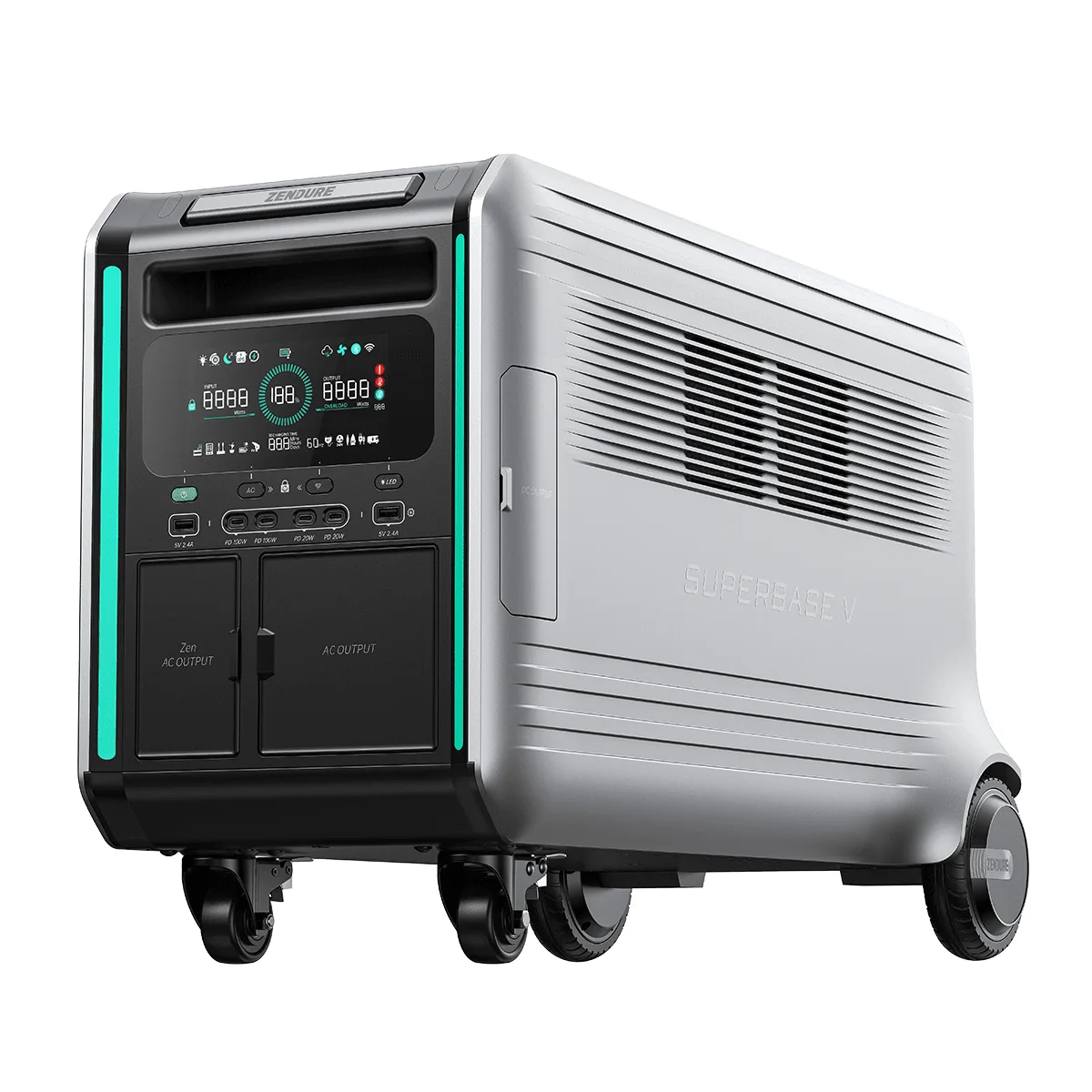
Zendure SuperBase V Power Station
-
Zendure SuperBase V Power Station: The SuperBase V6400 has a storage capacity of 6.4 kWh (6,438Wh). This tells you how long your essential appliances can run during an outage. For example, a typical refrigerator uses about 1-2 kWh per day, so 6.4kWh could last several days if you're careful.
-
Zendure SuperBase V Power Station: SuperBase V can accept solar power through the XT90 port or the AC input, with up to 3,000W solar input. If you plan to use solar panels, you need to match the panel voltage (12V-150V) and connect via the XT90 port. Zendure's 400W and 320W panels are tested and recommended.
-
Zendure SuperBase V Power Station: The Home Panel should be installed by a licensed electrician. This is a safety-critical step. Do not attempt to wire the Home Panel yourself unless you are a qualified electrician.
Expanding Your System: Adding Batteries and Units
If your power needs grow, SuperBase V is designed to scale. You can add Satellite Batteries (up to eight) to increase capacity to 64kWh, or connect a second SuperBase V of the same battery type using the ZenY cable or the Home Panel to double the output to 7,600W.
Important: Do not mix semi-solid-state and LFP components in the same system. A SuperBase V system should be configured with only semi-solid-state components or only LFP components. This keeps the system safe and functioning as designed.
When adding a Satellite Battery, the included battery cable is the only connection required. For a second SuperBase V, use the ZenY cable or the Home Panel to link them.
Safety and Maintenance Notes
SuperBase V uses advanced battery technology: the V6400 uses semi-solid-state batteries, while the V4600 uses LiFePO4 (LFP). Both offer long cycle life (3,000+ cycles for V6400, 6,000+ for V4600) and built-in battery management software that helps extend internal battery life to 10 years or more.
The unit has a seamless UPS feature that switches to battery power in 0ms, protecting sensitive electronics from interruptions. This is especially useful for computers, medical devices, or home network equipment.
For any permanent wiring to your home's electrical panel, always hire a licensed electrician. Do not attempt to modify the Home Panel or electrical connections yourself.
What the Supplied Information Does Not Cover
The official product record does not specify exact installation steps for the Home Panel or detailed wiring diagrams. Those instructions are provided by the electrician or in the Home Panel manual. Similarly, the record does not list specific appliance run times or load limits for individual devices. Use the power and capacity figures as your planning baseline, and check the power draw of your appliances to estimate backup duration.
Also, while SuperBase V is compatible with third-party solar panels (12V-150V), Zendure recommends its own tested panels (400W and 320W) for reliable performance. If you use other panels, verify their voltage and connector compatibility.