Quick answer
Slide the Blaze Evercade TATE Grip onto your EXP or EXP-R so the grip sits at the bottom when the screen is rotated 90° counter-clockwise. This instantly gives you a secure, ergonomic hold for vertical (TATE) shooters without blocking buttons or ports.
Why the TATE Grip helps with vertical games
Holding a handheld sideways for vertical shooters (shmups) can strain your wrists after a few rounds. The TATE Grip adds a contoured handle that shifts the console’s center of gravity, letting you relax your fingers while keeping a firm hold. It also lifts the device slightly off the table if you set it down in vertical mode.
The grip fits only the EXP and EXP-R models. If you have an original Evercade or a VS home console, this accessory won’t attach. The grip does not add any extra buttons or battery—it is purely an ergonomic shell.
How to set up the TATE Grip on your EXP or EXP-R
- 1. Power off and remove any case: Turn off your Evercade EXP or EXP-R and take off any silicone skin or hard case. The TATE Grip needs direct contact with the console’s sides to snap on securely. A thick case will prevent the grip from clicking into place. If the grip feels loose, check that no case is in the way.
- 2. Orient the grip for vertical mode: Hold the grip so the curved palm rest faces downward when the console’s screen is rotated 90° counter-clockwise (the usual TATE orientation). The grip’s cutouts should align with the USB-C port and headphone jack on the bottom edge of the EXP/EXP-R. If you rotate the screen clockwise instead, the grip’s cutouts will be on the wrong side and may block the charging port.
- 3. Slide the console into the grip: Align the console’s left edge with the grip’s inner rail, then press the right edge in until you hear a click on both sides. The grip should sit flush against the console’s back without gaps. Do not force the console. If it does not click in easily, double-check the orientation and remove any debris from the rail.
- 4. Rotate the screen to vertical mode: Power on the console and go to Settings > Display > Screen Rotation. Select 90° Counter-Clockwise. The Evercade OS will flip the UI and games that support TATE mode. Not every game in the Evercade library supports vertical mode. Check the game’s manual or online compatibility list before expecting a full-screen TATE experience.
- 5. Adjust your grip and play: Hold the console so the grip rests in your palm and your thumb reaches the D-pad and face buttons naturally. The grip’s contour should let your fingers relax around the back without cramping. If the shoulder buttons feel hard to reach, tilt the console slightly forward. The grip is designed for comfort, not for changing button positions.
Featured product
-
Blaze Evercade TATE Grip for the EXP and EXP-R Grey: Expertly designed to provide improved ergonomics and a secure hold, this accessory reduces hand fatigue during extended gaming sessions. You can play through longer shmup sessions without needing to pause or readjust your grip, which keeps you focused on the action.
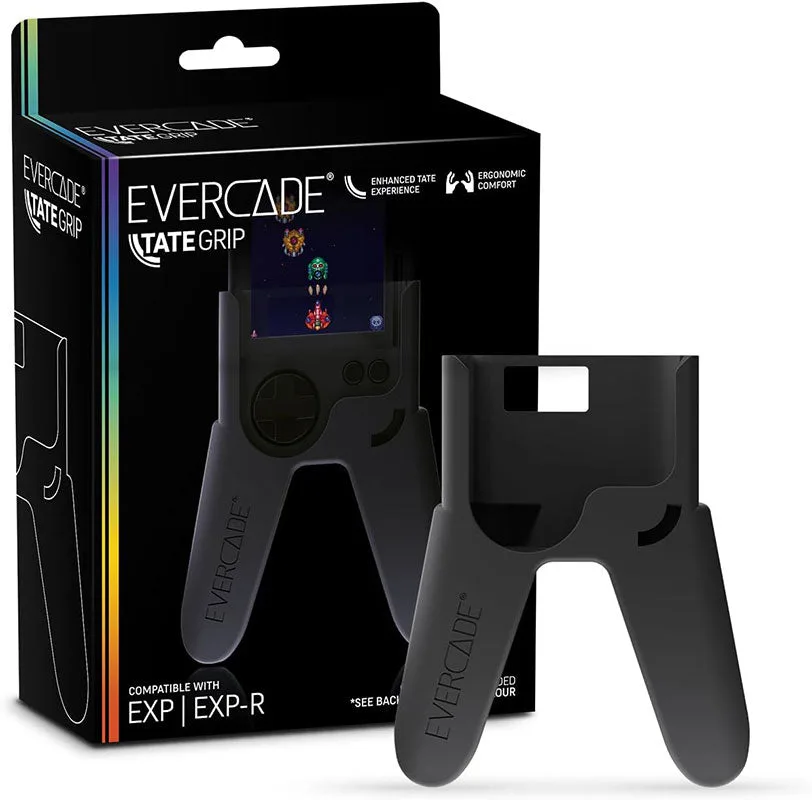
Blaze Evercade TATE Grip for the EXP and EXP-R Grey