Quick answer
Yes, you can use a MagSafe magnetic wallet with most rugged cases, but success depends on magnet strength and case thickness. Choose a case with built-in MagSafe compatibility, like the SUPCASE Unicorn Beetle PRO MAG, and attach the wallet directly over the case's magnet area. If your case lacks MagSafe, use a metal adhesive plate or a magnetic adapter, but expect a less secure hold.
A MagSafe magnetic wallet is a convenient way to carry cards and cash without a bulky pocket. But when you pair it with a rugged phone case, the extra thickness and materials can interfere with the magnetic connection. The good news: with the right case and setup, you can enjoy both heavy-duty protection and the convenience of a magnetic wallet.
This guide walks you through the practical steps to attach a MagSafe wallet to a rugged case, what to check before buying, and how to avoid common pitfalls like weak hold or accidental detachment.
Why rugged cases can complicate MagSafe
Rugged cases are built with multiple layers—often a hard polycarbonate shell plus a soft TPU bumper—to absorb impact. That extra material adds thickness, which increases the distance between the wallet's magnets and your phone's internal magnet array. The result is a weaker hold, especially if the case isn't designed with MagSafe in mind.
Another issue is material. Some rugged cases use metal or thick rubber that can block or interfere with magnetic fields. Even if the case is thin, a metal back plate can disrupt the connection. That's why checking for built-in MagSafe compatibility is the first step.
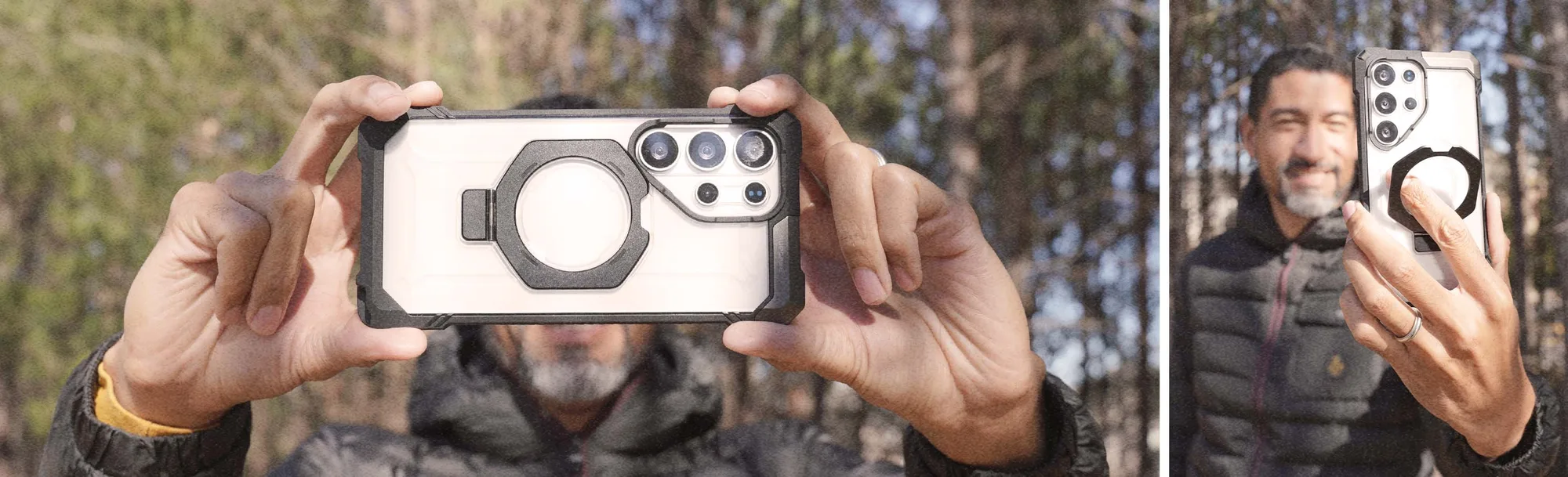
If your case already supports MagSafe, like the SUPCASE Unicorn Beetle PRO MAG Rugged MagSafe Case, the magnet alignment is engineered to work with Apple's accessories. If not, you'll need an adapter or a different approach.
- Look for cases that explicitly state MagSafe compatibility, not just 'wireless charging compatible'.
- Avoid metal-backed cases unless they have a designated magnet area.
How to attach a MagSafe wallet to a rugged case
Start by cleaning the back of your case with a soft, dry cloth to remove dust or oils. This ensures the wallet's adhesive ring (if included) sticks properly and the magnets make full contact.
Next, locate the magnet area on your case. For MagSafe-compatible cases, it's usually a visible circular ring or a raised area. Align the wallet's magnet ring with that spot. If you're using a non-MagSafe case, attach a metal adhesive plate to the case's back, centered where the wallet should sit.
Press the wallet firmly for about 10 seconds to engage the magnets. Then test the hold by gently shaking the phone. If it feels loose, reposition and try again. For non-MagSafe cases, consider a wallet with a stronger magnet or use a case with built-in MagSafe for the most reliable connection.
- Always test the hold before adding cards—cards can add weight and affect the magnet strength.
- If the wallet keeps sliding, the case may be too thick or the magnet alignment is off.
Common mistakes to avoid
One mistake is assuming all MagSafe wallets work with every rugged case. The magnet strength varies between brands. A wallet designed for a thin case may not hold securely on a bulky rugged case. Check the wallet's magnet rating or reviews from users with similar cases.
Another mistake is ignoring the case's material. Some rugged cases have a textured back that reduces the wallet's grip. In that case, a wallet with a non-slip surface or an adhesive ring can help.
Finally, don't forget about wireless charging. A magnetic wallet can interfere with charging if it stays attached. Always remove the wallet before placing your phone on a charger, and make sure your case is MagSafe-compatible for a reliable connection.
- Remove the wallet before wireless charging to avoid overheating or charging failure.
- If you use a metal plate, ensure it doesn't block the charging coil area.
Choosing the right rugged case for MagSafe
If you're in the market for a new case, prioritize one with built-in MagSafe. The SUPCASE Unicorn Beetle PRO MAG Rugged MagSafe Case for iPhone 14 Plus is a good example—it combines rugged drop protection with a magnet array that aligns perfectly with MagSafe accessories. This means your wallet attaches securely without extra adapters.
Another option is the UB GRIP PRO Series case for iPhone 17 Pro Max, which includes MagSafe compatibility and a built-in HD tempered glass screen protector. It's a two-in-one solution that saves you from buying a separate screen protector, and the grip-enhanced design helps you hold the phone firmly even with a wallet attached.
For non-MagSafe rugged cases, you can still use a magnetic wallet with a metal plate, but you'll sacrifice some hold strength. If you frequently use a wallet, investing in a MagSafe-compatible case is worth it.
- Check the case's product description for 'MagSafe compatible' before buying.
- Consider cases with built-in screen protectors to reduce bulk and improve compatibility.
Step-by-step: Set up your MagSafe wallet on a rugged case
- Check case compatibility: Look for 'MagSafe compatible' in the case specs. If not, plan to use a metal adhesive plate or a magnetic adapter. Checkpoint: If the case has a metal back, skip the adapter and choose a different case.
- Clean the case back: Wipe the back with a dry microfiber cloth to remove dust and oils. This helps the wallet's adhesive ring (if any) stick and improves magnet contact. Checkpoint: A clean surface prevents the wallet from sliding off later.
- Align the wallet: Position the wallet over the case's magnet area, usually a visible ring. Press firmly for 10 seconds to engage the magnets. Checkpoint: Shake the phone gently to test the hold. If it moves, realign.
- Test with cards: Add your cards and test the hold again. Heavier wallets may need a stronger magnet or a case with built-in MagSafe. Checkpoint: If the wallet sags, consider a different wallet or case.
- Remove before charging: Always take off the wallet before placing your phone on a wireless charger to avoid interference. Checkpoint: Make it a habit to detach the wallet when charging.
Rugged cases that work with MagSafe wallets
- iPhone 14 Plus 6.7 inch Unicorn Beetle PRO MAG Rugged MagSafe Case-Gun Metal: Built-in MagSafe compatibility for easy attachment, rugged design for enhanced drop protection. This case lets you attach a MagSafe wallet directly without adapters, ensuring a secure hold and reliable wireless charging.
- https://supcasery.com/products/ub-grip-pro-series-iphone-17-pro-max-magsafe-phone-case-with-hd-tempered-glass-288966UB GRIP PRO Series iPhone 17 Pro Max MagSafe Phone Case with HD Tempered Glass: MagSafe compatible for effortless wireless charging and accessory attachment, includes HD tempered glass for screen protection. You get a rugged case and screen protector in one, plus MagSafe support, so your wallet attaches firmly without extra accessories.
Using a MagSafe magnetic wallet with a rugged case is practical if you pay attention to compatibility and magnet strength. Start with a MagSafe-compatible case for the most reliable hold, and always test the connection before you rely on it. With the right setup, you can carry your cards securely without compromising on protection.