Quick answer
The NE555 DC 12V relay timer module lets you create adjustable delay-on or delay-off circuits by wiring a trigger source and turning the onboard potentiometer. This guide walks you through the setup process and highlights common pitfalls.
Understanding the NE555 Timer Module Basics
The NE555 chip is a classic timer IC that generates precise time delays. On this module, it drives a relay rated for 12V DC, so you can switch higher-current loads like lamps, pumps, or fans. The delay period is set by an onboard potentiometer, and you can choose between delay-on (trigger starts timing) or delay-off (trigger stops timing) by moving a jumper or selecting the mode pin.
One tradeoff: the module's delay range depends on the resistor and capacitor values soldered on the board. Most modules offer roughly 0–10 seconds, but some versions support up to several minutes. The exact range is not always marked, so test with a multimeter if you need precise timing.
What You'll Need for the Setup
Before wiring, gather a 12V DC power supply (e.g., a battery or wall adapter), the NE555 relay timer module, a load device (like an LED with resistor or a small motor), and a trigger source such as a push button, switch, or a 5V logic signal from a microcontroller. You'll also need a small flathead screwdriver to adjust the potentiometer.
Note: The module requires a clean 12V supply. Using an underpowered or noisy supply can cause erratic timing or relay chatter.
Step-by-Step Setup for the NE555 Relay Timer Module
- Connect power and ground: Wire the 12V positive from your supply to the module's VCC terminal and the negative to GND. The module's red LED should light up. Common mistake: reversing polarity can damage the NE555 chip – double-check before powering on.
- Wire the trigger source: Connect your trigger (e.g., a push button) between the TRIG terminal and GND. For delay-on mode, a momentary low pulse starts the timing. For delay-off mode, the timing begins when the trigger is released. Check the module's jumper or datasheet to confirm which mode your board uses. Common mistake: applying a continuous low signal instead of a pulse may keep the relay latched and prevent timing. If the relay stays on without timing, your trigger signal may be held low – use a momentary switch or a short pulse.
- Connect the load to the relay output: Wire your load (e.g., an LED with a current-limiting resistor) between the COM and NO terminals for normally-off operation. When the relay activates, the circuit closes. For normally-on operation, use the NC terminal instead. Common mistake: exceeding the relay's rated current (typically 10A at 250VAC or 10A at 30VDC) can weld the contacts – check your load's current draw.
- Adjust the delay time: Turn the onboard potentiometer with a small screwdriver. Clockwise increases the delay; counterclockwise decreases it. Power the module and trigger it, then time the relay activation with a stopwatch to dial in your desired delay. Common mistake: turning the pot too fast or past its mechanical stop can damage the trimmer – turn gently and stop when you feel resistance. If the delay seems too short or too long even at the pot extremes, the module's RC timing components may need to be swapped for a different range.
- Test the complete circuit: Apply power, trigger the module, and observe the load. The relay should click after the set delay. For delay-on, the load turns on after the delay. For delay-off, the load turns off after the delay. Common mistake: forgetting to set the mode jumper correctly – if the behavior is opposite of what you expect, change the mode selection. Always test with a low-current load (like an LED) before connecting high-power equipment.
Product used in this guide
-
NE555 DC 12V Relay Timer Switch Module Delay Relay Shield Adjustable: Timer switch module based on NE555 chip, operates at 12V DC. It provides a simple, low-cost way to add adjustable time delays to your projects without programming.
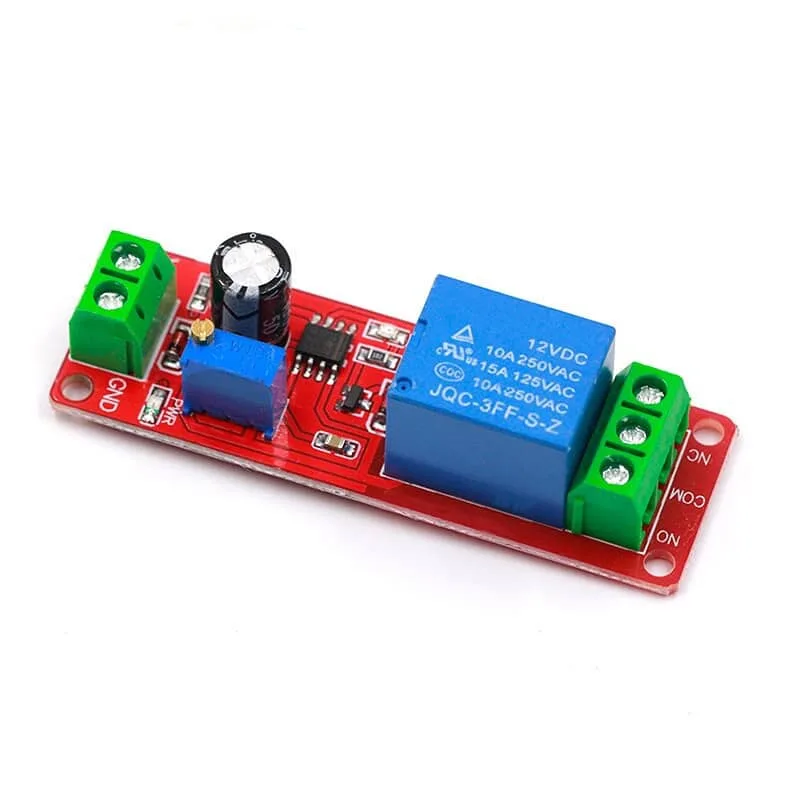
NE555 DC 12V Relay Timer Switch Module Delay Relay Shield Adjustable