Quick Answer
Use the Sheridan Floral Belt Craftaid to press a raised design into dampened leather, creating a clean imprint that guides your tooling. Follow the steps below for accurate placement and crisp results.
Why Use a Craftaid Template?
Transferring a floral pattern onto leather by hand can be time-consuming and prone to misalignment. The Sheridan Floral Belt Craftaid solves this with a raised design that you press into dampened leather, leaving a clean imprint to follow with your carving tools.
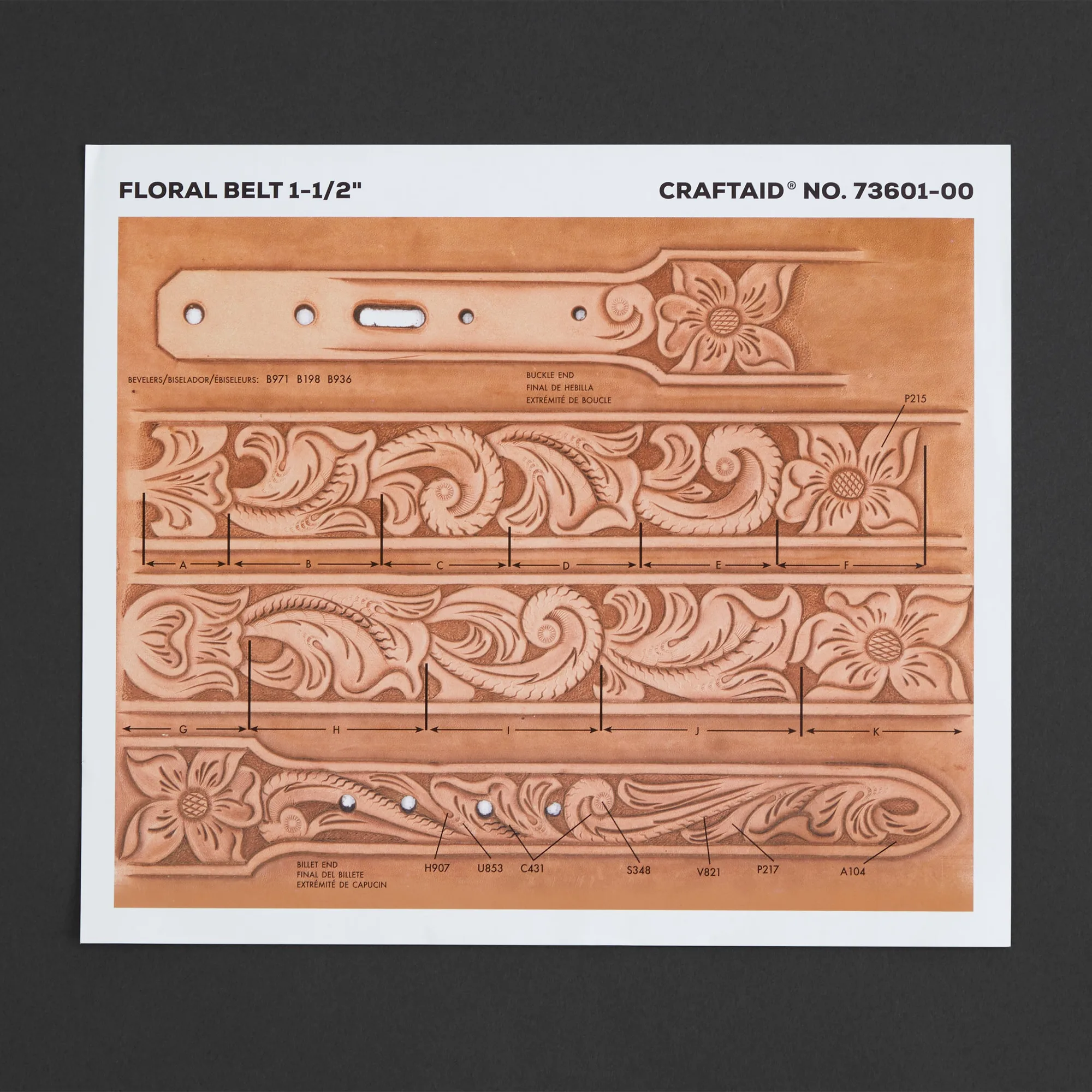
The template is reusable and sized for 1.5-inch belts, so you can use it on multiple projects. It also includes a photocarve diagram that shows different ways to achieve beautiful results, helping you plan your shading and backgrounding before you start.
What You Need Before You Start
Gather your leather belt blank (1.5 inches wide), a sponge and water, a mallet, a modeling spoon or stylus, and your carving tools. The Craftaid template itself does the pattern transfer, so you don't need tracing paper or a swivel knife for the initial imprint.
Make sure your leather is cased (dampened) evenly. Too dry and the imprint won't be visible; too wet and the leather can distort. A slightly firm surface works best for a clean impression.
Step-by-Step Tooling Guide
- Case the leather: Dampen a sponge and wet the leather surface evenly. Let it absorb until the leather returns to a slightly firm feel but still cool to the touch. This is the ideal moisture level for imprinting. Check that the leather is evenly damp; dry spots will produce faint imprints.
- Position the Craftaid: Place the Craftaid on the belt where you want the pattern. Align it carefully with the belt edges, making sure the design is centered and straight. Use the belt width as a guide. Double-check alignment before pressing; once imprinted, it's hard to reposition.
- Press the template: Using a mallet or a modeling spoon, press the raised design firmly into the leather. Work from the center outward to avoid air bubbles. Apply even pressure across the entire template. Avoid rocking the template; a steady, even press gives a cleaner imprint.
- Remove and inspect: Lift the Craftaid straight up. The imprint should be visible but not overly deep. If it's too faint, you can re-dampen the leather and press again, but be careful not to overwork the leather. If the imprint is uneven, re-case the leather and repeat the press rather than trying to freehand the pattern.
- Tool the pattern: Follow the imprinted lines with your carving tools. Use the photocarve diagram as a guide for shading and backgrounding. Work in small sections to maintain control and consistency. Keep your tools sharp and your leather slightly damp for clean cuts.
- Finish and seal: After tooling, let the leather dry completely. Apply your preferred finish or dye according to the product instructions. The imprint will remain visible, so you can also use it as a guide for coloring. Test your finish on a scrap piece first to ensure it doesn't blur the imprint.
Product Facts
-
Sheridan Floral Belt Craftaid®: The Sheridan Floral Belt Craftaid has raised designs that can be pressed into dampened leather to create a clean imprint. It is compatible with 1.5-inch belts and includes a photocarve diagram. This means you can transfer a detailed floral pattern quickly and accurately without freehand drawing, and the diagram helps you choose the best tooling approach.
Sheridan Floral Belt Craftaid®