What the edge guide does before you cut
A trim router edge guide replaces the bearing you would normally rely on to follow a workpiece edge. Instead, the guide references the edge itself, so the router bit stays parallel to that edge as you move the tool. That makes it useful for dados, grooves, fluting, and inlays, where a consistent offset matters more than following a curved template.
The Kreg Trim Router Edge Guide is built from impact-resistant polymer with a clear base, and it includes an integrated handle designed to improve grip and reduce fatigue during longer sessions. It also supports circle cutting from 3-1/2" to 15" diameter, which extends its use beyond straight runs.
Trim router edge guide setup for straight cuts
The supplied product information does not include a step-by-step installation procedure, so treat these as practical checkpoints rather than manufacturer instructions. Confirm the specifics for your router and bit before cutting.
- Confirm your router is listed as compatible: The guide is compatible with most major trim routers, including the Kreg 20V Ionic Drive 1/4" Trim Router. Check the compatibility chart before assuming a fit.
- Mount the guide and check the reference edge: The guide references the edge of the workpiece to control bit offset without bearings. Make sure the edge you plan to run against is straight and clear of obstructions before you set the offset.
- Set the bit offset for your cut: The guide precisely guides router bits along the workpiece edge. The supplied information does not state a specific offset range, so set the offset for your bit and test the setup on scrap before cutting the final piece.
- Use the integrated handle for control: The ergonomic handle is designed to improve control and reduce fatigue during extended use. Keep a firm grip and feed the router steadily along the edge.
- For circles, set the guide to the diameter: Circle cutting is supported for sizes from 3-1/2" to 15" diameter. The supplied information does not describe the circle-cutting setup steps, so confirm the method for your router before attempting a circle.
Kreg Trim Router Edge Guide at a glance
-
Trim Router Edge Guide: Precisely guide router bits without the need for bearings along the edge of the workpiece This is the core function: the workpiece edge becomes your reference, which simplifies straight cuts and reduces reliance on bit bearings.
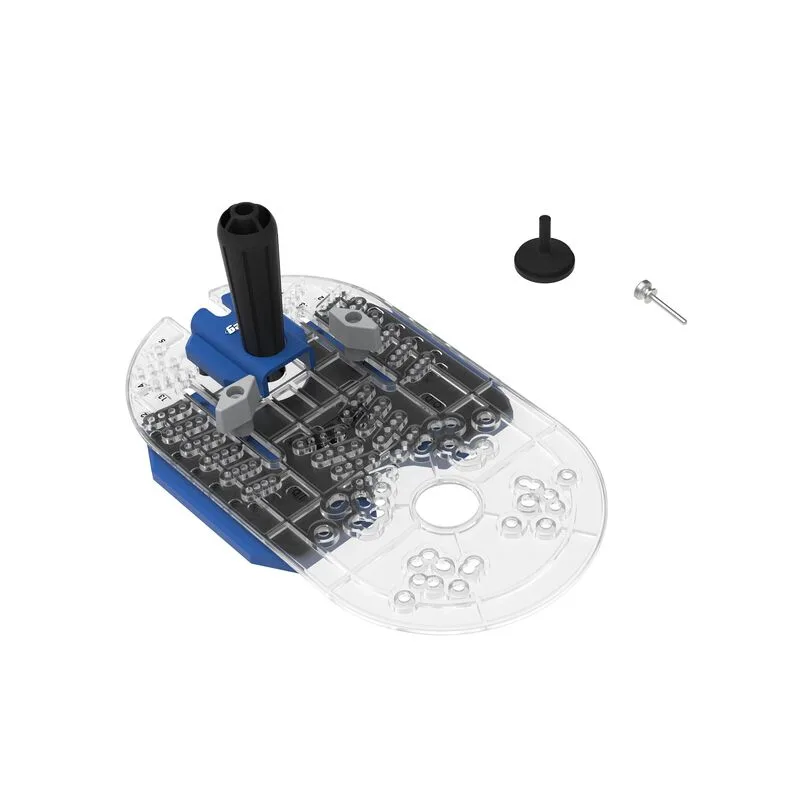
Trim Router Edge Guide
-
Trim Router Edge Guide: Perfect for dados, grooves, fluting, and inlays These are the cut types the guide is intended to support, so match your project to these uses before buying.
-
Trim Router Edge Guide: Accurate circle cutting with sizes from 3-1/2" to 15" diameter Circle cutting is a second use case beyond straight edges; check that your needed diameter falls within this range.
-
Trim Router Edge Guide: Compatible with most major trim routers (click for compatibility chart), including the Kreg 20V Ionic Drive 1/4" Trim Router Compatibility is the first thing to verify; the guide is not confirmed to fit every trim router.
-
Trim Router Edge Guide: Built from impact-resistant polymer with a clear base for improved visibility and control The clear base helps you see the cut line, and the polymer construction is intended to withstand shop use.
Where the edge guide earns its place
Use the edge guide when you need a consistent offset from a straight workpiece edge and want to avoid bearing-guided bits. It is especially helpful for dados and grooves where the cut runs parallel to an edge, and for fluting or inlays that require repeated passes at the same offset.
The integrated handle and clear base are practical for longer sessions: the handle is designed to reduce fatigue, and the clear base lets you monitor the bit without leaning around the tool. If your work is mostly freehand or template-based, a bearing-guided bit may still be the simpler choice.
Limits to check before you buy
- Router compatibility is not universal: The guide fits most major trim routers, but the supplied information directs you to a compatibility chart. Confirm your model is listed, especially if you do not own the Kreg 20V Ionic Drive 1/4" Trim Router.
- Circle cutting has a defined range: Circles are supported from 3-1/2" to 15" diameter. The supplied information does not state whether smaller or larger circles are possible, so do not assume they are.
- Setup steps and care instructions are not included in the supplied information: This article describes the guide's intended use, but the supplied record does not include installation steps, bit offset ranges, or care instructions. Check the product documentation for those details.
A practical workflow for straight router cuts with an edge guide
Start by checking that your router is compatible and that the workpiece edge is straight and clean. Mount the guide, set the offset for your bit, and make a test cut on scrap to confirm the setup. For dados and grooves, run the router along the edge with steady pressure, using the handle to maintain control. For circles, set the guide to the desired diameter within the supported range, then cut with the same controlled feed.
If the cut drifts or the guide feels unstable, stop and recheck the setup rather than forcing the cut. The guide is designed to improve control, but it works best when the reference edge and bit offset are correct before you start.