Quick answer
A universal L bracket lets you switch from horizontal to vertical framing without moving the tripod head or losing the center column balance. Mount the bracket once, then slide the camera sideways to shoot verticals while keeping the lens over the tripod center.
Why a universal L bracket helps with vertical photography
When you tilt a standard ball head 90 degrees for a vertical shot, the camera shifts off-center, making the setup top-heavy and harder to balance. A universal L bracket solves this by providing an Arca-Swiss compatible plate on both the bottom and the side of the camera. You simply loosen the clamp, slide the camera into the vertical position, and tighten—the lens stays centered over the tripod column for more stable shots.
The ProMaster Complete-L Bracket, for example, forms a dovetail plate across the bottom and side, so you can mount the camera directly over the head's center in either orientation. This keeps the head's full range of motion available while maintaining a central balance point.
Trade-offs to consider before buying
Universal L brackets are designed to fit many camera bodies, but the fit may not be as precise as a custom bracket. If your camera has a contoured base or unusual tripod socket placement, check that the bracket's side plate does not block battery or cable doors. The ProMaster Complete-L Bracket is a standard-size option that works with most DSLR and mirrorless bodies, but you should verify clearance around the ports before tightening.
How to use a universal L bracket for vertical shots
- Attach the L bracket to the camera: Align the bracket's bottom plate with the camera's tripod socket and tighten the mounting screw. Make sure the side plate is oriented toward the lens (most brackets have a left-hand or right-hand version; choose the side that keeps the camera controls accessible). Common mistake: over-tightening the screw, which can strip the socket or crack the bracket. Tighten firmly by hand, then give it an extra quarter turn with a coin or key.
- Mount the bracket to the tripod head: Slide the bracket's bottom dovetail into the Arca-Swiss clamp on the tripod head. Tighten the clamp knob enough to hold the camera securely, but avoid forcing it. Check that the camera is level by looking at the bubble level on the head or the bracket. Common checkpoint: if the camera wobbles, the clamp may not be compatible with the bracket's dovetail width—ensure both use the same Arca-Swiss standard.
- Switch to vertical orientation: Loosen the clamp knob, slide the camera sideways so the side plate engages the clamp, and re-tighten. The camera should now be vertical with the lens centered over the tripod column. Common mistake: forgetting to check the tripod head's pan lock. If the head is not locked, the camera may rotate unexpectedly when you release the clamp. Always lock the head's pan and tilt before loosening the bracket. After switching, verify that the camera is still level and that no cables or grip straps are pinched between the bracket and the camera body.
Product fact
-
Promaster Complete-L Bracket - Universal / Standard: The ProMaster Complete-L Bracket forms a dovetail, Arca-Swiss compatible quick release plate across the bottom and the side of the camera. This design lets you switch between horizontal and vertical framing without re-leveling the tripod head, saving time and keeping your composition stable.
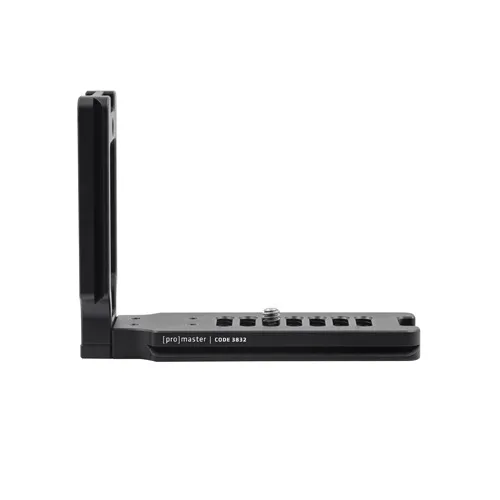
Promaster Complete-L Bracket - Universal / Standard