Quick Answer
A V-mount bracket adds three standard shoe mounts to your camera’s accessory shoe, letting you attach an LED light and a microphone at the same time. Follow these steps to set it up securely and avoid common balance or cable issues.
Why Use a V-Mount Bracket Instead of the Camera’s Single Shoe?
A camera’s accessory shoe can hold only one device at a time. If you need to mount an LED light and a microphone simultaneously for an interview or vlog, you run out of space. A V-mount bracket solves this by adding three standard shoe mounts, letting you attach a light, a mic, and a monitor or receiver without swapping gear. The trade-off is that the bracket adds a small amount of height and weight above the camera, so it works best with compact accessories that don’t overload the camera’s shoe. For heavier lights, consider a separate light stand mount instead.
How to Set Up a V-Mount Bracket for an LED Light and a Microphone
- 1. Attach the bracket to the camera’s shoe: Slide the bracket’s bottom shoe into your camera’s accessory shoe until it clicks or tightens. Most brackets use a thumbscrew or locking wheel—turn it clockwise until snug. Do not overtighten; you only need firm contact to prevent wobbling. Check that the bracket sits flat and does not tilt forward or backward.
- 2. Mount the LED light on a shoe mount: Slide the base of your LED light into one of the three shoe mounts on the bracket. Tighten the light’s locking knob or screw. If your light has a cold shoe foot, it will fit directly. For lights with a 1/4-20 thread, you may need a small adapter—most compact LED panels include one. Avoid mounting the heaviest accessory on the outermost shoe; use the center shoe for the light to keep the camera balanced.
- 3. Mount the microphone on a separate shoe: Slide the microphone’s shoe mount or shock mount into another shoe on the bracket. Tighten the mic mount’s locking ring. If your mic uses a 3.5mm cable, route the cable along the bracket or camera strap to avoid pulling on the jack during movement. Leave one shoe free if you plan to add a wireless receiver or monitor later.
- 4. Connect and test both devices: Turn on the LED light and adjust the brightness or color temperature as needed. Check the microphone levels in your camera’s audio menu. Do a quick recording test to confirm the light does not cause audio hum or that the mic cable does not block the light’s controls. If you hear interference, move the mic to the farthest shoe from the light.
Product Used in This Guide
-
V Mount bracket with 3 Standard shoe Mount for LED lights, Mics, Monitor: This V mount light and sound bracket mounts on the camera’s accessory shoe to provide extra mounting points for a light, microphone, or monitor. It adds three standard shoe mounts from a single camera shoe, so you can attach an LED light and a microphone at the same time without needing extra adapters.
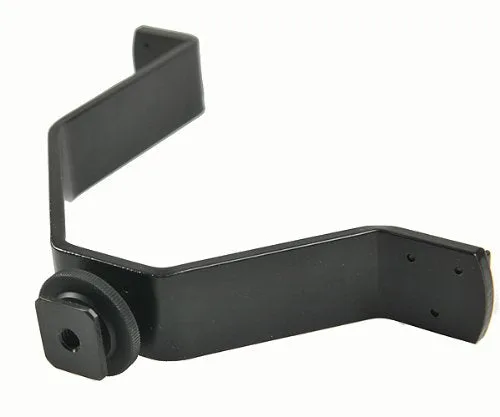
V Mount bracket with 3 Standard shoe Mount for LED lights, Mics, Monitor