Quick Answer
To use a ZMPT101B AC voltage sensor with Arduino, connect the module's VCC, GND, and OUT pins to 5V, GND, and an analog input, then read the analog value and calibrate it against a known reference voltage.
Why the ZMPT101B Needs Calibration
The ZMPT101B outputs an analog voltage proportional to the AC input, but the exact relationship varies from module to module due to component tolerances. Without calibration, your readings can be off by several volts, which is unacceptable for monitoring 240V mains.
Calibration involves measuring a known voltage (like your household mains) and adjusting a software scale factor until the Arduino reading matches. This is a one-time step for each module, and you should recalibrate if you change the board or the Arduino's supply voltage.
Step-by-Step Wiring and Code
- Wire the Module: Connect VCC to Arduino 5V, GND to GND, and OUT to an analog pin (e.g., A0). For the AC input, connect the live wire to the module's AC input terminal and neutral to the other. Always work with power off and use insulated wires. Double-check polarity on the AC side; reversing live and neutral is not dangerous but can affect accuracy.
- Upload a Basic Analog Read Sketch: Use the standard AnalogReadSerial example to read the analog pin. Open the Serial Monitor and observe the raw values (0-1023). The values should fluctuate as the AC sine wave cycles. If you see a constant 0 or 1023, check your wiring; the module may not be powered or the output may be disconnected.
- Determine the Zero Point: With the AC input disconnected, read the analog value and record it as the zero offset. This is typically around 512 (2.5V), but it can vary. Subtract this offset from all readings in your code. Do not assume the zero point is exactly 512; measure it for your specific module.
- Measure a Known Voltage: Connect the module to a known AC voltage (e.g., your household 120V or 230V outlet) and read the adjusted analog value. Record this value and the actual voltage (use a multimeter if possible). Never touch bare wires; use a properly rated plug and socket for safety.
- Calculate the Scale Factor: Divide the known voltage by the adjusted analog value to get a scale factor (volts per analog unit). For example, if 230V gives an adjusted value of 400, the factor is 0.575. In your code, multiply the adjusted reading by this factor to display the voltage. Perform this step with a stable voltage source and take multiple readings to average the value.
- Write the Final Sketch: In your sketch, read the analog pin, subtract the zero offset, multiply by the scale factor, and print the result. Add a small delay (e.g., 200ms) to avoid flooding the Serial Monitor. Optionally, compute the RMS value by sampling over a full cycle. For RMS, sample at a fixed rate (e.g., 1000 Hz) for at least 20ms and calculate the root mean square manually.
Product Facts
-
AC Voltage sensor module ZMPT101B 240V: The ZMPT101B module is designed to measure AC voltages up to 240V and includes a voltage transformer for isolation. It provides a safe way to interface high-voltage AC with your Arduino's 5V logic, but you still need to handle the wiring with care.
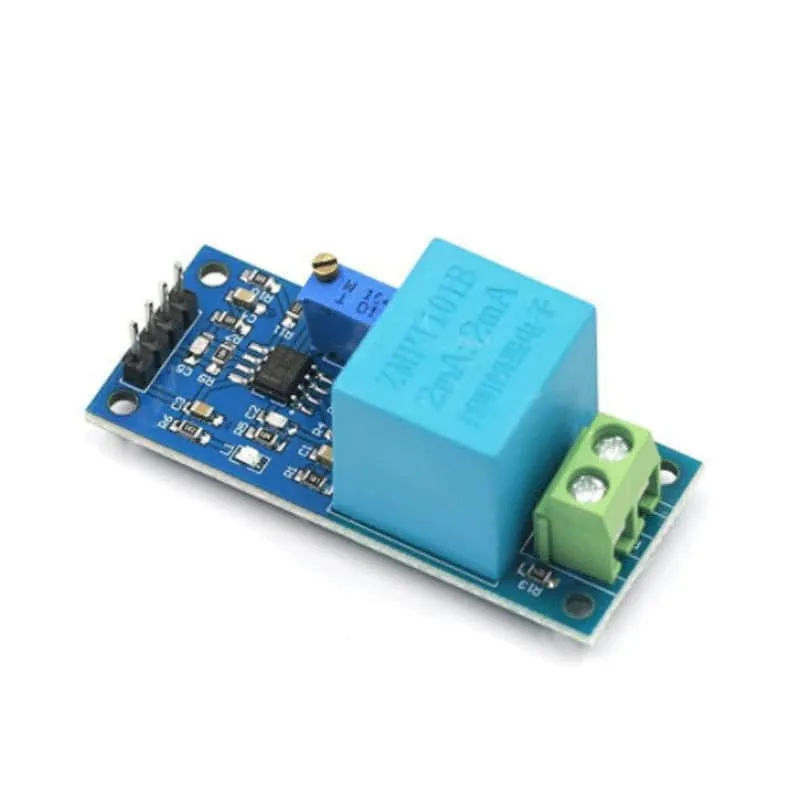
AC Voltage sensor module ZMPT101B 240V