Who the HP 14-dq0052dx fits—and who it doesn't
The HP 14-dq0052dx is a budget laptop aimed at students and home users who need a simple machine for writing, browsing, and light schoolwork. Its Intel Celeron N4120 processor, 4GB of DDR4 RAM, and 64GB eMMC storage set clear expectations: this is not a laptop for heavy multitasking, video editing, or large game libraries. But for basic tasks, the combination can work if you plan around its limits.
Before you buy, decide what your school day actually looks like. If you mostly write papers, check email, attend video calls, and use web-based tools, the HP 14-dq0052dx can handle that. If you regularly run several demanding apps at once or need to store many large files locally, you will likely feel the constraints of 4GB RAM and 64GB eMMC storage quickly.
Celeron N4120 performance: what to expect
The Celeron N4120 is an entry-level processor. It is designed for everyday tasks, not for CPU-heavy workloads. In practice, that means web browsing, word processing, and streaming video should be fine, but you should not expect fast performance when opening many browser tabs or running multiple applications simultaneously. The 4GB of RAM reinforces this: it is enough for one or two light apps at a time, but it leaves little headroom for more.
For a budget laptop for schoolwork, the key is to keep your workflow lean. Close tabs you are not using, avoid keeping large programs open in the background, and expect the machine to slow down if you push it. If your course requires specialized software like photo or video editors, check the software's own system requirements first—this laptop's 4GB RAM and Celeron N4120 may not meet them.
64GB eMMC storage: plan before you fill it
The 64GB eMMC storage is the most significant constraint for students. eMMC is slower than a typical SSD, and 64GB fills up quickly once you install Windows updates, a few applications, and save documents. You will have less free space than the number suggests because the operating system and preinstalled software take up part of it.
The practical approach is to rely on cloud storage for large files and to use the built-in SD card reader to add removable storage for documents, photos, or offline media. The laptop also includes USB-C and USB-A ports, so external drives are an option. If you need to keep many large files with you at all times, a laptop with more internal storage would be a better fit.
HP 14-dq0052dx specs that shape daily use
-
HP 14 Inch HD Laptop Notebook Intel Celeron N4120 4GB DDR4 RAM 64GB eMMC UHD Graphics 600 Snow White Keyboard SD Card Reader HDMI Headphone Microphone Port, White 14-dq0052dx Computer (factory renewed): Intel Celeron N4120, 4GB DDR4 RAM This combination handles basic schoolwork but limits heavy multitasking; plan to keep your workflow light.
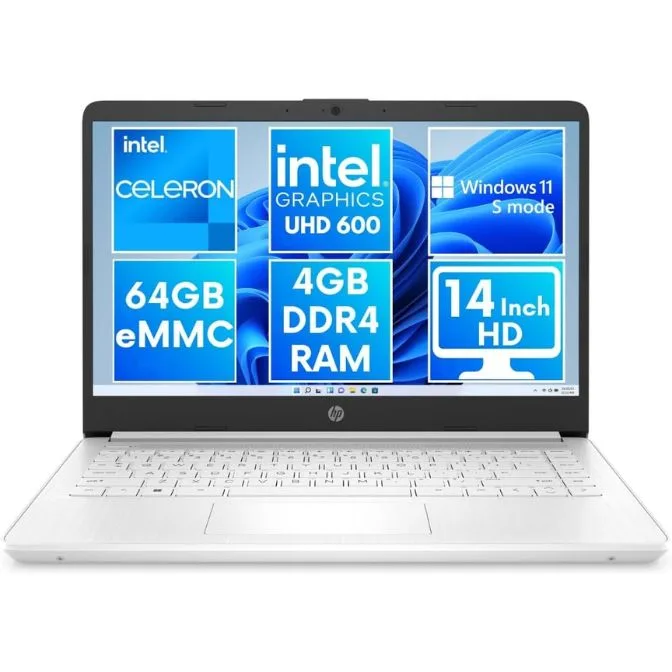
HP 14 Inch HD Laptop Notebook Intel Celeron N4120 4GB DDR4 RAM 64GB eMMC UHD Graphics 600 Snow White Keyboard SD Card Reader HDMI Headphone Microphone Port, White 14-dq0052dx Computer (factory renewed)
-
HP 14 Inch HD Laptop Notebook Intel Celeron N4120 4GB DDR4 RAM 64GB eMMC UHD Graphics 600 Snow White Keyboard SD Card Reader HDMI Headphone Microphone Port, White 14-dq0052dx Computer (factory renewed): 64GB eMMC storage You will need to manage space carefully; use cloud storage or the SD card reader for extra files.
-
HP 14 Inch HD Laptop Notebook Intel Celeron N4120 4GB DDR4 RAM 64GB eMMC UHD Graphics 600 Snow White Keyboard SD Card Reader HDMI Headphone Microphone Port, White 14-dq0052dx Computer (factory renewed): 14-inch HD display with Intel UHD Graphics 600 The screen size is portable and fine for documents and video, but HD resolution is not ideal for side-by-side windows.
-
HP 14 Inch HD Laptop Notebook Intel Celeron N4120 4GB DDR4 RAM 64GB eMMC UHD Graphics 600 Snow White Keyboard SD Card Reader HDMI Headphone Microphone Port, White 14-dq0052dx Computer (factory renewed): Ports: SD card reader, USB-C, USB-A, HDMI, headphone jack You can connect to projectors, transfer files, and add storage without a dongle for common tasks.
-
HP 14 Inch HD Laptop Notebook Intel Celeron N4120 4GB DDR4 RAM 64GB eMMC UHD Graphics 600 Snow White Keyboard SD Card Reader HDMI Headphone Microphone Port, White 14-dq0052dx Computer (factory renewed): Windows 11 Home in S mode S mode restricts you to apps from the Microsoft Store; you can switch out of S mode, but doing so is a one-way change and may affect performance.
Ports and connections for campus life
The HP 14-dq0052dx covers the essentials for a student: an SD card reader, USB-C, USB-A, HDMI, and a headphone jack. That means you can plug in a flash drive, connect to a projector or external monitor via HDMI, and use wired headphones without an adapter. The SD card reader is especially useful for adding storage or transferring photos from a camera.
One thing to note: the laptop does not include a built-in Ethernet port, so you will rely on Wi-Fi for network access. For most campus environments that is fine, but if you need a wired connection, you will need a USB adapter. Also, the HDMI port supports external displays, but the HD screen resolution means you may want a higher-resolution monitor for extended desktop work.
Decision rules for student buyers
- Choose the HP 14-dq0052dx if...: Your schoolwork is mostly web-based, you write papers, and you are comfortable managing storage with cloud services or an SD card.
- Look elsewhere if...: You need to run demanding software, keep many large files locally, or frequently multitask with several apps open. The 4GB RAM and 64GB eMMC will feel limiting.
- Consider the S mode limitation: Windows 11 Home in S mode only runs apps from the Microsoft Store. If you need apps from outside the Store, you can switch out of S mode, but that is a one-way change and may affect performance on this hardware.
- Plan for storage from day one: Budget for an SD card or external drive if you will store large files. The 64GB eMMC fills up faster than you expect.