Decide the job before you pick a spot
A single Play light bar is an accent piece, not a room light. The catalog describes it as creating a wash of colorful smart light, so the useful question is where a soft colored wash will do the most work: behind a screen, along a shelf, or beside a desk setup. Pick that role first, then choose the orientation and mount that fits it.
The black finish and slim bar shape make it easy to tuck out of direct view, which is usually what you want for accent lighting. If the bar itself will be visible, treat that as a design choice rather than a problem.
What the single pack includes
-
Play light bar single pack: The Play light bar single pack includes a power supply that can connect up to three light bars. That power supply is the anchor for placement. Wherever the cord reaches becomes your real boundary, and the three-bar capacity leaves room to expand later without buying a second supply.
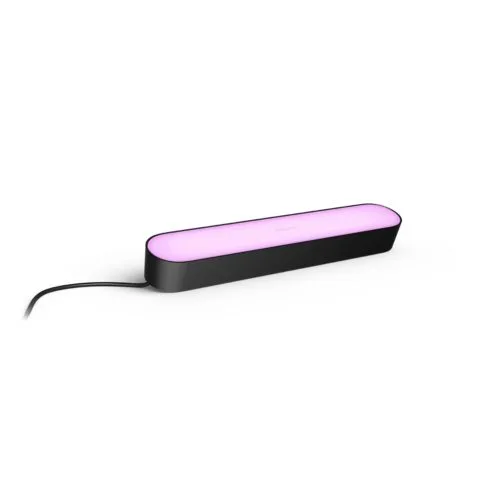
Play light bar single pack
-
Play light bar single pack: The bar can be stood upright, laid horizontally, or placed onto the back of your TV with the included mounts. Three supported orientations mean one bar can serve a shelf, a desktop, or a TV without extra hardware.
Placement checkpoints for one bar
Work through these in order. Each one narrows the spot before you commit to adhesive or a mount.
- 1. Find the outlet, then the spot: The included power supply sets your reach. Choose the outlet first and confirm the bar can sit where you want it with slack left over, rather than stretching the cord to its limit.
- 2. Choose the orientation that matches the surface: Stand it upright on a flat surface such as a desk or shelf end. Lay it horizontally along a shelf, mantel, or cabinet top. Use the included mounts when the bar needs to go on the back of a TV.
- 3. Keep the wash indirect where possible: The bar is meant to create a wash of colorful light. Aim it at a wall, the back of a screen, or a nearby surface rather than into the room, so you see reflected color instead of the bare bar.
- 4. Check the view from where you sit: Stand or sit at your normal viewing position. If the bar or its cord is in your line of sight, shift it along the surface or rotate it slightly before mounting anything permanently.
- 5. Leave room to add bars later: Because the power supply connects up to three light bars, note where a second and third bar would go. Spacing them evenly now avoids redoing the first placement later.
Single-bar uses that fit the catalog description
These are placements the supplied product details support. They are starting points, not rules.
- Behind a TV: Use the included mounts to place the bar on the back of the TV. One bar gives a partial wash rather than full-edge coverage, so expect an accent on one side or section.
- Along a shelf or cabinet: Lay the bar horizontally and let it wash the wall or shelf behind it. This suits a bookshelf, media console, or display cabinet where you want color without visible hardware.
- On a desk or side table: Stand it upright at the back edge of a desk or table. The upright position keeps the footprint small and throws light onto the wall behind.
What to confirm before you buy
The supplied record confirms the included power supply, the three-bar connection capacity, the three orientations, and the included TV mounts. It does not list dimensions, cord length, brightness, or adhesive specifications, so measure your intended surface and check the distance from outlet to placement against the physical product before ordering.
For a mains-powered fixture, follow the manufacturer's installation requirements. The supplied information does not include wiring steps, and the included mounts and power supply do not change what the circuit supports. If your setup requires anything beyond plugging in the supplied power supply, use a qualified installer.