A tool-less lock that attaches to the air vent
The HyperShield MacBook Pro Cable Lock is designed exclusively for 14" and 16" MacBook Pro models. Unlike traditional laptop locks that require a security slot, this lock attaches onto the air vent of your device. The installation is tool-less, so you can set it up without any tools. The design preserves the minimalist aesthetic of your MacBook Pro and keeps all ports accessible for uninterrupted functionality.
This guide walks you through attaching the lock, securing it to a fixed anchor, and using it in shared environments like coffee shops, offices, and libraries. It also covers what to check before you rely on it daily.
How to attach and secure the lock
- Check compatibility: Confirm your MacBook Pro is a 14" or 16" model. The lock is designed exclusively for these sizes.
- Locate the air vent: The lock attaches onto the air vent of your MacBook Pro. Ensure the vent area is clean and free of debris.
- Attach the lock: Snap the lock onto the air vent. No tools are required. The lock should fit securely without forcing.
- Route the cable: The 6.5ft galvanized steel cable is cut-resistant. Position your MacBook Pro near a fixed anchor such as a desk leg or chair frame.
- Secure to an anchor: Wrap the cable around a fixed anchor and lock it. Ensure the anchor is immovable and the cable is taut but not pulling on the MacBook Pro.
Key specifications
-
HyperShield MacBook Pro Cable Lock: Designed exclusively for 14" and 16" MacBook Pro users. Confirms compatibility before you buy or attach.
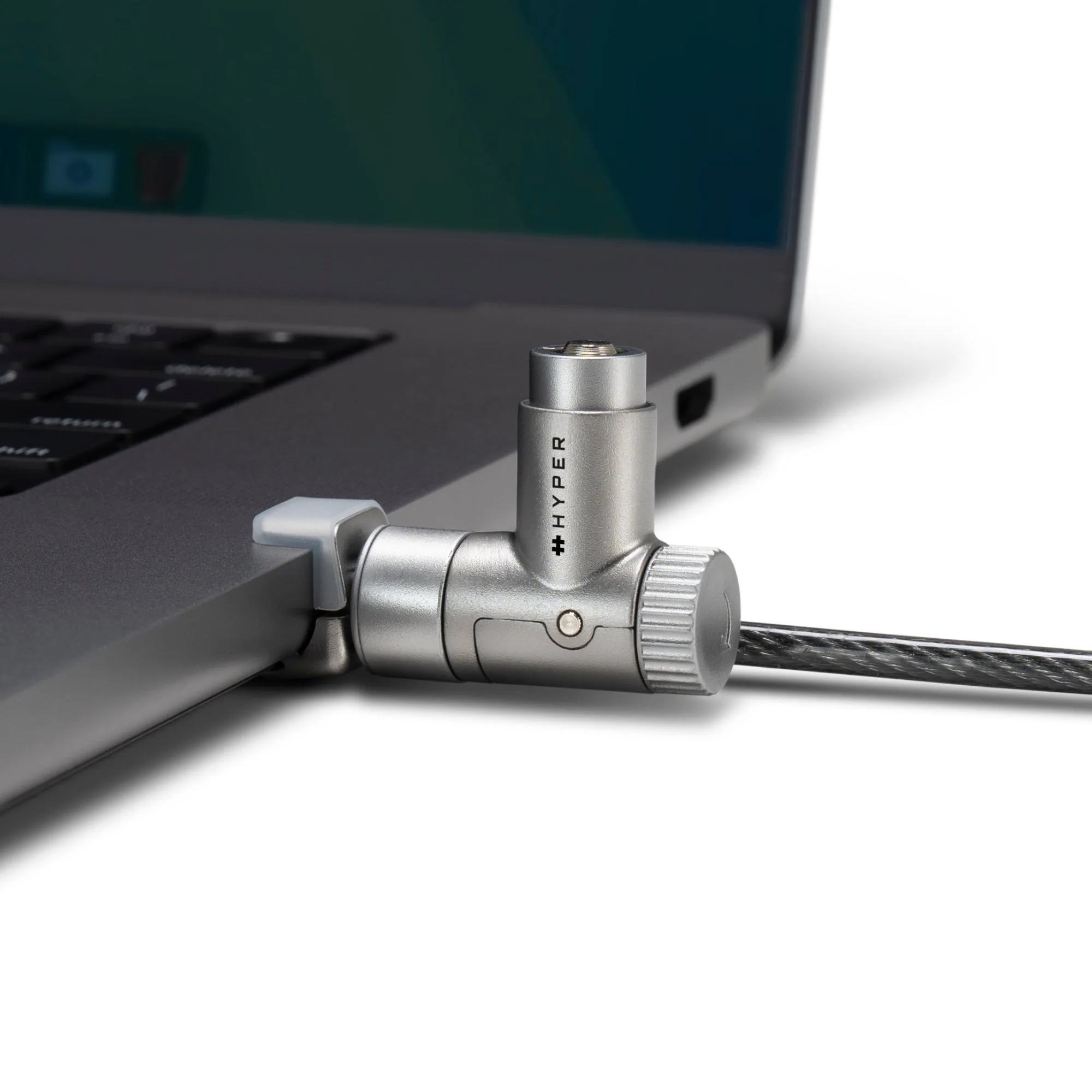
HyperShield MacBook Pro Cable Lock
-
HyperShield MacBook Pro Cable Lock: Tool-less installation that attaches onto the air vent. No tools needed; preserves ports and aesthetic.
-
HyperShield MacBook Pro Cable Lock: 6.5ft galvanized steel cable, cut-resistant. Provides reach to fixed anchors in shared spaces.
Daily use tips for shared spaces
- Choose a fixed anchor: Look for a desk leg, chair frame, or other immovable object. Avoid anchors that can be easily lifted or moved.
- Keep the cable clear of walkways: Route the cable so it doesn't create a tripping hazard or get caught on moving parts.
- Check the attachment regularly: Before each use, ensure the lock is still securely attached to the air vent and the cable is undamaged.
- Store properly when not in use: Coil the cable loosely and keep the lock clean to maintain smooth operation.
What to know before you rely on it
The HyperShield MacBook Pro Cable Lock is a deterrent and a physical security measure, but no lock is invincible. Always keep your MacBook Pro in sight when possible, and use the lock as part of a broader security routine.
The lock is lightweight and portable, making it easy to carry between locations. It is an essential solution for anyone who prioritizes security, ease, and reliability.