Start with the physical box, not the template
The In The Box Photoshop Templates are a compositing tool, not a prop kit. The supplied product record is explicit: the download does not include actual boxes, no item will be shipped, and you need a box (not included) to take photos in. So the first planning decision is not which template to open, but whether you can source a box and photograph a subject inside it before you promise a mini session date.
That order matters for a mini session set. If the box is not in hand, the templates cannot do their job, no matter how well the Photoshop files are organized. Treat the box as the one piece of equipment the product assumes you already have.
A supported setup sequence for the session
The supplied record confirms a box is required and that the templates composite people or pets into box scenes, but it does not prescribe lighting, camera height, or box preparation. The steps below stay inside what the record supports and leave those photographic choices to you.
- 1. Confirm the box is available: The record states a box is required and not included. Secure it before scheduling, because the session cannot be photographed without it.
- 2. Check your Photoshop setup: The templates are described as compatible and fully optimized for use in Adobe Photoshop, and they work on both Mac and PC. Confirm you have Photoshop and basic knowledge of it, since the record says basic Photoshop knowledge is required.
- 3. Match the template size to the intended output: The download contains five unique 12"x12" templates and five unique 16"x20" templates. Decide which size suits the prints or cards you plan to deliver before you start compositing.
- 4. Photograph the subject in the box: The record describes compositing people or pets into the box templates from pictures you have taken. The photographic setup itself is not specified in the supplied information, so plan it around your own box and space.
- 5. Composite in Photoshop using the included instructions: Instructions are included with the download. Follow them rather than improvising a layer order, since the record does not document the internal file structure.
What the download actually contains
-
In The Box Photoshop Templates (10): 10 In the Box Photoshop Templates: five unique 12"x12" templates and five unique 16"x20" templates. Two size groups let you plan a mini session around square social or album crops and larger portrait-oriented outputs without buying a second set.
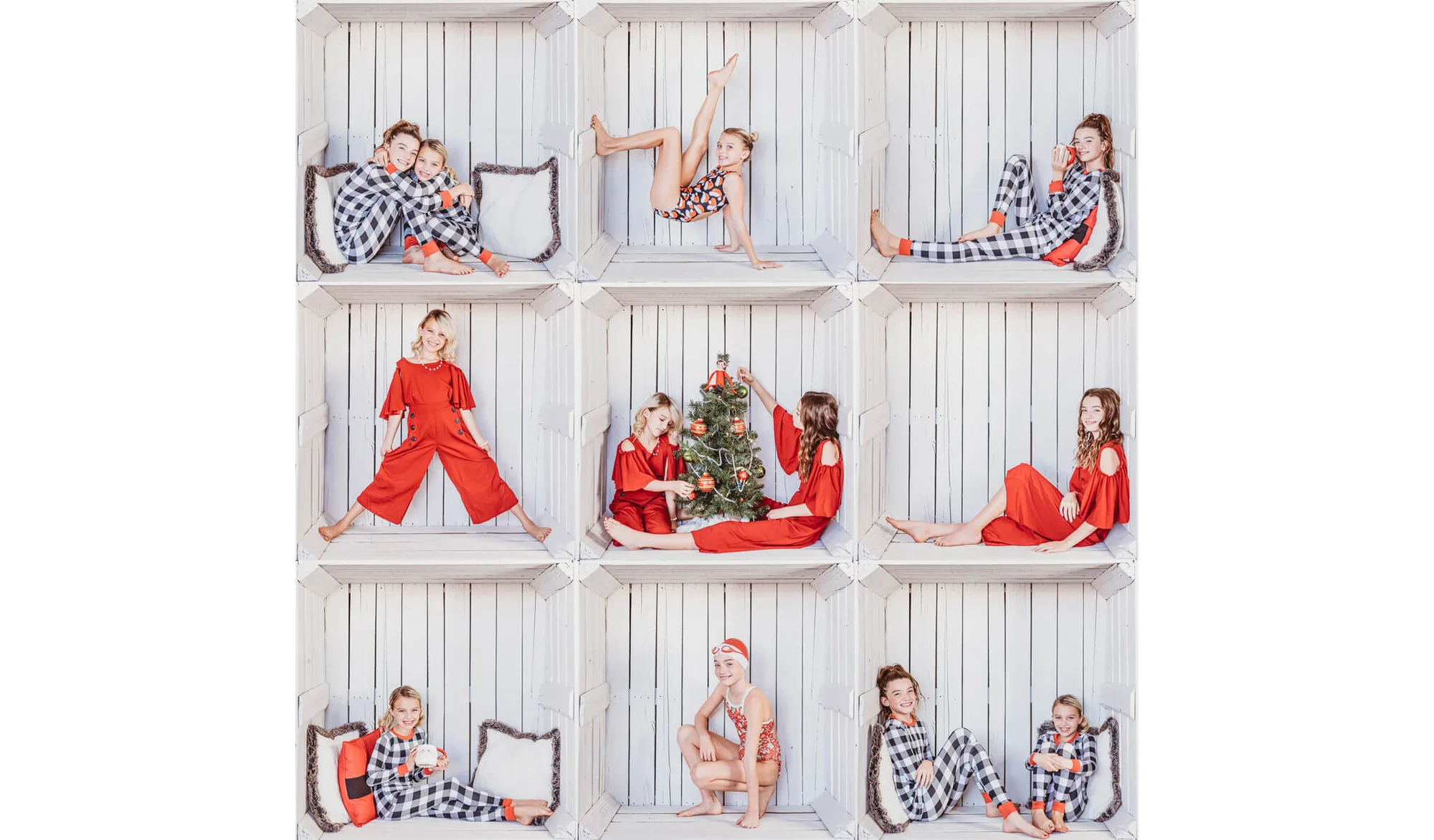
In The Box Photoshop Templates (10)
-
In The Box Photoshop Templates (10): Compatible and fully optimized for use in Adobe Photoshop; works on both Mac and PC. This is the compatibility boundary to check before purchase. The record does not claim support for other editors.
-
In The Box Photoshop Templates (10): Instructions included; basic knowledge of Photoshop is required. The set assumes you can already work in Photoshop. If you are new to layers and compositing, budget learning time before a paid session.
Where the 12x12 and 16x20 sizes fit a mini session workflow
A mini session usually produces a small number of final images per client, so template size is really a delivery decision. The five 12"x12" templates suit square formats, while the five 16"x20" templates suit a larger rectangular output. The record does not specify which subjects each template is designed for, so review the files after download and assign them to the poses or box scenes you actually photographed.
For a batch edit photo templates workflow, this matters: grouping your session images by intended output size lets you open the matching template once and repeat the process, rather than switching sizes mid-batch. The record does not describe batch automation features, so plan on working through the templates in Photoshop as the instructions direct.
Planning checkpoints before you book clients
The supplied record supports a few concrete checks. These are not manufacturer requirements beyond what is stated; they are planning points drawn from the product's own terms.
- Box in hand: Required and not included. Do not schedule a session until you have one.
- Photoshop installed and familiar: The templates are optimized for Adobe Photoshop, and basic Photoshop knowledge is required.
- License scope understood: The license is good for one photographer or studio only. If you share a studio, confirm who will use the files.
- Refund expectation set: Because the product is downloadable, the record states there are no refunds and all sales are final.
Marketing the session without overpromising
The record lists family, holiday, classroom, children's, pet, couples, and product photos among the ways the templates can be used. That is a broad range, but it does not guarantee a specific look or turnaround time. When you describe the session to clients, stick to what you can show: a box setup, a photographed subject, and a composited final image in one of the two supplied sizes.
If you plan to use the output for a holiday card template photoshop project, confirm the card's required dimensions against the 12"x12" or 16"x20" template before promising a print size. The record gives template dimensions but does not state recommended print resolutions, so verify that in Photoshop yourself.
Purchase terms that affect the plan
- In The Box Photoshop Templates (10): This is a digital product; due to the downloadable nature, there are no refunds and all sales are final. Once downloaded, the purchase is final, so confirm compatibility and the box requirement before buying.
- In The Box Photoshop Templates (10): License good for one photographer/studio only. A multi-photographer studio needs to agree on a single licensed user or plan accordingly.
- In The Box Photoshop Templates (10): Does not include actual boxes, and no item will be shipped. The product is files only. Budget separately for the physical box.
What the record leaves open, and how to plan around it
The supplied information does not describe lighting diagrams, camera settings, box preparation steps, or a recommended number of images per session. It also does not confirm support for editors other than Adobe Photoshop. Rather than guess, treat those as your own production decisions and test one full composite before a client session.
A sensible trial run: photograph one subject in your box, open one 12"x12" and one 16"x20" template, and follow the included instructions end to end. That single test tells you more about your workflow than any general guide, and it keeps your mini session plan grounded in what the templates actually do.