Quick Answer
To set up your Incog X Holster for Hellcat Pro/OSP with a weapon light, first confirm your pistol and light are compatible, then adjust the retention and ride height for your preferred carry position.
Why Setup Matters for the Incog X Holster
The Incog X Holster is designed for deep concealment and multi-positional carry. Getting the setup right ensures your Hellcat Pro/OSP with a weapon light stays secure and comfortable throughout the day.
Because the holster is compatible with multiple handgun fits and carry positions, a few minutes of initial adjustment can make the difference between a rig that works and one that doesn't.
Common Setup Challenges
Users often struggle with retention adjustment and finding the right ride height. The holster's hybrid design requires a balance between a secure hold and a smooth draw.
Another common issue is ensuring the weapon light fits properly within the holster shell. Always verify your specific light model is listed as compatible before starting.
Setup Steps for Your Incog X Holster
- Step 1: Verify Compatibility: Check that your Hellcat Pro/OSP and weapon light model are listed as compatible with the Incog X Holster. The holster is designed for specific handgun fits, and using an incompatible light may cause retention issues. Common mistake: assuming all lights fit. Always consult the product description for your specific light model.
- Step 2: Adjust Retention Screws: Use the provided hardware to tighten or loosen the retention screws on the holster body. Start with a snug fit that holds the pistol securely when inverted, then test the draw. Adjust in small increments until the draw is smooth but the pistol does not rattle. Checkpoint: If the draw feels gritty or the pistol is hard to seat, back off the screws slightly. Over-tightening can damage the holster or firearm finish.
- Step 3: Set Ride Height and Cant: The Incog X Holster uses adjustable belt clips to change ride height and cant (forward tilt). For appendix carry, a higher ride height and moderate cant improves concealment. For strong-side carry, a lower ride height and neutral cant may be more comfortable. Common mistake: setting the cant too extreme, which can cause the grip to print or the draw to feel unnatural. Test each adjustment with your carry position.
- Step 4: Test with Unloaded Firearm: With the holster empty, insert your unloaded Hellcat Pro/OSP with weapon light. Ensure the light seats fully into the holster shell and the trigger guard is clear. Practice drawing and reholstering to confirm smooth operation. Checkpoint: If the light catches on the holster edge, recheck compatibility or adjust the retention screws. Never force the firearm into the holster.
- Step 5: Wear and Adjust: Put on the holster with your preferred belt and carry position. Walk, sit, and bend to check for comfort and concealment. Adjust the belt clip position or ride height as needed. Repeat until the holster feels natural. Common mistake: skipping the wear test. A holster that feels fine standing may dig in when sitting. Take the time to adjust for your daily activities.
Product Facts
-
Incog X® Holster Hellcat Pro/OSP Weapon Light: The Incog X Holster is the latest evolution in ergonomic, RDS compatible, multi-positional, deep concealment IWB hybrid holsters, designed and built in collaboration with Safariland. This means you can carry your Hellcat Pro/OSP with a weapon light from multiple positions without sacrificing concealment or comfort.
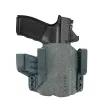
Incog X® Holster Hellcat Pro/OSP Weapon Light