Quick answer
Set up your Incog X Holster for the P365 Macro FUSE by adjusting the belt clip and cant for a left-handed draw, then test retention and concealment before carrying.
Understanding the Incog X Holster's Adjustability
The Incog X Holster is designed for multi-positional carry, including left-handed and cross draw positions. Its modular clip and cant system allow you to fine-tune the ride height and angle to suit your body and draw style.
For left-handed shooters, the holster's ambidextrous design (when ordered for left-hand orientation) provides a natural fit. However, the initial setup requires careful adjustment to ensure the holster sits correctly on your belt and allows a clean, consistent draw.
Common Mistakes in Left-Handed Setup
A frequent error is setting the cant too extreme, which can cause the grip to dig into your side or make the draw feel unnatural. Another mistake is not tightening the retention screws enough, leading to the holster shifting during movement.
Also, left-handed shooters sometimes forget to reverse the clip orientation for cross draw carry, which can cause the holster to sit at the wrong angle on the belt.
Left Hand Setup Steps
- Step 1: Attach the belt clip for left-handed draw: Position the belt clip on the holster so that the hook faces the rear of the holster (toward the slide) for a standard left-handed IWB carry. For cross draw, rotate the clip 180 degrees so the hook faces the front. Check that the clip is fully seated and the screw is tight to prevent the holster from shifting.
- Step 2: Adjust the cant angle: Loosen the cant adjustment screws on the clip and tilt the holster to your preferred angle. A 10-15 degree forward cant (muzzle pointing slightly back) is common for left-handed draw. Tighten the screws firmly. Test the draw: the grip should be easy to access without excessive wrist bending. Avoid angles beyond 20 degrees as they can cause printing.
- Step 3: Set the ride height: Use the provided spacers to raise or lower the holster on the clip. For deep concealment, use the lowest ride height. For faster access, use a higher setting. Make sure the holster does not interfere with your belt loops or pants button when seated.
- Step 4: Adjust retention: Turn the retention screw (located near the trigger guard) clockwise to increase retention or counterclockwise to decrease. The holster should hold the gun securely when inverted but allow a smooth draw with moderate force. Over-tightening can make the draw difficult and unsafe. Under-tightening may cause the gun to shift.
- Step 5: Test and refine: Wear the holster in your preferred carry position (e.g., appendix or strong-side) and practice drawing and reholstering. Make small adjustments to cant or ride height as needed for comfort and concealment. Recheck all screws after a few hours of wear, as they may loosen during break-in.
Product facts
-
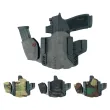
Incog X® Holster P365 Macro/FUSE Light/Caddy LH: The Incog X Holster is designed for deep concealment IWB carry and is compatible with the Sig P365 Macro/FUSE with weapon light. This means you can carry your P365 Macro FUSE with a light attached while maintaining a low profile, which is ideal for everyday concealed carry.
Incog X® Holster P365 Macro/FUSE Light/Caddy LH