Quick Answer
To install a 15-inch KeyMod handguard on your AR15, remove the old handguard and delta ring, attach the new barrel nut, slide the handguard over the barrel, and tighten the screws evenly to the specified torque. Follow the steps below to avoid misalignment and stripped threads.
Why KeyMod and Free Float Matter
KeyMod is a mounting system that uses a series of slots to attach accessories directly to the handguard. A free float handguard does not touch the barrel, which can improve accuracy by reducing pressure on the barrel from the handguard.
A 15-inch rail gives you ample space for accessories like grips, lights, and bipods, while also allowing you to extend your support hand forward for better control.
Tools You'll Need
Before starting, gather the following tools: an armorers wrench or barrel nut wrench, a torque wrench, a vise and upper receiver block, Allen keys (usually 3/32" or 5/64" for the handguard screws), and thread locker (blue Loctite recommended).
Installation Steps
- Prepare the Upper Receiver: Secure the upper receiver in a vise with a receiver block. Remove the existing handguard, delta ring, and any other components that block access to the barrel nut. Use a punch to remove the delta ring if necessary. Ensure the upper receiver is firmly secured to prevent rotation during torque application.
- Remove the Old Barrel Nut: Use an armorers wrench to loosen and remove the old barrel nut. Turn it counterclockwise. If it's stuck, apply penetrating oil and let it sit before trying again. Do not use excessive force; a stuck nut can be freed with patience and oil.
- Install the New Barrel Nut: Apply a thin layer of anti-seize or grease to the barrel threads. Slide the new barrel nut over the barrel and thread it onto the receiver. Tighten to the manufacturer's recommended torque (typically 30-80 ft-lbs). If the handguard uses a timing nut, align it so the slots line up with the handguard's anti-rotation tabs. Check the alignment of the barrel nut before final torque; if it doesn't align, use shims or a different torque value within the acceptable range.
- Slide the Handguard Over the Barrel: Slide the 15-inch KeyMod handguard over the barrel and onto the barrel nut. Ensure the anti-rotation tabs engage properly with the barrel nut slots. The handguard should sit flush against the receiver. If the handguard doesn't seat fully, check for burrs or debris on the barrel nut or handguard.
- Tighten the Handguard Screws: Using the included Allen key, tighten the handguard screws evenly in a crisscross pattern. Apply blue Loctite to the threads before installation. Torque to the recommended spec (usually 15-20 in-lbs, but check your handguard's instructions). Do not overtighten, as this can strip the threads or deform the aluminum. Use a torque wrench for the screws; if you don't have one, tighten snugly and stop—do not force it.
- Verify Alignment and Function: After installation, check that the handguard is centered and does not contact the barrel. Cycle the charging handle and inspect the gas tube clearance. Attach a few KeyMod accessories to confirm the slots are properly aligned. A misaligned handguard can affect accuracy; if it touches the barrel, loosen and re-align.
Product Fact
-
AR15 15" Slim Keymod Handguard Rail One Piece Free Float with 6 Screws: This 15-inch KeyMod handguard is made from lightweight 6061-T6 aluminum and includes a steel barrel nut, Allen key, and crush washers. The 6061-T6 aluminum provides a strong yet light platform, and the included barrel nut and crush washers mean you have everything needed for installation without extra purchases.
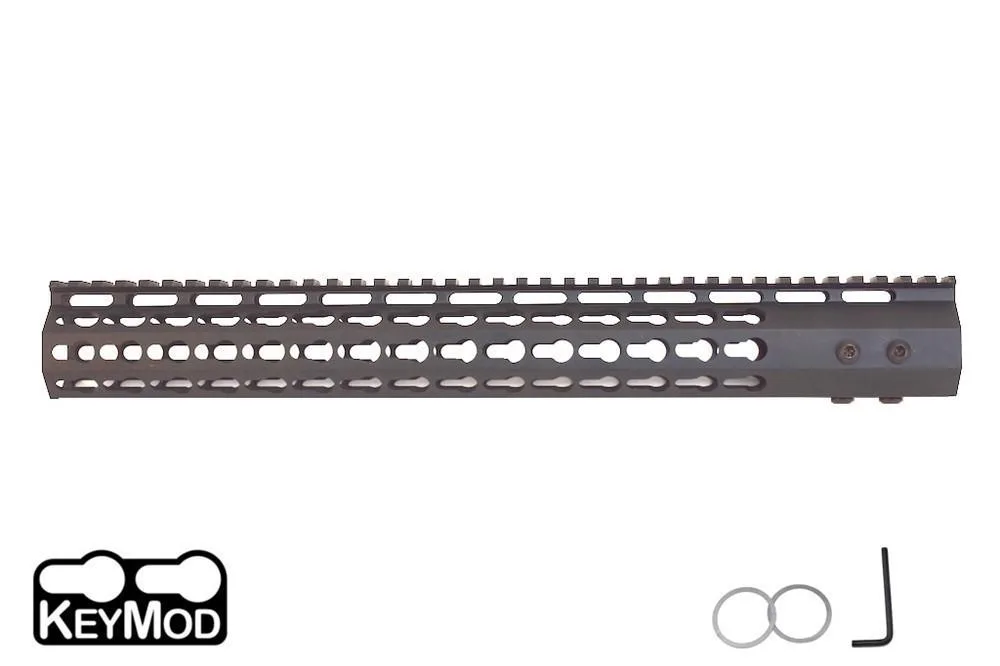
AR15 15" Slim Keymod Handguard Rail One Piece Free Float with 6 Screws