Start with the right iPhone 14 Pro Max
The Unicorn Beetle MAG XT MagSafe Holster Case is designed specifically for iPhone 14 Pro Max 6.7-inch models. Before you do anything with the belt clip, confirm your phone is that exact model. A different iPhone size will not fit the case correctly, and forcing it can make the holster feel loose or misaligned.
Once the phone is seated in the case, the rest of the setup is about how you carry it. The integrated holster is meant for belt or bag carry, and the case keeps MagSafe compatibility so you can snap on accessories or charge wirelessly without removing the case.
What the MAG XT case gives you
-
iPhone 14 Pro Max 6.7 inch Unicorn Beetle MAG XT MagSafe Holster Case-Metallic Blue: Designed specifically for iPhone 14 Pro Max 6.7-inch models. Fit is the first checkpoint: the holster and case are sized for this phone, not other iPhone 14 versions.
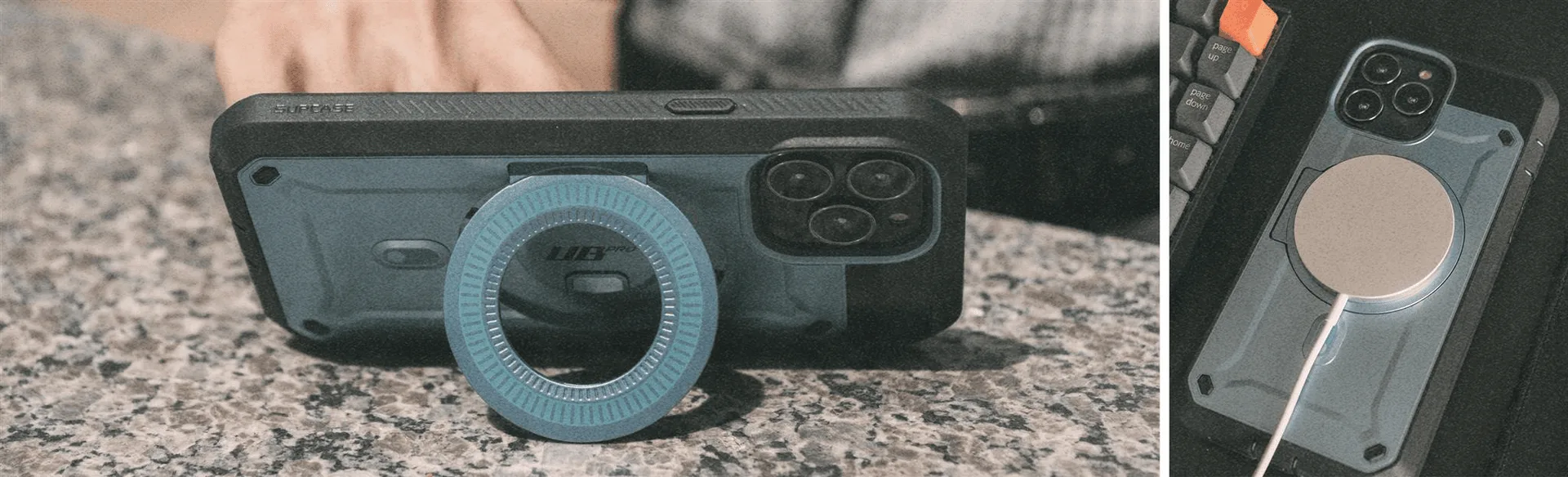
iPhone 14 Pro Max 6.7 inch Unicorn Beetle MAG XT MagSafe Holster Case-Metallic Blue
-
iPhone 14 Pro Max 6.7 inch Unicorn Beetle MAG XT MagSafe Holster Case-Metallic Blue: Integrated holster provides easy belt or bag carry options. The holster is the carrying feature you are setting up, so you can choose belt or bag based on your day.
-
iPhone 14 Pro Max 6.7 inch Unicorn Beetle MAG XT MagSafe Holster Case-Metallic Blue: MagSafe-compatible for snap-on accessories and wireless charging. You can keep the case on when you attach MagSafe accessories or charge wirelessly.
Belt clip setup for the MAG XT holster
The supplied product information does not include a step-by-step assembly manual, so use these checkpoints to set up the holster without guessing at hidden mechanisms.
- Seat the iPhone 14 Pro Max in the case first: Make sure the phone is fully inside the case before attaching or adjusting the holster. The case is built for the 6.7-inch iPhone 14 Pro Max, so the fit should be specific to that model.
- Attach the holster for belt or bag carry: The integrated holster is designed for belt or bag carry. Choose the carry position that matches your routine, then check that the phone sits securely in the holster before walking or moving around.
- Test the hold before you rely on it: With the phone in the holster, gently check that it stays in place. The supplied information does not list a rotation mechanism or locking specification, so do not assume a rotating clip or a particular lock strength unless you see it on your own unit.
- Keep MagSafe accessories separate from the holster: MagSafe compatibility applies to the case, not the holster. If you want to attach a MagSafe accessory or charge wirelessly, remove the phone from the holster first and use the case on its own.
Rotation clip tips: what to check on your unit
The product record does not confirm a rotating belt clip, so treat rotation as a feature to verify on the holster you receive rather than a promised function.
- Look for a visible pivot point: If your holster has a rotating clip, you should see a joint or dial where the clip meets the holster body. If there is no such part, the clip is fixed.
- Adjust before putting the phone in: If a rotation feature is present, set the angle while the holster is empty. That keeps you from handling the phone and clip at the same time.
- Recheck the hold after any adjustment: After changing the clip angle, put the phone back in and confirm it still sits securely. The supplied information does not give a rotation range or a locking force, so rely on what you feel on your own holster.
MagSafe and the Metallic Blue finish in daily use
The MAG XT case keeps MagSafe compatibility, which means you can snap on MagSafe accessories or charge wirelessly while the case is on the phone. That convenience is separate from the holster: the holster is for carrying, and MagSafe is for accessories and charging. Keep those two routines distinct so you are not trying to charge the phone while it is clipped to your belt.
The Metallic Blue finish is part of the case's look, and the product record describes it as a stylish, durable color. The supplied information does not include a cleaning procedure or a claim about scratch resistance, so avoid guessing at care steps. If you want to keep the finish looking its best, handle the case as you would any everyday accessory and check with the manufacturer for care guidance not covered here.
Product facts for the MAG XT holster case
- iPhone 14 Pro Max 6.7 inch Unicorn Beetle MAG XT MagSafe Holster Case-Metallic Blue: Unicorn Beetle MAG XT MagSafe Holster Case in Metallic Blue for iPhone 14 Pro Max 6.7 inch. This is the exact model to match against your phone before setting up the belt clip.
- iPhone 14 Pro Max 6.7 inch Unicorn Beetle MAG XT MagSafe Holster Case-Metallic Blue: Combines a metallic blue finish with a built-in holster for convenient carrying. The holster is part of the case design, so setup is about how you carry rather than adding a separate clip.
- iPhone 14 Pro Max 6.7 inch Unicorn Beetle MAG XT MagSafe Holster Case-Metallic Blue: Part of the Unicorn Beetle series known for protective design. The rugged series context helps set expectations for a case built around protection and carry.