Why your Galaxy Backpack may feel uncomfortable
If your Iris Galaxy Backpack #9016 digs into your shoulders or sits awkwardly, the first thing to check is strap length. The backpack has adjustable straps that range from 18 inches at the shortest to 32 inches at the longest, so there is room to fine-tune the fit. The straps are also cushioned, which helps spread pressure, but only when they are set to the right length for your body and load.
Comfort also depends on how you pack the bag. The #9016 measures 10.5 x 12.5 x 4 inches, so it is compact but has multiple pockets and compartments. Overloading it or packing unevenly can make even a well-adjusted strap feel uncomfortable.
How to adjust the backpack straps for a better fit
These steps focus on the adjustable straps and the bag's carry features. They do not require any special tools.
- Loosen the straps fully before putting the bag on: Start with the straps at their longest so you can slide your arms through easily. The #9016 straps extend to 32 inches at the longest.
- Position the bag on your back: The padded second pocket is designed to protect electronics, so place that side against your back if you are carrying a tablet or similar device. The bag should sit centered.
- Tighten both straps evenly: Pull the adjustment tails on both sides little by little. The straps shorten to 18 inches at the shortest, so you have a wide range to work with. Stop when the bag feels snug but not tight.
- Check the shoulder strap placement: The cushioned straps should rest on your shoulders without twisting. If one side feels tighter, adjust that strap slightly until both sides match.
- Use the luggage strap if you are traveling: The backpack has a strap to attach to your carry-on or luggage. This can take weight off your shoulders at the airport, but check with your airline for carry-on size rules—the #9016's 10.5 x 12.5 x 4 inch size is a starting point, not a guarantee of acceptance.
Backpack comfort tips for daily wear
Small packing habits make a big difference to how the adjustable straps feel over a full day.
- Keep heavier items close to your back: The padded second pocket is a good spot for a tablet or e-reader. Place heavier items in the main compartments near your back to reduce strain.
- Use the multiple compartments to balance the load: The #9016 has two front zipper pockets, a back zipper pocket, two elastic side pockets, and two main zipper compartments with inside pockets. Spreading items across these pockets helps prevent one side from pulling.
- Don't overstuff the bag: The 4-inch depth limits how much you can carry. Overpacking can distort the shape and make the straps feel tighter than they are.
- Wear the bag over both shoulders: The adjustable straps and cushioned design are meant to be used together. Slinging the bag over one shoulder may feel less comfortable over time.
- Check the strap length when you change layers: A thick coat or a thin shirt changes how the straps sit. Re-adjust the straps when you change what you're wearing.
Key measurements and features of the Iris Galaxy Backpack #9016
-
The Iris Galaxy Backpack (#9016) with Adjustable Straps - By Iris & Rainbow: Adjustable straps range from 18 inches at the shortest to 32 inches at the longest. This range lets you set the strap length for your body and layers, which is the main fix for most comfort issues.
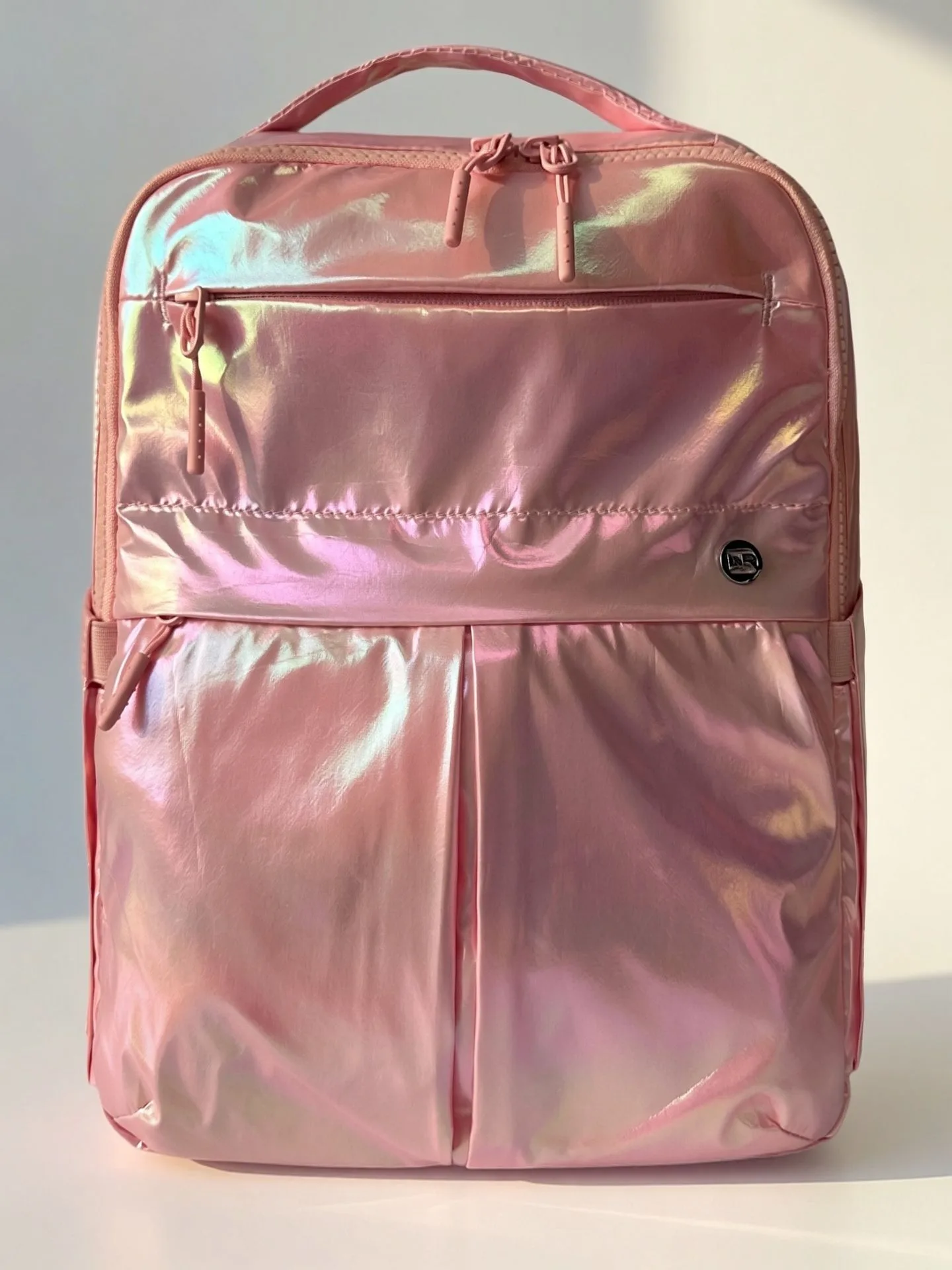
The Iris Galaxy Backpack (#9016) with Adjustable Straps - By Iris & Rainbow
-
The Iris Galaxy Backpack (#9016) with Adjustable Straps - By Iris & Rainbow: Bag dimensions: 10.5 x 12.5 x 4 inches. Knowing the size helps you judge how much to pack and whether the bag will fit under an airplane seat or in a locker.
-
The Iris Galaxy Backpack (#9016) with Adjustable Straps - By Iris & Rainbow: Comfortable cushioned backpack straps. Cushioning reduces pressure points, but only when the straps are adjusted to the right length.
-
The Iris Galaxy Backpack (#9016) with Adjustable Straps - By Iris & Rainbow: Strap to attach to your carry-on or luggage. This feature lets you secure the backpack to rolling luggage, which can ease shoulder strain during travel.
-
The Iris Galaxy Backpack (#9016) with Adjustable Straps - By Iris & Rainbow: Water repellent; spot clean with soap and water. The water-repellent finish helps protect your items, and spot cleaning keeps the straps and fabric in good condition.
When the problem is not the strap length
If you have adjusted the straps through the full 18-to-32-inch range and the backpack still feels uncomfortable, the cause may be elsewhere. Check that the bag is not overloaded and that items are distributed evenly. The #9016 has a 6-month warranty, so if you notice a defect in the straps or stitching, contact Iris & Rainbow Boutique for assistance.
The supplied information does not include a maximum load weight or specific fitting instructions beyond the adjustable strap range. If you are unsure whether the backpack suits your carry needs, compare its 10.5 x 12.5 x 4 inch size and pocket layout with what you typically carry.