Quick answer
A cable with mic can be worth it if you take calls or game with your IEMs, but it may alter the connector compatibility and introduces a slight compromise in pure audio transparency.
Why consider a mic cable?
If you use your IEMs for video calls, online meetings, or console gaming, a built-in microphone saves you from wearing a separate headset. The 64 Audio Cable With Mic integrates a four-conductor TRRS 3.5mm jack, which combines audio and mic signals into one plug.
The trade-off: TRRS compatibility
Not all audio equipment supports a TRRS connector—some laptops, phones, or DACs expect a standard TRS plug. The Cable With Mic includes a Mic Cable Adapter to bridge this gap, but it adds one extra piece to keep track of. If you primarily listen to music on a dedicated player, a standard TRS cable is simpler.
Diagnosis: Does a mic cable fit your use?
- Symptom: You need to take calls or voice chat while wearing your IEMs, but you don't want a separate microphone.
- Likely cause: Your current cable has no microphone, forcing you to remove an IEM or use a second device.
- Corrective action: Switch to a cable with a built-in mic, such as the 64 Audio Cable With Mic. Ensure your device supports a TRRS jack or use the included adapter. After switching, test a call to confirm the mic works and the adapter is properly connected.
- Stop or choose another option: If you only listen to music on a desktop DAC or high-end DAP that uses a TRS jack, a standard cable without mic is simpler and avoids adapter clutter.
Product spotlight
-
Cable With Mic: This 48" cable comes in a beautiful soft touch black finish. It features IPX and 2-pin connectors with a four-conductor TRRS 3.5mm audio jack. The TRRS jack carries both audio and microphone signals, but you may need the included adapter for devices that only accept a standard TRS plug.
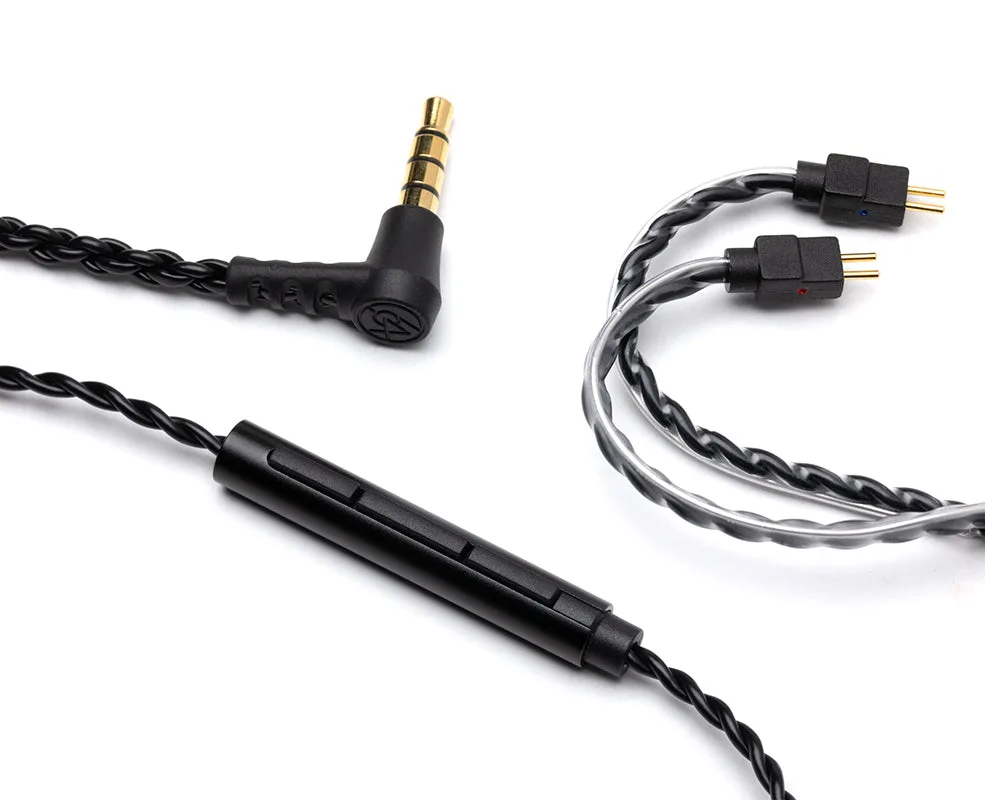
Cable With Mic