Quick answer
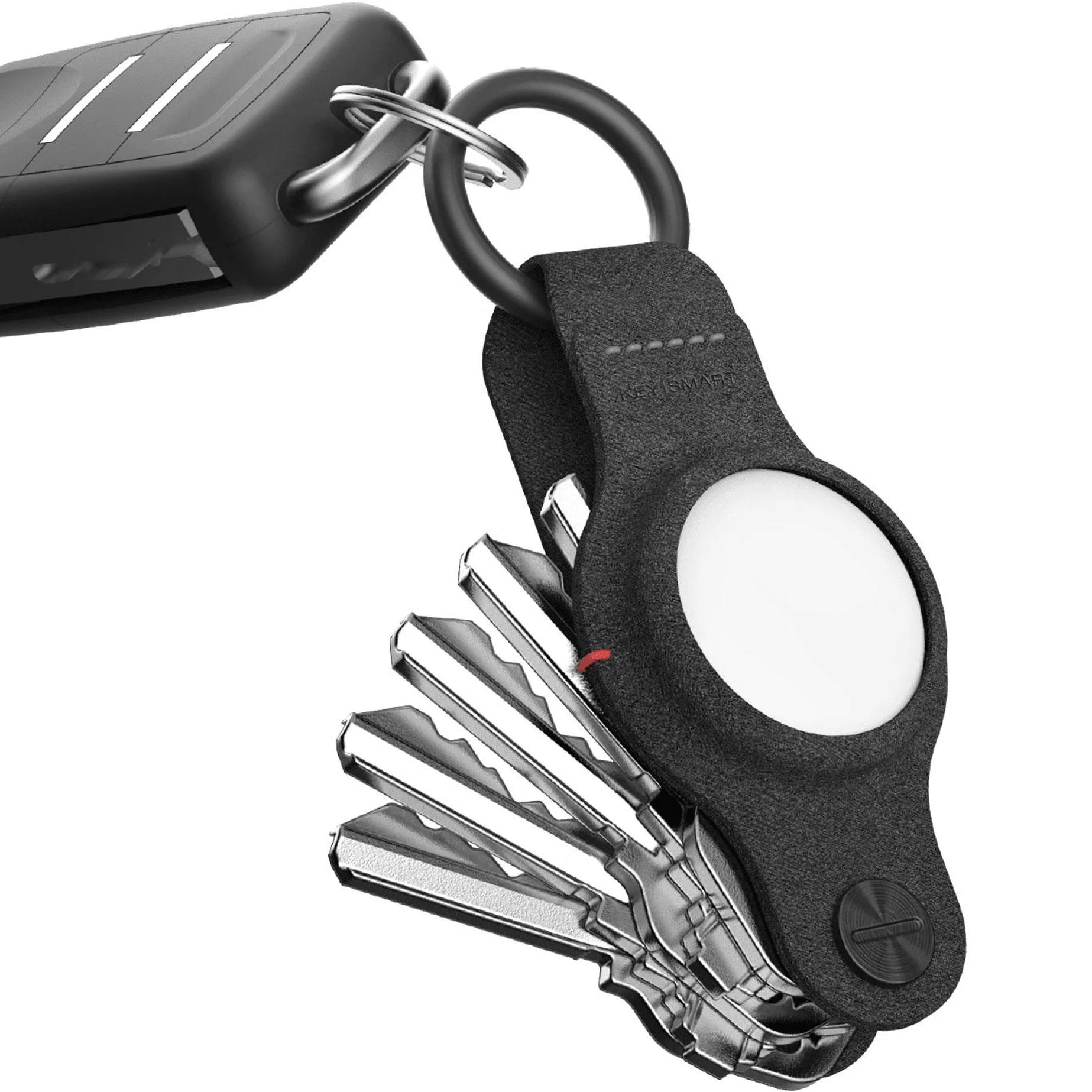
If you want to slim down your key load and don't need AirTag tracking, the KeySmart Classic is a proven, affordable choice. If you carry an AirTag or want built-in tracking without an extra keychain attachment, the KeySmart Air is the smarter upgrade. Both organize up to 5 keys, but the Air adds a dedicated slot for your AirTag and a more refined finish.
Your keys are one of the few things you carry every day, so making them quieter, lighter, and easier to grab is a small upgrade that pays off constantly. KeySmart offers two popular organizers that both collapse your key ring into a neat folding stack: the KeySmart Classic and the KeySmart Air. They look similar at a glance, but the Air adds a twist by integrating an Apple AirTag slot right into the body.
The right choice depends on how you carry your keys, whether you already use an AirTag, and how much you value a little extra polish. In this comparison, we break down the differences that matter so you can pick the organizer that actually fits your carry.
Key capacity and key organization
Both the KeySmart Classic and the KeySmart Air hold up to 5 keys, which covers the typical everyday setup: house key, car key, mailbox key, and a couple of extras. The folding mechanism keeps those keys flat and quiet, so you don't get that jangling sound when you walk or dig in your bag.
The Air's design is a bit more refined, with a slim profile that feels modern and a secure fit that keeps your keys tight. The Classic is the original workhorse, and while it may lack the Air's upgraded finish, it still does the job reliably. If you carry more than 5 keys, you'll need to look at larger organizers, but for most people, 5 is plenty.
- Count your daily keys first—if you're over 5, consider a larger KeySmart model.
- Both models use the same folding mechanism, so key access and quiet carry are similar.
AirTag tracking: the key difference
The biggest difference between the two is AirTag support. The KeySmart Air includes a dedicated slot for an Apple AirTag, so you can track your keys using the Find My network. That means you can ping your keys from your iPhone or see their last known location if you misplace them. It's a practical feature for anyone who tends to lose their keys or wants peace of mind.
The KeySmart Classic does not have an AirTag slot. If you want tracking with the Classic, you'd need to attach an AirTag separately, which adds bulk and defeats the purpose of a slim organizer. So if tracking is important, the Air is the clear winner. If you don't use an AirTag, the Classic saves you a few dollars and still gives you the same key organization.
- If you already own an AirTag, the Air integrates it seamlessly—no extra keyring needed.
- Skipping AirTag support with the Classic keeps your setup simpler and lighter.
Materials and durability
The KeySmart Air is available in a version with a SmartShield leather finish that's stain- and water-resistant, and it's designed to last 10 times longer than traditional leather. It also has a bumper for 360° drop protection, so your AirTag stays safe if you drop your keys. The Classic is built with the same sturdy construction but doesn't offer the same premium material options.
If you're rough on your gear or want a more polished look, the Air's leather and bumper are worth the extra cost. If you prefer a straightforward, no-frills organizer, the Classic is still durable and functional. Both are designed to handle daily use, but the Air adds a layer of protection that's especially useful if you're carrying an AirTag.
- The Air's bumper protects your AirTag from drops and scuffs—a real plus if you're clumsy.
- Classic users can add a pocket clip for extra security, but there's no built-in drop protection.
Trade-offs to consider
- AirTag tracking vs. simplicity: The Air adds a dedicated AirTag slot, but the Classic keeps your setup simpler and lighter if you don't need tracking. Choose Air if you use AirTag; choose Classic if you don't.
- Premium materials vs. affordability: The Air offers leather and drop protection, but the Classic is more budget-friendly while still organizing keys effectively. Invest in Air for durability and style; save with Classic for function.
- Future-proofing vs. immediate needs: If you might add an AirTag later, the Air saves you from buying a separate holder. If you're happy with just keys, the Classic covers your needs now. Think about whether you'll want tracking in the next year.
Product facts at a glance
- KeySmart® Air | Compatible With Apple Airtag | Organize Up To 5 Keys: Organize 5 keys + car key with included carabiner. Stain & water-resistant SmartShield leather lasts 10x longer than traditional leather. 360° drop protection bumper protects your AirTag from drops & scuffs. This gives you both key organization and AirTag tracking in one slim package, with added durability for everyday bumps and spills.
- KeySmart Air FKM | Compatible With Apple Airtag | Organize Up To 5 Keys: Compact design holds your keys and your AirTag in one simple accessory. 2025 Upgrade: Locking Screws for Improved Tightness, engineered to keep your keys tight without getting loose over time. The locking screws address a common annoyance—keys loosening over time—so your organizer stays snug and quiet longer.
Which KeySmart should you choose?
Best for
- People who already use an Apple AirTag and want integrated tracking without extra bulk.
- Those who want a more premium, durable finish with leather and drop protection.
Not for
- Budget-focused buyers who don't need AirTag tracking and prefer a simpler, lower-cost organizer.
- Anyone who carries more than 5 keys—consider a larger KeySmart model instead.
The KeySmart Classic and KeySmart Air both do the core job of organizing up to 5 keys into a slim, quiet carry. The Air wins if you want built-in AirTag tracking and a more refined, durable build. The Classic is the practical pick if you just want to declutter your keys without extra features. Choose based on your tracking needs and budget, and you'll get a key organizer that makes daily carry easier.