The Tethermate turns a tripod into a laptop platform
When you shoot tethered on location, your laptop needs a stable, elevated spot that keeps it off the ground and within reach. The Kupo Tethermate Small is a portable plate designed for a 15" MacBook and similarly sized laptops. Its 17.5" x 11.7" (445 x 286.5 mm) surface gives you a dedicated platform, and the underside includes both 1/4"-20 and 3/8"-16 female threads so you can mount it directly to a tripod or any support with matching male threads. That makes it a practical foundation for a laptop tethering stand setup without adding a separate table.
Mounting threads and plate size
-
Kupo Tethermate Small (For Macbook 15" and Other Similar Sized Laptops): The 17.5" x 11.7" (445 x 286.5 mm) size includes 1/4"-20 and 3/8"-16 female threads on its underside to mount directly on a tripod or any equipment that comes with 1/4"-20 and 3/8"-16 male threads. These are the two common thread standards for tripod heads and light stands, so you can attach the Tethermate to gear you already own without adapters.
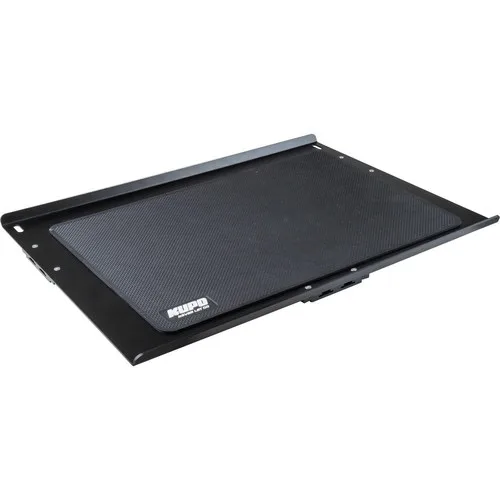
Kupo Tethermate Small (For Macbook 15" and Other Similar Sized Laptops)
A sensible order for your tethering workstation
- Start with a stable support: Choose a tripod or light stand with a 1/4"-20 or 3/8"-16 male thread. The Tethermate's female threads accept either, so match the thread on your support to avoid needing a reducer.
- Attach the Tethermate to the support: Thread the Tethermate onto the male thread and tighten it securely. Because the mounting points are on the underside, the plate sits flat and ready for your laptop.
- Add accessories with the sliding plate: Three mounting slots under the portable plate let you connect additional accessories using the included U-shaped sliding plate. The spring-loaded knob keeps that sliding plate securely in place.
- Place your laptop and connect: Set your 15" laptop on the 17.5" x 11.7" platform and connect your tethering cable. The Tethermate does not include a cable or lock, so plan your cable routing to avoid strain on the ports.
What the Tethermate does not confirm
The supplied information does not specify a maximum laptop weight, so treat the 15" size as a guide rather than a guarantee for every similarly sized laptop. It also does not describe any tilt or angle adjustment, so the plate's position will depend entirely on the support you mount it to. If you need to angle the laptop toward you, check that your tripod head or stand allows it. Finally, no installation steps beyond threading and sliding are provided; the process above is a practical starting point, not a manufacturer's procedure.
Why this setup suits studio and location tethering
A dedicated laptop platform keeps your tethered station organized and reduces the risk of kicking a cable or knocking a laptop off a table. The Tethermate's compact footprint and threaded mounting make it easy to integrate with existing stands. At a catalog price of $74.37 (compared with a $119.95 comparison price), it offers a cost-effective alternative to bulky tethering tables. If you already own a sturdy tripod or light stand, the Tethermate Small is a straightforward way to build a repeatable studio tethering workstation.