Start with the three charging paths
The Lighthouse 400 is a rechargeable lantern with a built-in 4,400mAh lithium battery (16.3 Wh). Before you rely on it at camp, decide how you will recharge it: from a USB source, from a compatible solar panel, or by hand crank. The supplied information lists three ways to charge the Lighthouse 400, and each one suits a different situation.
USB is the fastest supplied option: a USB source recharges the lantern in about 5 hours. The USB input is 5V at up to 1A (5W max), so use a USB port or adapter that matches that input rather than assuming a higher-power charger will speed things up.
Solar is the slow, off-grid option. Connecting a compatible solar panel such as a Goal Zero Nomad 7 or Nomad 7 Plus takes about 7–14 hours, according to the supplied charge times. That range depends on conditions you cannot control, so plan solar charging around a full day rather than a quick top-up.
The hand crank is the emergency path. Cranking at 130 RPM produces 1 W, and 1 minute of cranking gives 10 minutes of light on low. It keeps the light going when other charging is unavailable, but it is not a practical way to recharge the battery fully.
Charging facts to plan around
-
Lighthouse 400 Lantern & USB Power Hub: USB port (input): 5V, up to 1A (5W max), regulated Match your USB source to this input so you know what to expect from a roughly 5-hour USB recharge.
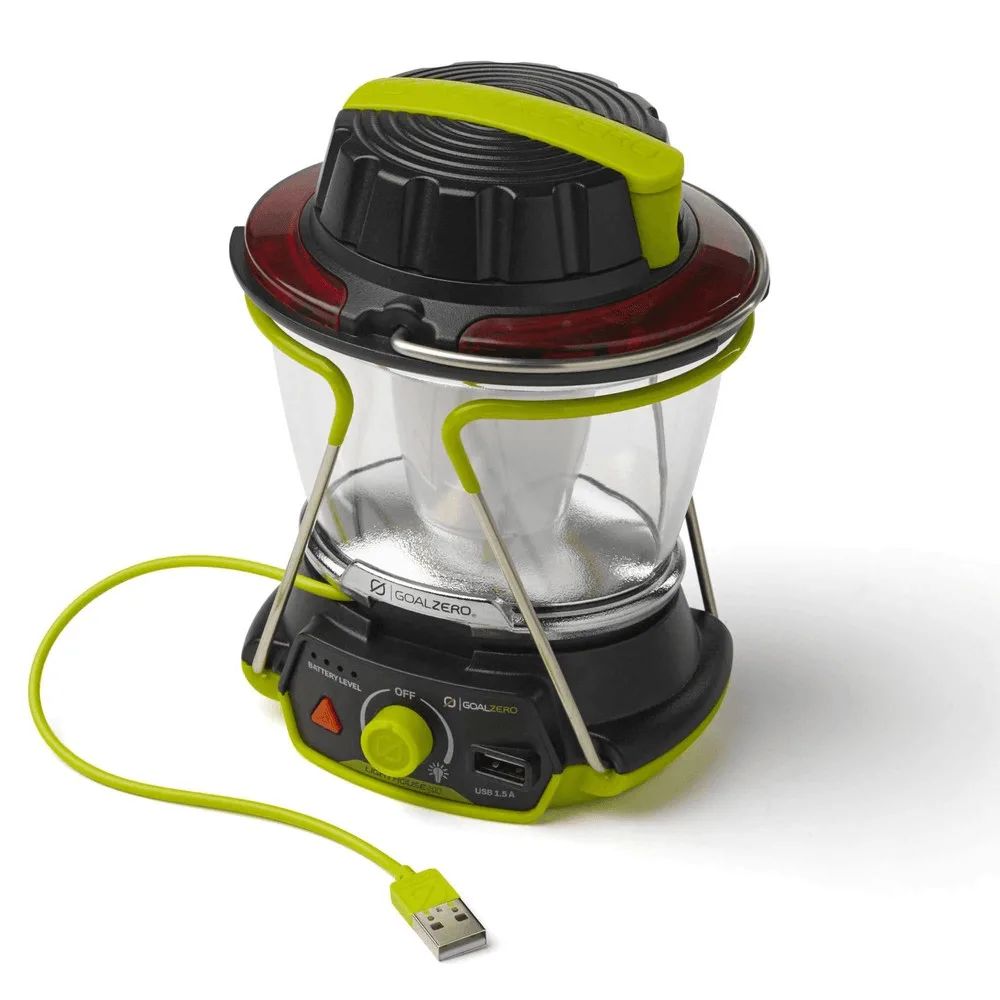
Lighthouse 400 Lantern & USB Power Hub
-
Lighthouse 400 Lantern & USB Power Hub: Recharge the Lighthouse 400 from the sun by connecting a compatible solar panel in about 7-14 hours. Solar charging is a day-long project, not a quick stop, so plan it around camp downtime.
-
Lighthouse 400 Lantern & USB Power Hub: Hand Crank: 1 W (cranking at 130 RPM), 1 minute of crank = 10 minutes of light on low The crank is a light extender for emergencies; it is not a substitute for a full recharge.
Set up the lantern at camp
- Choose a spot and deploy the legs: The collapsible legs fold out into a stand for maximum light dispersion and fold in for storage. The built-in handle lets you carry or hang the lantern.
- Pick one side or both: The DuaLite directional lighting lets you use both sides for full output or light only one side to save power and extend runtime.
- Aim the light where you need it: The LED light is directional and adjustable, so you can point it at a table, tent entrance, or cooking area rather than lighting the whole site.
- Plug in a phone when needed: The 1.5A USB output (5V, 7.5W max) is enough to charge phones and tablets off-grid. Connect your cable to the USB output port, not the input.
Light and power details that shape your setup
- Lighthouse 400 Lantern & USB Power Hub: LED (output): 2x3W, warm white LED, 400 Lumens; Color Temperature: 3,500 Kelvin 400 lumens of warm white light is the ceiling for this lantern, so set expectations for area lighting versus task lighting.
- Lighthouse 400 Lantern & USB Power Hub: One side lit: 48 hours (low), 6 hours (high); Both sides lit: 24 hours (low), 2.5 hours (high) One-sided low is the long-runtime setting; both sides on high drains the battery in about 2.5 hours.
- Lighthouse 400 Lantern & USB Power Hub: Charge Phones, Boost Tablets Internal lithium battery boasts 4,400mAh with a 1.5A USB output, enough power to charge phones and tablets even off-grid. The lantern doubles as a small power bank, so you can leave a separate phone battery at home for short trips.
Match the light mode to the evening
The biggest runtime decision is how many sides you light. With one side lit on low, the supplied runtime is 48 hours; on high, it drops to 6 hours. With both sides lit, low gives 24 hours and high gives 2.5 hours. For a long evening around the tent, one side on low is the efficient choice. For a short burst of bright light while cooking or sorting gear, both sides on high is fine, but expect the battery to drain quickly.
The lantern is not chainable, according to the supplied information, so plan each Lighthouse 400 as a standalone light rather than linking several together. If you need light in more than one area, that means more than one lantern or a different lighting plan.
Keep the battery ready between trips
- Store it plugged in or top it up regularly: The supplied shelf-life guidance says to keep the lantern plugged in, or charge it every 3–6 months. Put a reminder on your calendar so it is ready when you grab it.
- Check the charge before you leave: The built-in management system includes charging and low-battery protection, but it does not tell you the battery level from across the room. Top up at home so you start with a full battery.
- Pack for the recharge method you chose: If you plan to solar charge, bring the compatible panel and cable. If you plan to crank, know that 1 minute of cranking at 130 RPM yields 10 minutes of low light.
What the supplied information does not confirm
The supplied record does not list a specific USB power adapter or cable in the box beyond the lantern and USB power hub, and it does not confirm which solar panel models beyond the Nomad 7 and Nomad 7 Plus are compatible. It also does not give a water-resistance rating, so treat the lantern as an indoor or sheltered-use light unless the full documentation says otherwise. Check those details before you rely on the lantern in rain or with a panel you already own.
The Lighthouse 400 weighs 1.1 lbs (498 g) and measures 4.5 x 5 x 6.5 in (11.4 x 12.7 x 16.5 cm), which makes it easy to pack. The 12-month warranty is supplied with the product; keep your receipt in case you need it.