Start with what the S9 kit is built to do
The blue LUMIX S9 lens kit is a compact full-frame mirrorless setup aimed at creators who want strong image quality, simple controls, and a design that stands out. For street and travel work, that combination matters more than a long spec sheet: you want a camera that is easy to carry, quick to shoot with, and ready to share before the moment passes.
The catalog confirms three practical pillars for this kit: a full-frame sensor for clarity in low light and flexible framing, Real-Time LUT for applying signature looks in-camera, and fast phone sharing through the LUMIX Lab app. Use those as the backbone of your setup, and treat everything else as something to verify on your own body and lens.
The confirmed features that shape a street and travel workflow
-
PANASONIC LUMIX S9 Lens Kit - BLUE: Compact full-frame mirrorless camera with a full-frame sensor for exceptional image clarity even in low light and frames for any social media aspect ratio. Street and travel shooting often means dim alleys, evening streets, and vertical or square crops for social. A full-frame sensor and flexible aspect ratios support those conditions without forcing you to carry extra lighting.
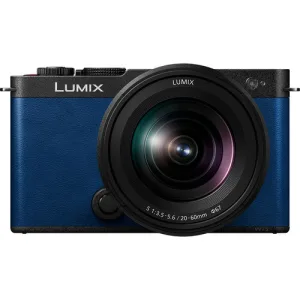
PANASONIC LUMIX S9 Lens Kit - BLUE
-
PANASONIC LUMIX S9 Lens Kit - BLUE: REAL-TIME LUT applies signature presets directly in-camera. You can choose a look before you shoot rather than grading every file later, which shortens the gap between capture and posting on a trip.
-
PANASONIC LUMIX S9 Lens Kit - BLUE: Super-fast sharing through your phone with the LUMIX Lab app. Travel workflows benefit from moving selected images to a phone quickly, especially when you want to post from the street or from a hotel room without a laptop.
A practical first setup for a walkaround day
The catalog does not supply a menu-by-menu procedure, so this is a workflow plan rather than a manufacturer instruction. Confirm each step against the camera menu and the LUMIX Lab app on your own phone.
- 1. Choose your aspect ratio before you leave: The S9 supports frames for social media aspect ratios. Decide whether the day is vertical-first or wide-first, and set that before you start walking so you are not cropping every frame later.
- 2. Pick a Real-Time LUT for the light you expect: Real-Time LUT applies signature presets in-camera. Choose one look for the outing and keep it consistent, so a series of street frames feels like a set rather than a random mix.
- 3. Pair the LUMIX Lab app before you need it: Phone sharing is confirmed, but the exact pairing steps are not in the supplied catalog. Set up and test the connection at home or at the hotel, not in the middle of a crowded street.
- 4. Carry the kit as one light unit: The S9 is described as compact and the kit is a lens kit, so treat it as a single walkaround package. Add only what you will actually use between charges and card swaps, and check your own battery and card status before a long day.
- 5. Review and share in small batches: Use the phone app to move a handful of selected frames rather than your whole card. That keeps the sharing step quick and leaves the rest of your files for a proper edit later.
Street settings to try, and what to confirm yourself
For street work, the S9's low-light strength and in-camera LUTs are the two features the catalog actually supports. A sensible approach is to keep the LUT fixed for the walk, use the full-frame sensor to shoot in shade and evening light rather than avoiding it, and frame for the aspect ratio you set at the start.
The catalog does not list exposure modes, autofocus settings, stabilisation figures, battery life, or a specific lens focal length for this kit. Those are not omissions you should fill in with guesses. Check the camera menu and the lens markings on your own kit, then build your street settings around what you find.
Travel configuration: plan around sharing, not around specs
On a trip, the S9's advantage is the shorter path from camera to phone. The LUMIX Lab app is the confirmed sharing route, and Real-Time LUT means the look is already applied when the file arrives. That lets you post a few frames from a cafe or train without carrying a laptop.
What the supplied information does not settle: how long a charge lasts, how many images the app can transfer at once, whether the kit lens covers the focal length you prefer, or which LUTs are included. Decide those by checking the camera and app directly. If any of them is a dealbreaker, resolve it before you travel rather than discovering it on day one.
Is the blue kit the right walkaround choice for you?
The blue finish is a style choice, but the practical case for this kit is the combination of full-frame image quality, in-camera LUTs, and quick phone sharing in a compact body. If your street and travel workflow is social-first and you want to shoot and share without a full edit, that combination is the reason to choose it.
If you need confirmed details on lens focal length, battery life, stabilisation, or app transfer limits before buying, the supplied catalog does not answer those questions. Ask Dodd Camera or check the camera directly. The S9 kit is a strong fit for creators who value the in-camera look and the phone handoff; it is not a substitute for verifying the specifics that matter to your own trip.