What a Macro Reverse Ring Does for Your Olympus 4/3 Camera
A macro reverse ring lets you mount a lens backward on your camera body, turning any compatible lens into an extreme close-up optic. For Olympus 4/3 (OM4/3 or 4/3) mount cameras, the Fotodiox Macro Reverse Ring is a simple metal adapter that screws onto the lens's filter thread and clicks onto the camera mount. There are no optical elements inside, so the lens retains its original sharpness and character.
This is a purely mechanical connection. There are no electrical contacts, so autofocus, AE metering, and image stabilization will not function. You will need to focus manually and set exposure manually or use Aperture Priority (stop-down) metering. The reward is extreme magnification at a fraction of the cost of a dedicated macro lens.
Choosing the Right Filter Thread Size
The reverse ring is available in 52mm and 58mm filter thread sizes. You select the size that matches the filter thread of the lens you want to reverse. If your lens has a different thread diameter, you can use step-up or step-down rings to adapt it. The ring itself uses a precise 0.75 pitch thread for a secure fit.
The ring works with any lens that has a filter thread, not just Olympus 4/3 lenses. This means you can experiment with vintage glass or lenses from other systems, as long as you can adapt the thread size.
Supported Setup Sequence for Reversing a Lens
The following sequence is based on the supplied operating information. The goal is to mount the lens securely and achieve focus on your subject.
- Mount the reverse ring on the lens: Screw the reverse ring onto the filter threads of your lens. Turn it gently until it is snug. Do not overtighten.
- Attach the lens-and-ring assembly to the camera: Align the ring's bayonet mount with the camera's Olympus 4/3 mount and twist to lock. The lens will now face backward toward the subject.
- Set the camera to manual or aperture priority mode: Because there is no electronic communication, set your camera to Manual (M) or Aperture Priority (A/Av) mode. In Aperture Priority, the camera will meter stopped-down, which is the supported method.
- Focus manually and adjust exposure: Move the camera closer to or farther from your subject to achieve focus. The lens's focus ring may still work, but the working distance will be very short. Adjust shutter speed and ISO as needed.
- Experiment with different lenses: The supplied notes indicate that it will take some experimentation with various lens lengths to find a comfortable magnification and focusing range for your setup.
Important Lens Compatibility Checks
Not every lens works well when reversed. The key limitation is focus-by-wire lenses, such as Canon STM or Nikon AF-P lenses. These lenses require power from the camera to engage the manual focus ring, and since the reverse ring provides no power, those lenses will not be able to focus at all.
Also, if your lens lacks a manual aperture control ring, the aperture will revert to its default position. Depending on the lens, this may be fully stopped down or fully open. Lenses with a manual aperture ring give you full control over depth of field.
The Fotodiox reverse ring is made of hardened anodized aluminum and weighs only 0.4 oz (11 g). It comes with a limited 2-year manufacturer warranty.
Product Evidence at a Glance
-
Macro Reverse Ring for Olympus 4/3 - Camera Mount to Filter Thread Adapter for Olympus 4/3 (OM4/3 or 4/3) Camera Mounts: Extreme macro close-up results; precise thread, 0.75 pitch size Confirms the ring is designed for high-magnification work and uses a standard thread pitch that matches most filter threads.
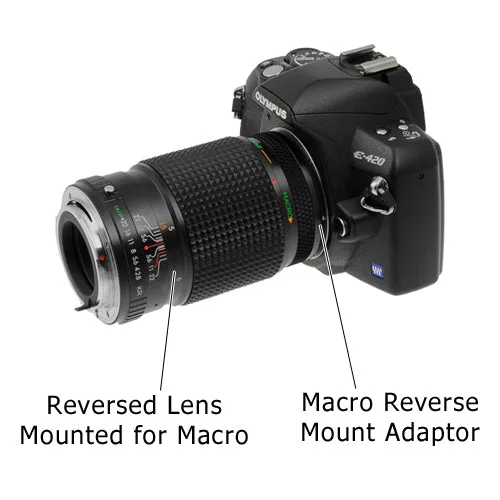
Macro Reverse Ring for Olympus 4/3 - Camera Mount to Filter Thread Adapter for Olympus 4/3 (OM4/3 or 4/3) Camera Mounts
-
Macro Reverse Ring for Olympus 4/3 - Camera Mount to Filter Thread Adapter for Olympus 4/3 (OM4/3 or 4/3) Camera Mounts: No electrical contacts; manual focusing, manual or aperture priority mode needed Sets clear expectations: you must shoot manually and cannot rely on autofocus or autoexposure.
-
Macro Reverse Ring for Olympus 4/3 - Camera Mount to Filter Thread Adapter for Olympus 4/3 (OM4/3 or 4/3) Camera Mounts: Any lens with a filter thread, not just Olympus 4/3 lenses, will fit on the thread side of the adapter Expands your lens options beyond the native system, especially useful for adapting vintage or third-party glass.
-
Macro Reverse Ring for Olympus 4/3 - Camera Mount to Filter Thread Adapter for Olympus 4/3 (OM4/3 or 4/3) Camera Mounts: All metal design with a smooth surface for effortless mount Indicates durability and ease of use; the ring should mount and dismount smoothly without binding.
What the Supplied Information Does Not Cover
The supplied records do not specify the exact magnification ratio you will achieve with a given lens and focal length. Magnification depends on the lens's focal length and the distance to the subject, which you will need to determine through experimentation. Similarly, there are no specific instructions for cleaning the reverse ring or for using it with zoom lenses. The ring's compatibility with specific Olympus 4/3 camera models is confirmed, but the list of compatible bodies is not exhaustive.
For the most accurate and safe use, always refer to your camera and lens manuals, and test the setup in a controlled environment before critical shooting.