Start with the right case
The FUZION Magnetic MAGMAX Phone Wallet with Stand is designed to work exclusively with MagSafe phone cases. Before you attach it, confirm your iPhone or Samsung phone is wearing a MagSafe-compatible case. The wallet uses a built-in MAGMAX ring to attach directly to the back of that case, so a non-MagSafe case will not give you the intended hold.
If you already use a Rokform MAGMAX case, the wallet can deliver up to 6x the holding strength of ordinary magnets, according to the product details. With other MagSafe cases, the wallet still attaches, but the extra-strength claim is specifically tied to pairing with a MAGMAX Rokform case.
Compatibility and hold at a glance
-
FUZION Magnetic MAGMAX™ Phone Wallet with Stand: Designed to work exclusively with MagSafe phone cases. This is the first checkpoint: the wallet is not a universal stick-on accessory.
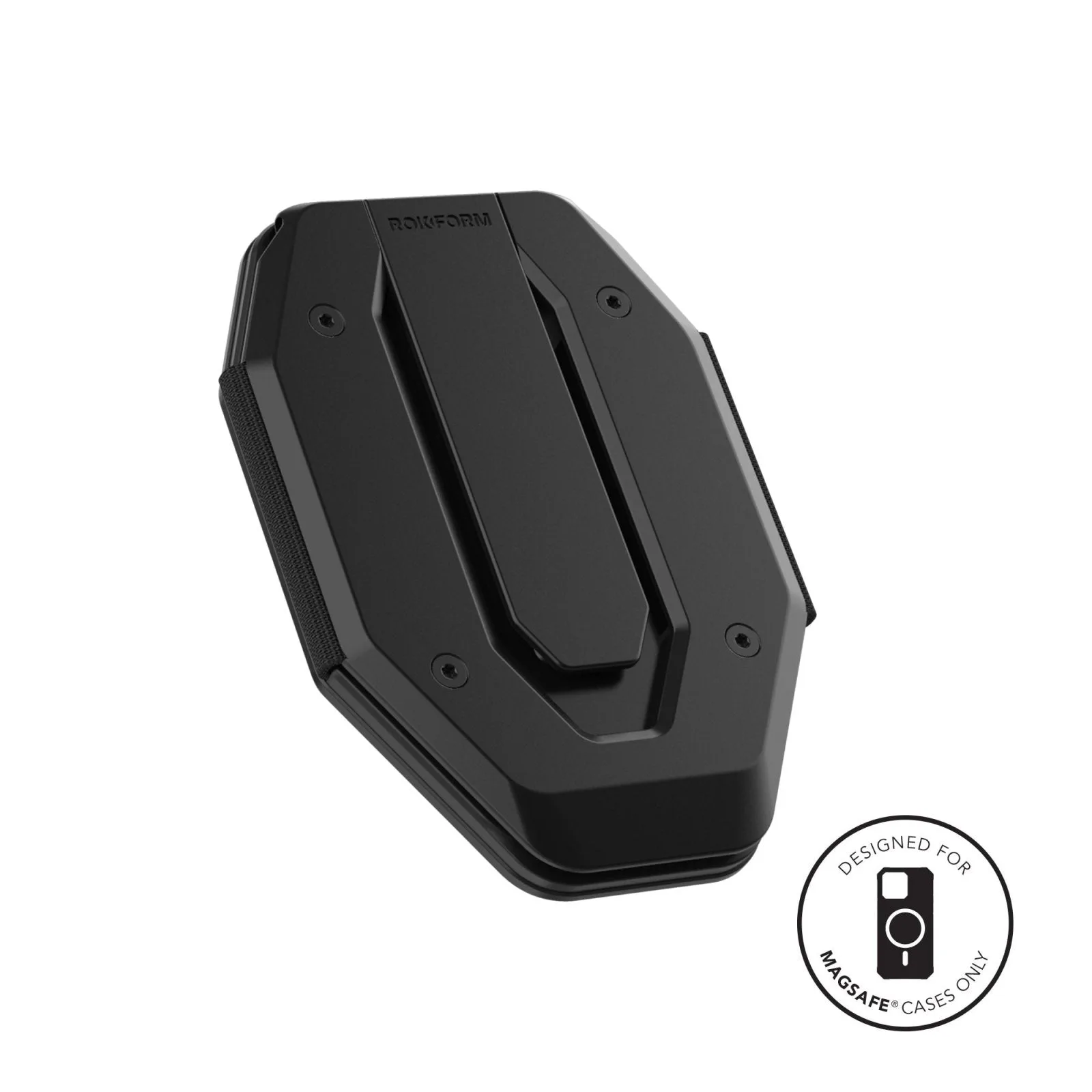
FUZION Magnetic MAGMAX™ Phone Wallet with Stand
-
FUZION Magnetic MAGMAX™ Phone Wallet with Stand: Built-in MAGMAX ring attaches directly to the back of any MagSafe phone case. Explains how the wallet mounts without adhesive or a separate plate.
-
FUZION Magnetic MAGMAX™ Phone Wallet with Stand: MAGMAX magnets deliver up to 6x the holding strength of ordinary magnets when paired with a MAGMAX Rokform case. Sets realistic expectations: the strongest hold depends on the case you pair it with.
How to attach the FUZION MAGMAX wallet
The supplied instructions describe a simple magnetic attachment. Follow these steps in order.
- Check your case: Make sure your phone is in a MagSafe-compatible case. The wallet is designed to work exclusively with MagSafe phone cases.
- Align the wallet: Hold the FUZION wallet so its built-in MAGMAX ring lines up with the magnetic ring area on the back of your MagSafe case.
- Let the magnets connect: Bring the wallet close and allow the magnets to pull it into place. The product describes this as an easy magnetic attachment.
- Test the hold: Before you load cards, give the wallet a gentle tug to confirm it is seated. If it shifts easily, remove it and re-align.
Load cards without overfilling
The FUZION wallet holds 1–7 cards and up to 3 bills. That range is the manufacturer’s stated capacity, so treat seven cards as the upper limit rather than a target. If you carry thick embossed cards or folded bills, start with fewer cards and add until the wallet still sits flat against the case.
The wallet is described as slim and front-pocket friendly, but capacity and bulk go together. Overstuffing can make the wallet harder to slide into a pocket and may affect how securely it stays attached. The supplied information does not specify a breaking-in period or a recommended card thickness, so use your own judgment and keep the load within the stated 1–7 card range.
Using the stand in daily life
The FUZION MAGMAX includes a stand function, but the supplied record does not describe specific viewing angles or a step-by-step deployment method. Use these practical tips within that limitation.
- Set up on a stable surface: Prop the phone on a table or desk rather than a soft surface where the stand could sink or tip.
- Keep the card load light for stand use: A lighter wallet is easier to balance. If the phone feels top-heavy, remove a card or two before using the stand.
- Check the magnetic connection before propping: Make sure the wallet is firmly attached to the MagSafe case before you rely on the stand to hold the phone upright.
- Avoid using the stand while walking: The stand is for stationary viewing. The supplied information does not describe any locking mechanism, so do not treat it as a grip or handle.
What the aluminum build means for care
The wallet uses a slim, light, and durable aluminum construction. That material choice suggests it can handle daily handling, but the supplied record does not include cleaning instructions or water-resistance ratings. Keep it away from excessive moisture and wipe it with a dry or slightly damp cloth if it gets dusty. Avoid abrasive cleaners that could scratch the finish.
Because the wallet attaches magnetically, check the case surface for grit before reattaching. Dust or sand between the wallet and case can reduce grip and may scratch either surface over time.
Capacity, warranty, and support
- FUZION Magnetic MAGMAX™ Phone Wallet with Stand: Holds 1–7 cards and up to 3 bills. Defines the practical load limit so you can plan what to carry.
- FUZION Magnetic MAGMAX™ Phone Wallet with Stand: 2-year limited warranty and a 5-star customer service team based in Irvine. Gives you a clear support path if something goes wrong with the wallet.
- FUZION Magnetic MAGMAX™ Phone Wallet with Stand: Available in Black. Confirms the color option shown in the catalog.
When the FUZION MAGMAX is the right wallet for you
Choose this wallet if you already use a MagSafe case and want a magnetic card holder that doubles as a stand. It is a good fit for people who carry a moderate number of cards and occasionally prop their phone for video calls or watching content. The aluminum build and 2-year limited warranty add peace of mind.
Skip it if you use a non-MagSafe case, need to carry more than seven cards regularly, or want a wallet that attaches with adhesive. The FUZION is designed around MagSafe, and its strongest magnetic performance is tied to pairing with a MAGMAX Rokform case. If you are unsure about your case compatibility, check the case specifications before you buy.