Quick answer
The ZEISS Victory Vario Eyepiece transforms your Harpia 85 or 95 into a versatile observation tool, offering a wide field of view across a 22-65x or 23-70x zoom range. Proper setup and technique unlock its full potential for birding and digiscoping.
Understanding the Vario Eyepiece's Zoom Range
The Vario Eyepiece provides a continuous zoom from 22x to 65x on the Harpia 85, and from 23x to 70x on the Harpia 95. The wide-angle design maintains a generous field of view even at higher magnifications, which is rare among zoom eyepieces. This means you can track moving birds or scan landscapes at low power, then zoom in for detailed observation without losing your subject.
Digiscoping with the Vario Eyepiece
For digiscoping, the Vario Eyepiece's wide field at low magnifications makes it easier to frame your subject through a phone or camera adapter. However, the eyepiece lacks a dedicated thread for phone adapters, so you'll need a universal clamp or a specific adapter that fits the 44mm outer diameter. Start at the lowest magnification to center your subject, then zoom in gradually to avoid losing the image.
How to set up and use the Vario Eyepiece
- Attach the eyepiece securely: Align the bayonet mount on the Vario Eyepiece with the slot on your Harpia scope body, then twist clockwise until it clicks into place. Ensure the locking ring is tight to prevent accidental rotation. Common mistake: not fully engaging the bayonet, which can cause the eyepiece to loosen during use.
- Set the diopter adjustment: Rotate the diopter ring on the eyepiece while viewing a distant object at mid-zoom (around 40x). Close your non-dominant eye and adjust until the image is sharp, then switch eyes to confirm both see the same clarity. Checkpoint: if the image seems blurry at one end of the zoom, re-check the diopter setting rather than adjusting the main focus.
- Use the zoom ring smoothly: Twist the zoom ring to change magnification. Practice moving from low to high power while keeping the target centered. The wide field at low zoom helps you reacquire the subject if it moves off-center. Common mistake: zooming in too quickly, which can cause you to lose the subject entirely.
- Optimize for digiscoping: Attach a universal phone adapter or a dedicated digiscoping clamp to the eyepiece's outer barrel. Start at the lowest magnification (22x or 23x) to get the full field of view on your phone screen, then zoom in to frame your subject. Use a remote shutter or timer to avoid shake. Checkpoint: if the image is vignetted, you may need to zoom in slightly or adjust the adapter's position.
- Maintain the eyepiece: Clean the lenses with a soft brush or air blower before using a microfiber cloth. The LotuTec coating repels water and dust, but avoid wiping dry dirt. Store the eyepiece in a dry, dust-free case when not attached to the scope. Common mistake: using a dirty cloth that can scratch the coatings—always blow off debris first.
Product details
-
ZEISS Victory Vario Eyepiece for Harpia Spotting Scopes: The ZEISS Victory Vario Eyepiece delivers 22-65x magnification with the Harpia 85 and 23-70x with the Harpia 95, featuring a wide angle of view across the entire zoom range. This means you can start at low power for easy subject acquisition and zoom in for detailed views without the narrow tunnel effect common to other zoom eyepieces.
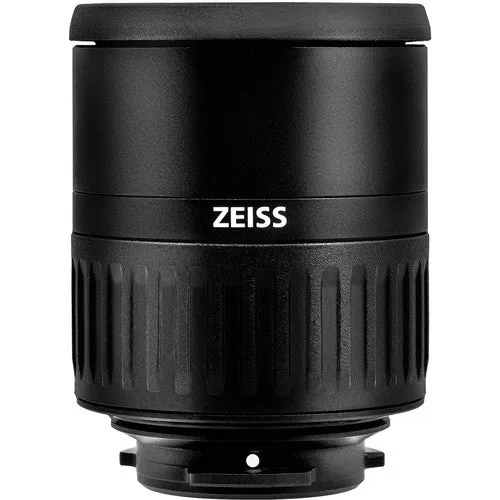
ZEISS Victory Vario Eyepiece for Harpia Spotting Scopes