Quick Answer
The Makeblock mBot Ultimate 10-in-1 robot kit is a strong choice for classrooms that want to move beyond basic robotics and teach real programming with Arduino or Raspberry Pi. It offers ten build options and advanced coding support, but it may be more than younger or beginner students need.
Why the mBot Ultimate Stands Out for STEM Education
The mBot Ultimate is not just another robot toy. Its 10-in-1 design lets students build ten different robots, each with a unique function. This variety keeps learners engaged over a longer period and exposes them to different mechanical and engineering concepts.
For teachers, the key advantage is the kit's compatibility with both Arduino and Raspberry Pi. This means the same kit can serve students who are just starting with block-based coding and those ready for text-based programming. It grows with your curriculum.
Consider the Learning Curve and Time Commitment
Building each robot takes time and requires careful attention. Younger students may struggle with the more complex builds, and the advanced coding options could overwhelm beginners. Plan for dedicated build sessions and be ready to provide guidance.
The kit also assumes some prior knowledge. If your class is new to robotics, you might need to spend extra time teaching basic concepts before diving into the Ultimate. It's better suited for students who already have some experience.
Cost vs. Value: What You're Paying For
At around USD 286.79, the mBot Ultimate is a significant investment. But you get a kit that can be reconfigured into ten different robots, which means you're not buying ten separate kits. For a classroom budget, this can be more economical in the long run.
However, if you only need a simple robot for an introductory lesson, a less expensive kit might be enough. The Ultimate's value is realized when you actually use its multi-robot capability and advanced programming features.
Decision Rules for Your Classroom
- Student Skill Level: Choose the mBot Ultimate if your students already have basic robotics or coding experience. For absolute beginners, consider a simpler kit first.
- Curriculum Goals: Pick this kit if you plan to teach text-based programming (Arduino or Raspberry Pi) or want a multi-project platform. If your goal is just an introductory robotics activity, a single-purpose kit may be more cost-effective.
- Classroom Budget: Invest in the Ultimate if you need one kit that can serve multiple lessons and student levels. For limited budgets, calculate the cost per robot build; the Ultimate offers ten builds for one price.
- Time and Supervision: Allocate enough classroom time for assembly and troubleshooting. The Ultimate's complex builds require adult guidance, so it's best for settings where a teacher or mentor is actively involved.
Product Facts
-
Makeblock mBot Ultimate: 10-in-1 Robot Building Kit for Students: 10-in-1 Robot Building Kit: Create 10 different robots to explore and learn through hands-on play. This variety keeps students engaged across multiple lessons and lets them compare different mechanical designs.
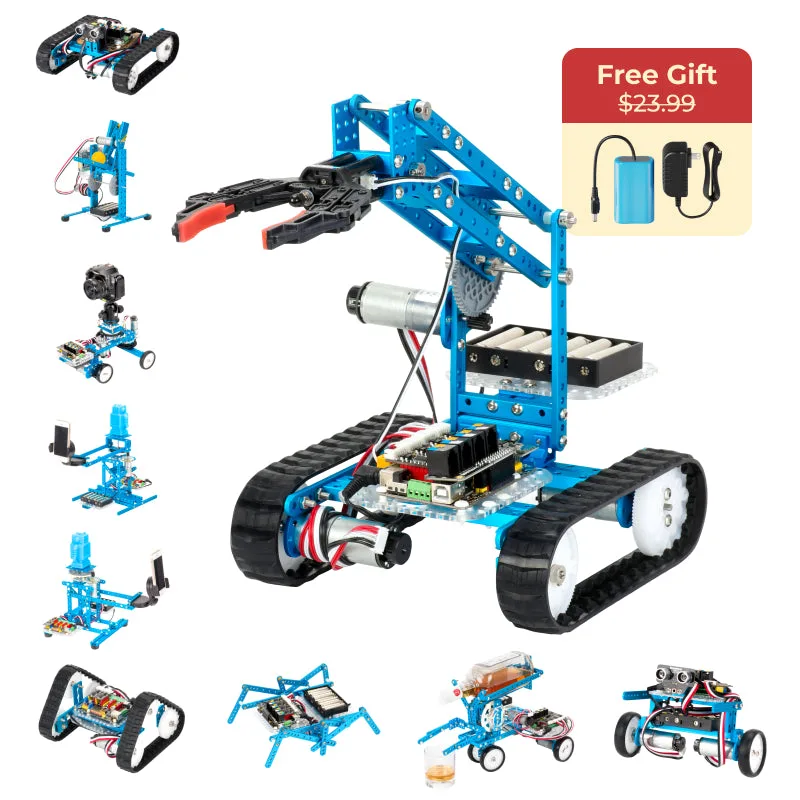
Makeblock mBot Ultimate: 10-in-1 Robot Building Kit for Students
-
Makeblock mBot Ultimate: 10-in-1 Robot Building Kit for Students: Versatile Compatibility: Works seamlessly with both Arduino and Raspberry Pi for advanced projects. The same kit can support students at different skill levels, from beginner block coding to advanced text-based programming.
-
Makeblock mBot Ultimate: 10-in-1 Robot Building Kit for Students: Advanced Coding Support: Supports Scratch and Arduino IDE, offering a range of visual and text-based programming options. Teachers can scaffold learning by starting with Scratch and progressing to Arduino IDE without needing a new kit.
Is It Right for You?
Best For
- Middle school or high school students with some robotics experience
- Classrooms that want to teach Arduino or Raspberry Pi programming
- After-school clubs or electives that can dedicate multiple sessions to building and programming
Not For
- Younger students (elementary) who need simple, quick builds
- Introductory lessons where a basic robot is enough
- Teachers with very limited class time or no assistant support