What's in the Box
The Memorex MX-CRBT250 includes the alarm clock unit, an AC/DC adapter, and a user manual. Before you begin, make sure you have a clear spot on your nightstand or desk within reach of a power outlet. The clock's large red LED display is easy to read from across the room, but you'll want to place it where the display isn't directly in your eyes while you sleep — the dimmer control helps with that.
First-Time Setup
Follow these steps to get your Memorex MX-CRBT250 running.
- Connect power: Plug the included AC/DC adapter into a wall outlet and connect it to the clock. The display will light up with the default time (12:00) and date.
- Set time and date: Use the buttons on the clock to set the current time and day. The clock supports 12H and 24H formats — choose the one you prefer. The display shows day, hour, minute, and week.
- Adjust brightness: Use the dimmer control to set the LED brightness to a level that's comfortable for your room. A dimmer setting can help avoid disturbing your sleep.
- Set the alarm: Press the alarm button, set your desired wake-up time, and choose whether to wake to the buzzer or to Bluetooth audio from your phone. The clock will remember your settings.
Pairing via Bluetooth 5.0
The MX-CRBT250 uses Bluetooth 5.0 with a range of up to 30 feet (about 9 meters). To stream audio from your phone, tablet, or computer, put the clock into pairing mode (see the manual for the exact button sequence), then select "Memorex MX-CRBT250" from your device's Bluetooth menu. Once paired, audio from your device will play through the clock's dual stereo speakers (1.5W each). Keep your source device within 30 feet for a stable connection.
Key Specifications at a Glance
-
Memorex MX-CRBT250 | Bluetooth LED Alarm Clock with 10W Fast Wireless Charging, Adjustable Dimmer, Dual Stereo Speakers, Large Red LED Display, Bluetooth 5.0 Audio Streaming | Ultimate Bedside Clock: Bluetooth 5.0 with 30 ft range Gives you reliable wireless audio streaming from across a typical bedroom, and supports modern devices with low power consumption.
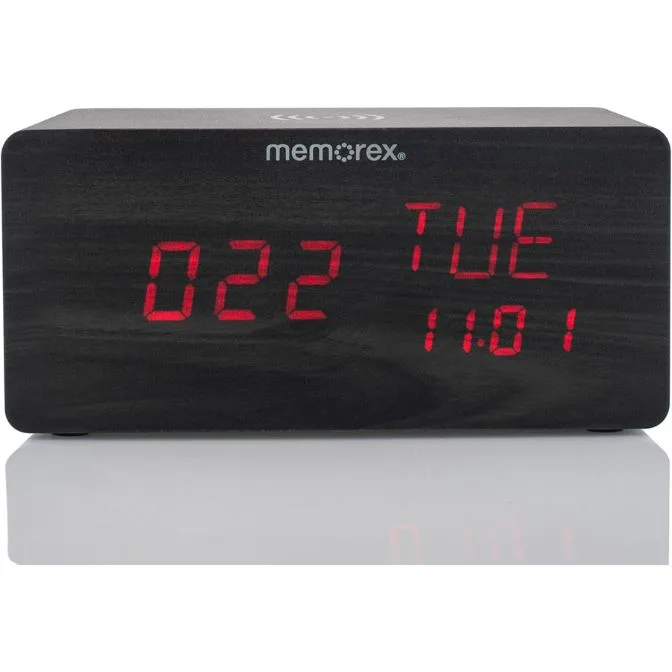
Memorex MX-CRBT250 | Bluetooth LED Alarm Clock with 10W Fast Wireless Charging, Adjustable Dimmer, Dual Stereo Speakers, Large Red LED Display, Bluetooth 5.0 Audio Streaming | Ultimate Bedside Clock
-
Memorex MX-CRBT250 | Bluetooth LED Alarm Clock with 10W Fast Wireless Charging, Adjustable Dimmer, Dual Stereo Speakers, Large Red LED Display, Bluetooth 5.0 Audio Streaming | Ultimate Bedside Clock: 10W fast wireless charging (EPP+PPDE) Charges compatible smartphones and other devices quickly — just place your phone on the charging pad on top of the clock.
-
Memorex MX-CRBT250 | Bluetooth LED Alarm Clock with 10W Fast Wireless Charging, Adjustable Dimmer, Dual Stereo Speakers, Large Red LED Display, Bluetooth 5.0 Audio Streaming | Ultimate Bedside Clock: Speaker output: 1.5W x2 Provides stereo sound for alarms and audio streaming, suitable for a bedroom or small office.
Using the Wireless Charger
The top of the MX-CRBT250 has a 10W fast wireless charging pad that supports EPP and PPDE standards. To charge your phone, simply place it centered on the pad. The clock will detect your device and start charging. Note that charging speed depends on your phone's compatibility — if your phone supports fast wireless charging, you'll get the full 10W. The clock includes an adjustable dimmer, so you can reduce the LED brightness at night without affecting the charging function.
Placement Tips
For best performance, place the clock on a flat, stable surface near a power outlet. Keep the top clear for wireless charging — avoid placing metal objects or other electronics on the charging pad. The Bluetooth range of 30 feet works through walls and furniture, but for the most reliable connection, keep your phone or tablet within the same room. The large red LED display is readable from across the room, so you can check the time without getting out of bed.