The enclosure is the easy part — the drive decides whether it works
An M.2 enclosure is a shell, a bridge chip and a USB-C connector. The SSD you slide into it determines whether the whole thing fits, how fast it feels, and how much you can carry. The Satechi Mini NVMe SSD Enclosure is deliberately narrow in scope: the supplied information says it is optimized for 2230mm NVMe solid-state drives and uses Gen 2 USB-C technology for speeds up to 10Gbps. If your spare drive is a longer 2280 stick, this is the wrong enclosure regardless of price.
The SSD is not included, so treat the enclosure as one half of a purchase. The other half — the drive — is where most buyers get caught out.
Four checks before you buy a drive for it
Work through these in order; the first one eliminates the most drives.
- Form factor: 2230 only: The catalog specifies 2230mm NVMe drives. That is the short, stubby M.2 size used in compact laptops and handhelds. A 2242, 2260 or 2280 drive is not described as supported, so don't buy one hoping it will fit.
- Interface: NVMe, not SATA: The enclosure is described for NVMe solid-state drives. M.2 SATA drives share the same connector shape but are a different protocol; the supplied information does not describe them as compatible.
- Speed expectation: 10Gbps is the ceiling: Gen 2 USB-C caps the link at 10Gbps, which the catalog frames as significantly faster than traditional SATA SSDs. A premium Gen 4 or Gen 5 drive will not deliver its full rated speed through this enclosure, so pay for enough drive rather than the fastest one.
- Capacity: size it to the job: The catalog does not list a maximum supported capacity. Choose capacity from what you actually store — video files on an iPhone, a working photo library, or project archives — and confirm the drive's capacity with the drive seller, since the enclosure record doesn't state a limit.
What the Mini NVMe SSD Enclosure actually specifies
-
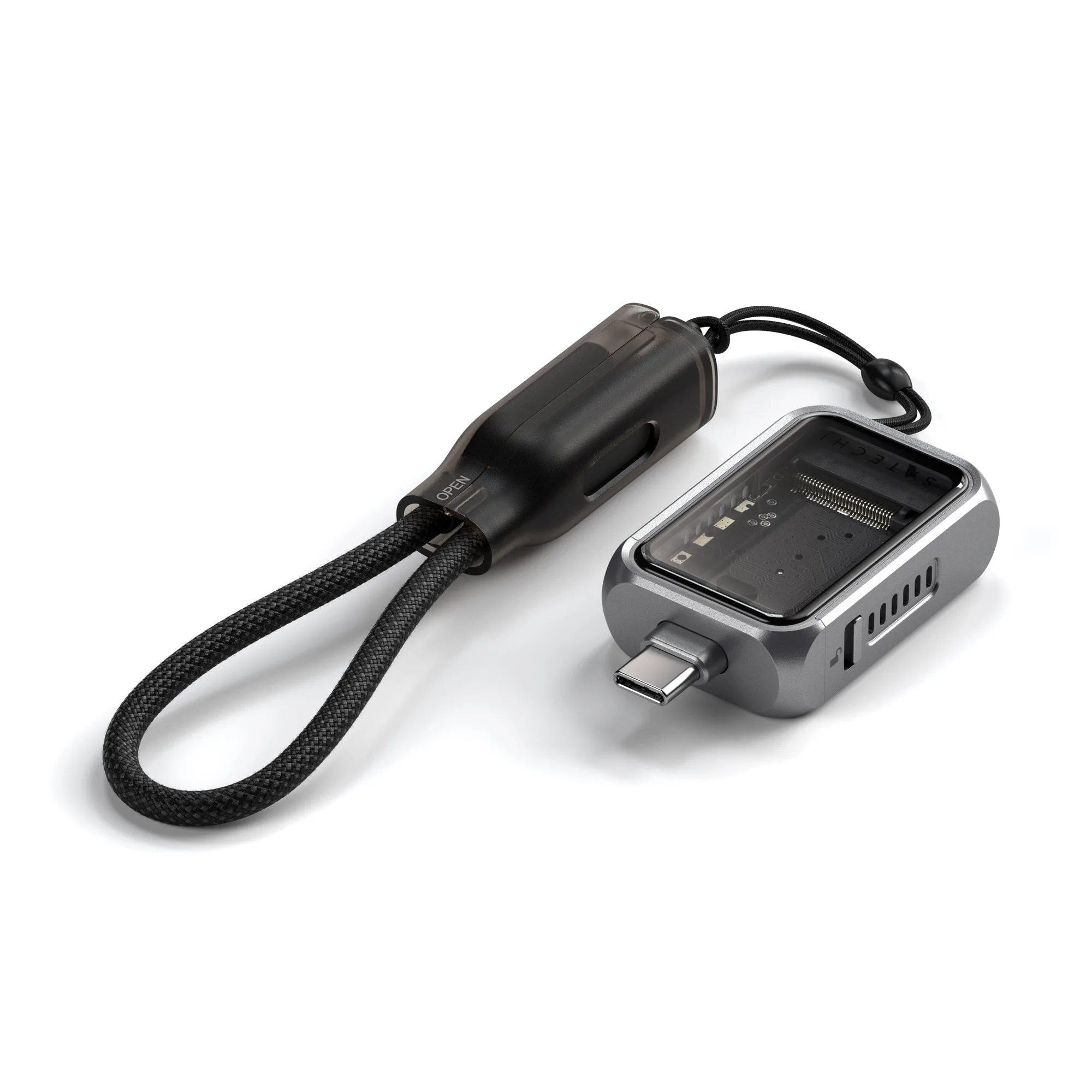
Mini NVMe SSD Enclosure: Optimized to read 2230mm NVMe solid-state drives with speeds up to 10Gbps via Gen 2 USB-C technology. This is the compatibility boundary. Check your drive's length and protocol against it before ordering.
Mini NVMe SSD Enclosure
-
Mini NVMe SSD Enclosure: Tool-free installation with interchangeable storage, so you can switch between multiple SSDs. If you already own several 2230 drives, one enclosure can serve them in turn rather than one enclosure per drive.
-
Mini NVMe SSD Enclosure: Includes a lanyard cable for on-the-go use; SSD is not included. Budget for the drive separately, and note that the cable is part of the package rather than an extra purchase.
Why a 2230 drive changes the shopping list
Most off-the-shelf NVMe drives sold for desktops and PS5 expansion are 2280 length. The 2230 size is more commonly found as a pull from a compact laptop or handheld, or bought specifically as a small-form-factor drive. That has two practical consequences: your existing spare drive may not fit, and the drives that do fit tend to come in smaller capacities and fewer performance tiers.
If you are buying new, search by the size first and the capacity second. If you are reusing a drive, measure it before you assume. The enclosure's tool-free design makes swapping straightforward once you have the right drives, but it cannot make a longer drive shorter.
Which buyer gets the most from this enclosure
- You already own 2230 drives: Strong fit. Interchangeable storage and tool-free installation mean you can move a drive between projects without tools.
- You shoot ProRes Log on iPhone 15/16 Pro: The catalog states the enclosure enables Apple ProRes Log on iPhone 15/16 Pro. Confirm your iPhone model and your workflow's capacity needs before relying on it as your only recording drive.
- You want the fastest possible transfer: Look elsewhere. The 10Gbps Gen 2 ceiling is the limit here; a Gen 4 drive's headline speed is not reachable through this enclosure.
- You have a spare 2280 drive: Not a fit. The enclosure is specified for 2230 drives, so a standard-length drive is the wrong starting point.
What the catalog does not settle
Some details that matter for a final decision are not confirmed in the supplied information: a maximum supported drive capacity, a list of tested drive brands, host-device compatibility beyond the iPhone 15/16 Pro ProRes Log mention, and thermal behaviour under sustained writes. None of these should be read as a defect — they are simply outside what the record states. Check the drive seller's capacity and compatibility notes, and test your own combination with a real file transfer before you depend on it for a shoot or a deadline.
At a catalog price of USD 38.99 against a comparison price of USD 59.99, the enclosure leaves room in the budget for a proper 2230 drive. Spend the difference there: the right drive matters more than the shell around it.