Why the 75mm OV2640 is a drop-in candidate for many ESP32-CAM builds
If you are replacing a damaged camera or want a different field of view on your ESP32-CAM, the OV2640 2MP module with a 75mm lens is a practical starting point. It uses the same 24-pin, 0.5mm pitch interface found on ESP32-CAM and TTGO series boards, so the electrical connection is the same type you already have.
The module is listed as suitable for ESP32-CAM, TTGO, SIPEED, ESP-EYE, and STM32F4/F7 boards, but the ESP32-CAM board itself is not included. That means you are buying the camera only—your existing board, ribbon cable, and connector must be in good condition.
What the catalog confirms about this OV2640 module
-
OV2640 Camera Upgrade 2MP Length 75mm fits ESP32 Cam Module: OV2640 75mm length 66-degree camera module with 24PIN 0.5mm pitch interface. The 24-pin, 0.5mm pitch is the physical connection type used on ESP32-CAM and TTGO boards, so this is the key compatibility check before you order.
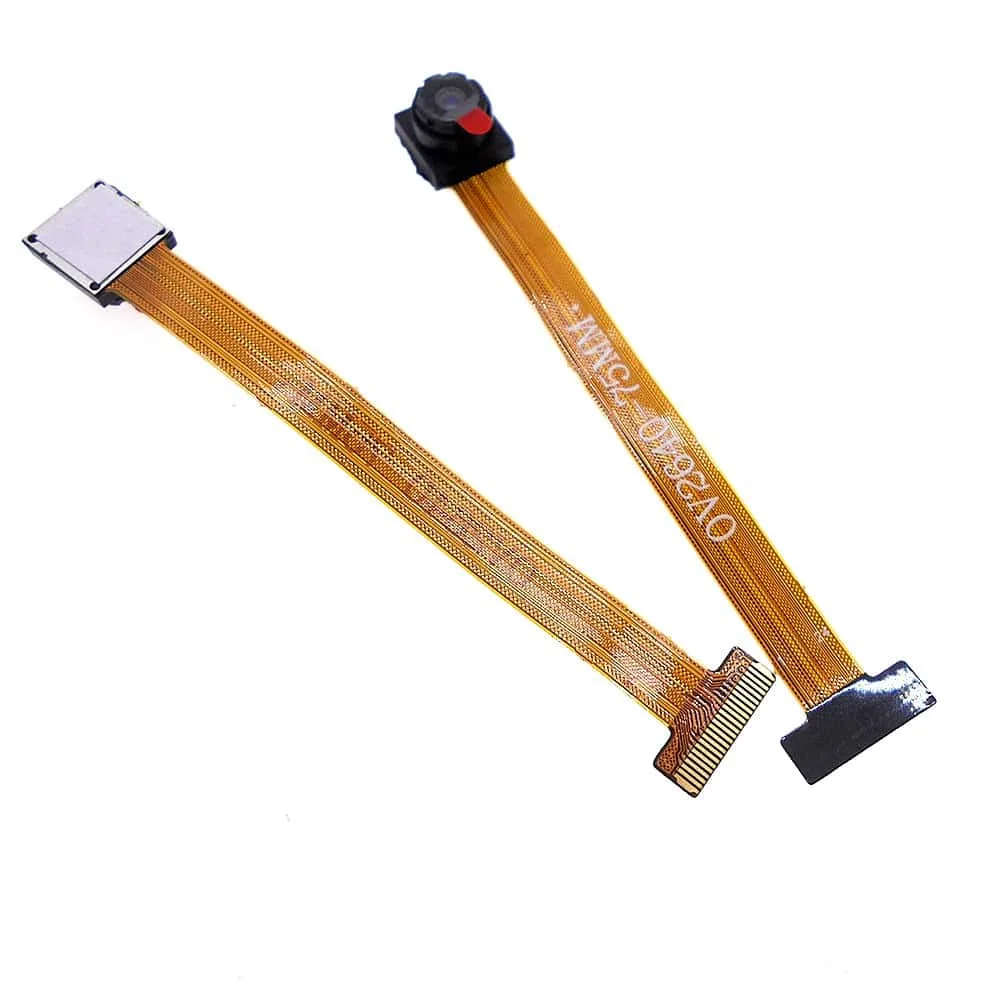
OV2640 Camera Upgrade 2MP Length 75mm fits ESP32 Cam Module
-
OV2640 Camera Upgrade 2MP Length 75mm fits ESP32 Cam Module: 2 million pixels (2MP) resolution. This matches the typical OV2640 resolution class, so you are not changing the sensor's pixel count—only the lens and module assembly.
-
OV2640 Camera Upgrade 2MP Length 75mm fits ESP32 Cam Module: CSI/DVP interface. ESP32-CAM boards use a DVP-style camera interface; this module is built for that signaling type, not USB or MIPI.
-
OV2640 Camera Upgrade 2MP Length 75mm fits ESP32 Cam Module: Angle of view: 68 degrees (also described as 66-degree in the short summary). Use this as a rough guide for framing. A narrower angle than a wide-angle lens means you will need to aim the camera more precisely or move it farther back.
-
OV2640 Camera Upgrade 2MP Length 75mm fits ESP32 Cam Module: ESP32-CAM board not included. You must already have a working ESP32-CAM or compatible board; this purchase is the camera module only.
How to swap the camera module without damaging the connector
- Power down and disconnect: Unplug USB or remove power from your ESP32-CAM before touching the camera connector. The ribbon cable and connector are not designed for hot-plugging.
- Release the old camera's ribbon cable: On most ESP32-CAM boards the camera connector has a small flip latch. Gently lift the latch, then slide the ribbon cable out. Do not pull on the wires themselves.
- Check the new module's ribbon orientation: The 24-pin 0.5mm pitch connector is keyed by contact orientation. Compare the exposed contacts on the old and new cables before inserting. If the cable is inserted upside down, the camera will not work and may be damaged.
- Seat the new ribbon and close the latch: Slide the ribbon fully into the connector, then press the latch down. The cable should be straight and fully seated; a partial insertion causes intermittent detection.
- Power up and test detection: Reconnect power and run your existing camera sketch. If the board does not detect the camera, power down and recheck the ribbon seating and orientation before assuming the module is faulty.
Focus and lens handling: what you can and cannot adjust
The supplied information does not describe a focus ring or manual focus mechanism on this 75mm OV2640 module. Treat the lens as fixed unless you can see a threaded lens barrel on the unit you receive. Do not force the lens to rotate—many compact camera modules are glued or press-fit, and turning them can crack the sensor or detach the lens.
If your images are blurry, first check that the protective film (if present) has been removed and that the lens surface is clean. Then verify the ribbon cable is fully seated. Only attempt focus adjustment if the module clearly has a movable lens thread; otherwise, adjust the camera-to-subject distance instead.
Will the 75mm lens change your framing?
The 66–68 degree angle of view is narrower than a typical wide-angle ESP32-CAM lens. That affects how much of a scene you capture at a given distance.
- Closer subjects: If your subject is within a meter or two, a narrower lens may crop out surroundings. You may need to move the camera back or accept a tighter shot.
- Room or outdoor monitoring: For wide-area monitoring, a narrower lens means you see less of the room from the same corner. Plan the camera position accordingly.
- Existing enclosure or mount: The 75mm length refers to the module's physical length. Check that your enclosure or bracket has clearance for the longer assembly before installing.
Compatibility limits to confirm before you buy
This module is listed for ESP32-CAM, TTGO, SIPEED, ESP-EYE, and STM32F4/F7 boards, but the catalog does not confirm pin-for-pin compatibility with every board variant. If you are using a non-standard ESP32 camera board, compare the connector size (24-pin, 0.5mm pitch) and ribbon orientation with your board's documentation.
The supplied information also does not include a datasheet, power draw, or register settings. Your existing ESP32-CAM camera library and board definition should remain unchanged because the sensor is still an OV2640; however, if you are migrating from a different sensor (for example, OV7670), you will need to update your code separately.