Why a set of 8 changes your camera packing
A packing cube set of 8 gives you eight separate compartments to sort camera bodies, lenses, batteries, and accessories. Instead of one large compartment where items knock together, you can isolate hard and soft gear, reduce abrasion, and find what you need without unpacking everything.
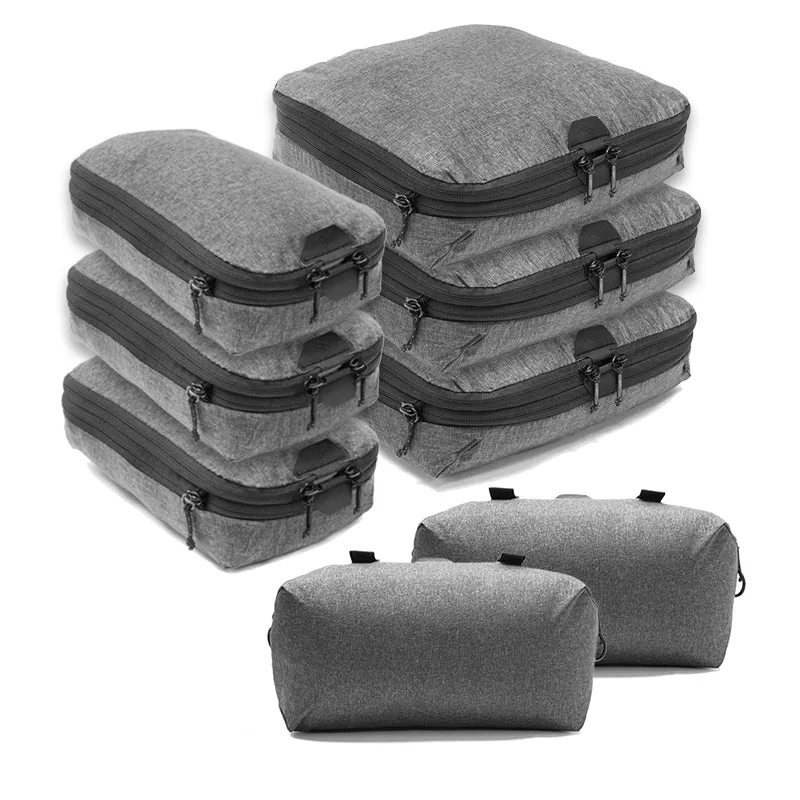
The Peak Design Packing Cube in Charcoal, offered as a set of 8, is designed for organizing and packing items. This listing is for the Standard option. The charcoal colorway keeps the interior visually calm, which makes it easier to spot small black accessories like lens caps or memory cards against the fabric.
What the set includes
-
Packing Cube | Charcoal | Set of 8: Peak Design Packing Cube in Charcoal, offered as a set of 8. Eight cubes let you dedicate separate compartments to camera bodies, lenses, and small accessories, reducing contact between items.
Packing Cube | Charcoal | Set of 8
-
Packing Cube | Charcoal | Set of 8: This listing is for the Standard option. Confirm the size option before you buy, since the set is sold as Standard here and other sizes are not confirmed by the supplied information.
A cube-by-cube packing method for camera gear
- 1. Sort by fragility and shape: Group hard items like camera bodies and lenses separately from soft items like straps, cleaning cloths, and cables. Hard items need cushioning; soft items can act as padding.
- 2. Assign cubes by size and access frequency: Put the gear you reach for most—spare batteries, memory cards, a lens cloth—in cubes that will sit near the top or outside of your bag. Rarely used items go deeper.
- 3. Cushion lenses inside their cube: Wrap each lens in a soft cloth or place it in a padded pouch before it goes into a cube. The cube organizes, but it does not replace lens-specific padding.
- 4. Keep batteries and small items contained: Use one or two cubes exclusively for batteries, chargers, and cables. This prevents loose items from scratching screens or getting lost in the bag.
- 5. Fill empty space to limit movement: If a cube is not full, add a soft item like a strap or cloth so contents do not shift. A loosely packed cube allows more movement than a snug one.
- 6. Close and compress gently: Zip each cube closed and press lightly to remove excess air. Do not force the zipper or overcompress hard gear, as that can stress both the cube and the equipment.
Packing cube tips that protect gear while traveling
- Use one cube per lens or body when possible: Dedicated cubes prevent direct contact between hard items. If you must share a cube, separate items with a cloth.
- Place heaviest cubes at the bottom of your bag: This keeps the load stable and reduces pressure on softer items above. It also makes the bag easier to carry.
- Keep a dedicated cube for quick-access essentials: A small cube for batteries, cards, and a cloth saves you from digging through the whole bag at a checkpoint or during a shoot.
- Label or color-code cubes if you use several sets: The charcoal colorway is uniform, so a small tag or marker helps you identify which cube holds camera gear versus personal items.
- Check cube seams and zippers before each trip: Inspect for loose threads or sticking zippers. A failing cube can spill small accessories into your bag.
What the packing cube set does not do
The supplied information describes the Packing Cube Set of 8 as designed for organizing and packing items. It does not confirm water resistance, padding thickness, or compatibility with specific camera bags. Treat the cubes as organizers, not as protective cases for fragile gear.
For camera equipment, always add lens-specific padding and avoid placing unprotected bodies or lenses directly against each other. The cubes help you separate and organize, but they are not a substitute for a padded camera insert or bag.
Product facts for the Packing Cube Set of 8
- Packing Cube | Charcoal | Set of 8: Brand: Peak Design; Color: Charcoal; Set of 8 packing cubes; Option: Standard. These are the confirmed attributes. Any other claims about dimensions, weight, or material are not supported by the supplied information.