Quick answer
Use the Philips Hue single-input power adapter only with the fixtures it is listed for, such as Signe, Bloom, Iris, lightstrip, and Play gradient light tube. If one of those lights loses power, check the connection and outlet first; replace the adapter only when the light itself is known to work.
Why the single-input adapter is not a universal replacement
Philips Hue makes several power adapters, and they are not interchangeable across every product. The single-input version is intended for fixtures that need one power connection, and the catalog lists Signe, Bloom, Iris, lightstrip, and Play gradient light tube as compatible. A different Hue light may use a different adapter or connector, so matching the product name is more reliable than matching the plug shape.
The adapter listing does not publish voltage, current, or connector dimensions. Treat that absence as a decision limit: if your light is not on the compatible list, do not assume this adapter will work. Check the label on your existing adapter or the light's product documentation instead.
Safety comes before troubleshooting
Unplug the adapter from the wall before inspecting or reseating any connection. Keep the adapter dry, leave it visible rather than buried under rugs or furniture, and stop using it if you see cracking, discoloration, a loose plug, or smell burning. Those are signs to replace the adapter, not to keep testing.
Do not open the adapter or splice the cable. The single-input adapter is a sealed accessory, and repairs inside it are not a user service task. If the adapter is damaged, replace it with the same model rather than a higher-output charger from another device.
Diagnose the power problem
- Symptom: the light is completely dark: Confirm the outlet works with another device, then unplug and firmly reseat the adapter at both the wall and the light. If the light still does not respond, test it with a known-good compatible adapter. If a known-good adapter powers the light, the original adapter is the likely fault.
- Symptom: the light flickers or cuts out intermittently: Check for a loose connector, a damaged cable, or a loose plug at the wall. Move the adapter away from heat sources and avoid daisy-chaining it through a worn power strip. Stop troubleshooting and replace the adapter if the cable or plug is visibly damaged.
- Symptom: the light is not on the compatibility list: Do not force the connector or assume the adapter fits. Look up the adapter specified for that specific Hue product, or contact Philips Hue support with the model number. Choose another adapter option rather than modifying the connection.
- Symptom: the adapter is hot, discolored, or smells: Unplug it immediately and stop using it. Replace it with the same single-input model and keep the new adapter in an open, dry location. Do not continue testing a damaged adapter, even if the light still turns on.
Product facts
-
Philips Hue power adapter (single input): The white single-input power adapter is listed for Signe, Bloom, Iris, lightstrip, and Play gradient light tube. Check your light against that list before buying, because a different Hue fixture may need a different power supply.
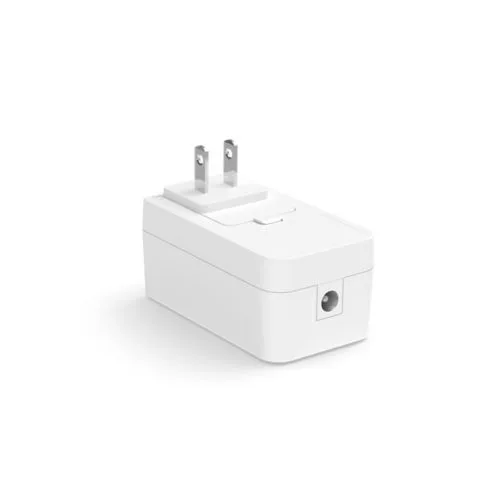
Philips Hue power adapter (single input)