Why a DSLR Power Cable Matters for Long Exposures
DSLR cameras rely on lithium batteries that can run out of charge during long exposure astrophotography, interrupting your imaging session. A dedicated power cable with a voltage regulator and false battery lets you power the camera directly from an Eagle or Eagle Core instead of the battery, so you can keep shooting without swapping cells.
This guide explains how to choose the right cable for your camera and how to connect it safely to your mount's power source using a cigarette lighter adapter.
Eagle-Compatible DSLR Power Cable: What It Does
-
Eagle-Compatible Power Cable for DSLRs: These Eagle-compatible power cables feature a false battery that plugs into the DSLR in place of the standard battery, and a voltage regulator that converts power to the voltage required by the selected camera. This allows you to power your camera from an Eagle or Eagle Core, avoiding battery swaps during long exposures.
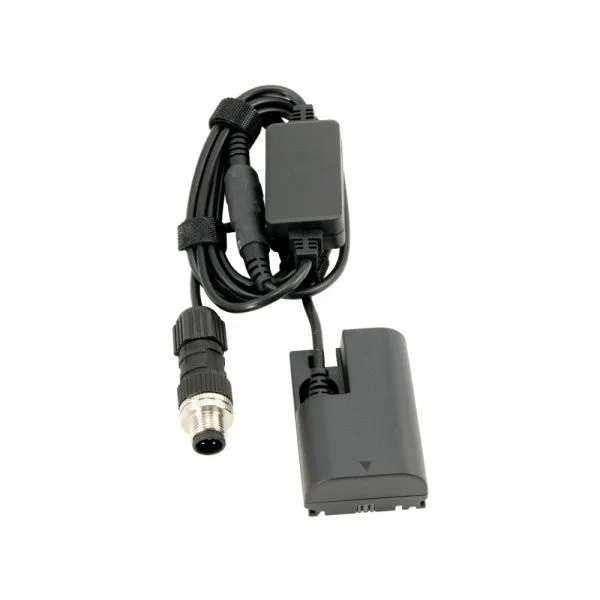
Eagle-Compatible Power Cable for DSLRs
-
Eagle-Compatible Power Cable for DSLRs: The cable has a plug with screw connection to prevent accidental disconnection from the Eagle. A secure connection is critical for unattended imaging sessions where a loose cable could end your run.
Match the Cable to Your Exact Camera Model
The Eagle-Compatible Power Cable for DSLRs is available in several variants, each designed for specific Canon EOS and Nikon DSLR models. Using the correct variant ensures proper fit and voltage regulation.
- Canon EOS 1100D, 1200D, 1300D: Variant: EOS 1100D/1200D/1300D (SKU PL1000010)
- Canon EOS 550D, 600D, 650D, 700D: Variant: EOS 550D/600D/650D/700D (SKU PL1000009)
- Canon EOS 6D, 7D, 60D, 60Da, 70D, 5D Mark II, 5D Mark III: Variant: EOS 6D/7D/60D/60Da/70D/5D Mark II/5D Mark III (SKU PL1000005)
- Canon EOS 750D, 760D: Variant: EOS 750D/760D (SKU PL1000008)
- Nikon D3100, D3200, D3300, D5100, D5200, D5300, D5500: Variant: Nikon D3100/D3200/D3300/D5100/D5200/D5300/D5500 (SKU PL1000007)
- Nikon D500, D600, D610, D750, D800, D7000, D7100, D7200, D810, D810A: Variant: Nikon D500/D600/D610/D750/D800/D7000/D7100/D7200/D810/D810A 3A (SKU PL1000006)
Check Your Camera Before Ordering
The supplied information lists compatibility only for the specific models above. If your camera is not listed, the correct variant is not confirmed by the available information. In that case, contact Cloud Break Optics to verify fit before ordering, as using an incompatible false battery could damage your camera or fail to power it.
Cigarette Lighter Adapter to GX12: Powering Your Mount
-
Cigarette Lighter Adapter to GX12: This adapter is compatible with Pegasus NYX-101 and Skywatcher EQ6 mounts, and includes a 10 Amps fuse. It allows you to power these mounts from a standard cigarette lighter socket, with fused protection.
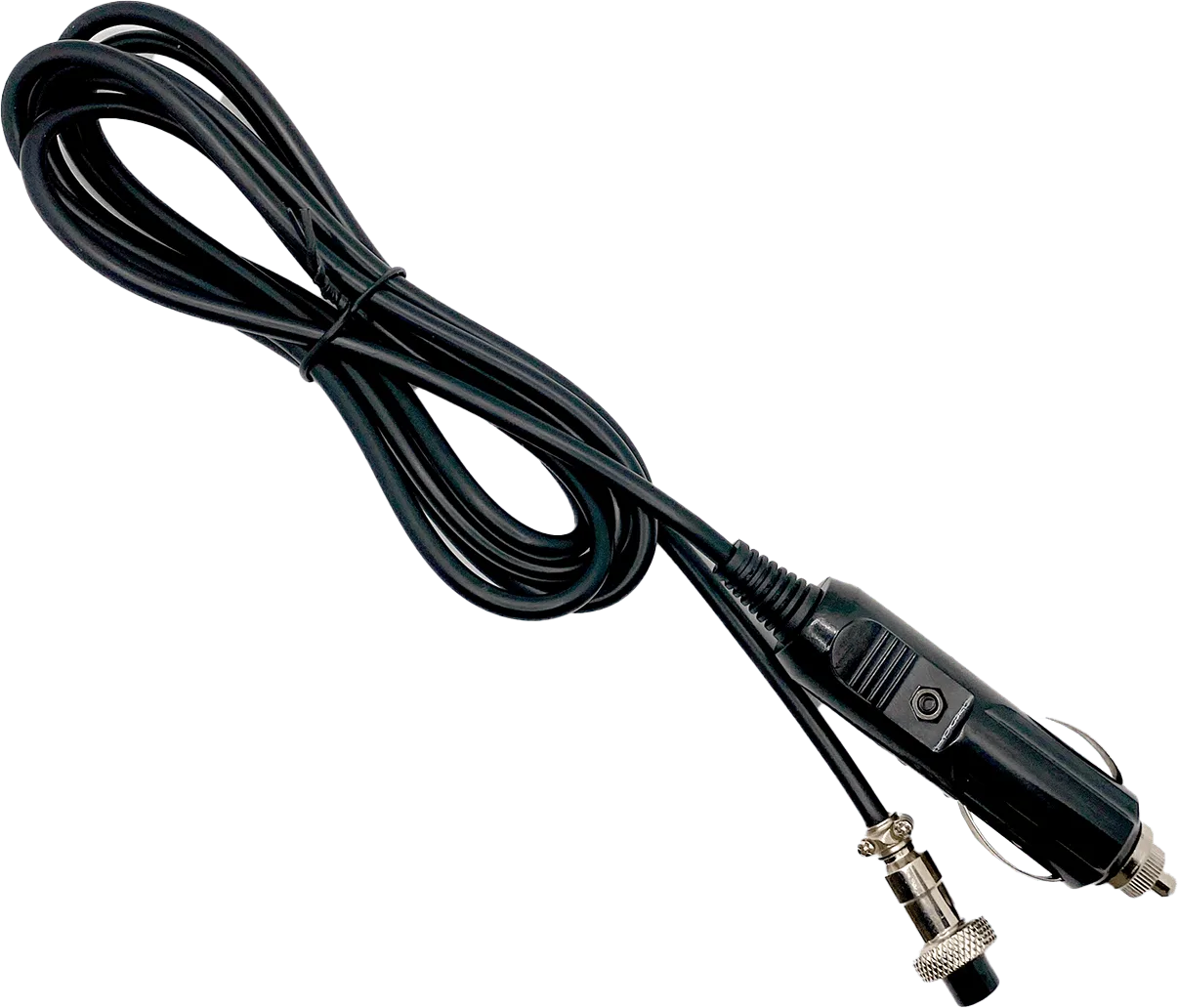
Cigarette Lighter Adapter to GX12
-
Cigarette Lighter Adapter to GX12: The cable is 1.8m / 6 feet long and has a GX12 jack. The length gives you flexibility in positioning your power source, and the GX12 connector matches the mount's input.
Confirmed Mount Compatibility for the GX12 Adapter
The Cigarette Lighter Adapter to GX12 is compatible with the following mounts as listed:
- Pegasus Astro NYX-101: Compatible
- Skywatcher AZ-EQ5: Compatible
- Skywatcher AZ-EQ6 Pro: Compatible
- Skywatcher EQ6-R Pro: Compatible
- Skywatcher EQ6-R: Compatible
- Skywatcher EQ8–RH: Compatible
- Skywatcher EQ8-R: Compatible
What About Paramount Mounts and Locking Power Cables?
The supplied information does not mention compatibility with Paramount mounts or locking power cables for GTOCP. If you are looking for a power conversion cable for a Paramount mount or a locking cable for a GTOCP, the available product records do not confirm a match. Check with Cloud Break Optics for specific options that meet those requirements.
Putting It Together: Powering Your DSLR and Mount
Here is a general sequence to connect your DSLR power cable and mount adapter. Always refer to your equipment manuals for specific instructions.
- Select the correct Eagle-compatible cable variant for your camera model.: Use the compatibility list above to choose the variant that matches your DSLR exactly.
- Insert the false battery into your camera's battery compartment.: This replaces the standard battery and connects the camera to the power cable.
- Connect the screw-lock plug to your Eagle or Eagle Core.: The screw connection prevents accidental disconnection during imaging.
- Connect the GX12 adapter to your mount's power input.: Ensure the mount is compatible as listed above, and plug the cigarette lighter end into a suitable power source.
- Verify all connections are secure before starting your session.: Check that the screw-lock is tight and the GX12 jack is fully seated.
What the Supplied Information Does Not Confirm
The product records do not provide details on supported power input ranges, cable polarity, or specific setup steps beyond those mentioned. They also do not confirm compatibility with cameras or mounts not listed. Always consult your device manuals and test connections before a critical imaging session.