Quick answer
The QHYCCD PM-AVX adapter lets you attach a QHY PoleMaster electronic polar scope to a Celestron AVX or CG5 mount. Install it once, then polar align in minutes without looking through an eyepiece.
Why use an electronic polar scope?
Traditional polar alignment requires bending down to look through a small eyepiece, which is uncomfortable and error-prone. The QHY PoleMaster replaces that with a camera-based system that shows the sky on a laptop or tablet. The PM-AVX adapter bridges the physical gap between the PoleMaster and the mount's polar axis housing.
One trade-off: the PM-AVX adapter only works with Celestron AVX, CG5, and Meade LXD55 mounts. If you own a different mount, you need a different adapter variant.
Installation steps
- Remove the polar scope cover: Unscrew the existing polar scope cap or cover from the mount's RA axis housing. On the AVX, this is a threaded plastic cap. Set it aside. Checkpoint: if the cap is stuck, use a rubber strap wrench — never metal pliers that could scratch the housing.
- Thread the PM-AVX adapter onto the mount: Screw the adapter into the same threaded hole where the polar scope cap was. Hand-tighten only; overtightening can strip the threads or deform the adapter. Common mistake: cross-threading. Start turning counterclockwise until you feel the threads drop in, then turn clockwise.
- Attach the QHY PoleMaster camera: Slide the PoleMaster onto the adapter's dovetail rail and tighten the thumbscrew. Do not force it — the fit should be snug but not tight enough to bind the camera body. Checkpoint: confirm the camera faces the same direction as the mount's polar axis. If the camera is rotated 180 degrees, the software will show a flipped view.
- Connect and calibrate in software: Plug the PoleMaster USB cable into your computer, launch the PoleMaster software, and follow the on-screen calibration steps. The adapter does not affect calibration — it only provides a stable mounting point. Common mistake: leaving the mount powered off during calibration. The mount must be tracking at sidereal rate for the software to measure drift correctly.
Product facts
-
QHYCCD PoleMaster Adapter for Celestron AVX or CG5 Mounts - PM-AVX: This adapter fits Celestron Advanced VX, classic CG5, and Meade LXD55 mounts. It ensures a snug, wobble-free connection so the PoleMaster camera stays aligned with the mount's polar axis.
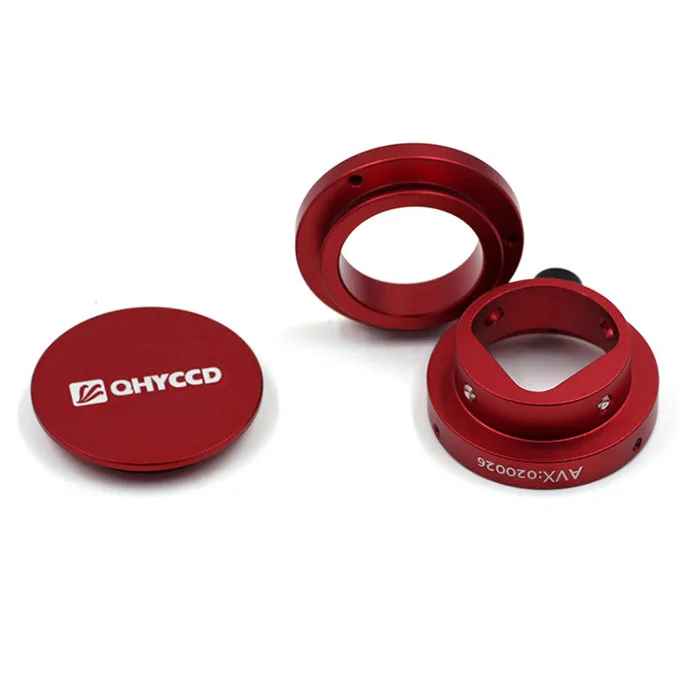
QHYCCD PoleMaster Adapter for Celestron AVX or CG5 Mounts - PM-AVX