Start with the right surface
The RAM EZ-Roll'r iPad mini 1-3 suction cup mount (RAM-B-166-AP14U) is designed to hold on glass and non-porous plastic surfaces, including RAM adhesive disks. Before you mount it, confirm your intended spot is smooth, clean, and non-porous. Textured dashboards, fabric, and porous materials are not supported by the supplied information.
This mount is model-specific for the Apple iPad mini 1-3. If you have a different iPad mini generation or another tablet, check compatibility before ordering.
What the mount includes
-
RAM® EZ-Roll'r™ for iPad mini 1-3 with RAM® Twist-Lock™ Suction Cup: The RAM-B-166-AP14U consists of a 3.3" diameter suction cup twist lock base, double socket arm, round base adapter, and EZ-Roll'r model-specific cradle for the Apple iPad mini. Knowing the components helps you plan the mounting sequence and confirm you have all parts before installation.
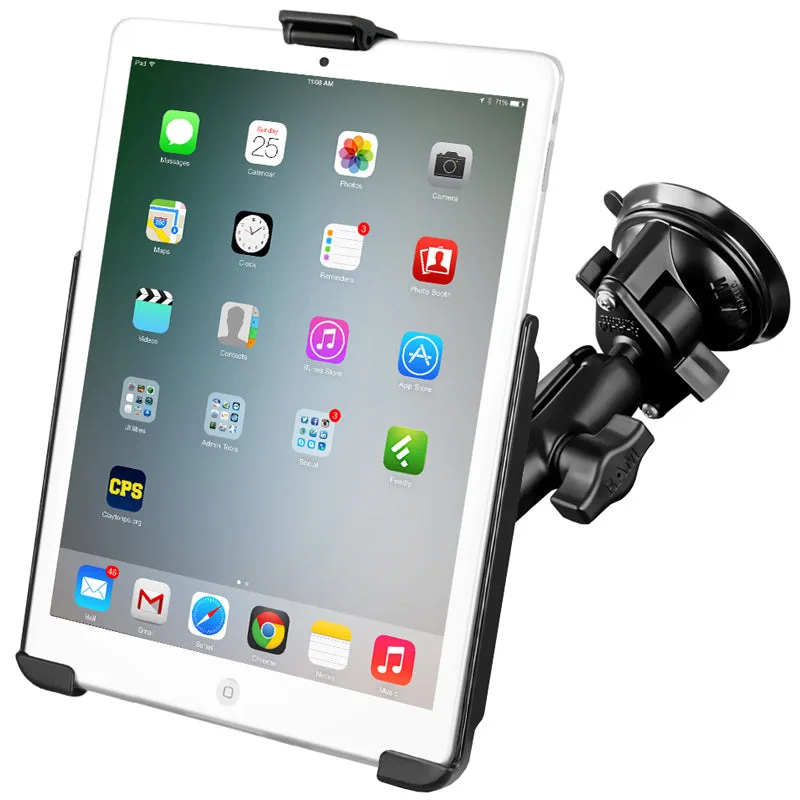
RAM® EZ-Roll'r™ for iPad mini 1-3 with RAM® Twist-Lock™ Suction Cup
-
RAM® EZ-Roll'r™ for iPad mini 1-3 with RAM® Twist-Lock™ Suction Cup: The suction cup base is designed to have a strong hold on glass and non-porous plastic surfaces, including RAM adhesive disks. This defines where the mount can be used and helps you avoid surfaces that may not hold securely.
Mounting sequence for a windshield or glass surface
The supplied information does not include a step-by-step installation manual. The following sequence is a practical approach based on the product's components and intended use. Always follow any instructions included with your mount.
- Clean the mounting surface: Wipe the glass or non-porous plastic with a clean, dry cloth to remove dust and oil. A clean surface helps the suction cup achieve a strong hold.
- Attach the Twist-Lock suction cup base: Press the 3.3" diameter suction cup firmly against the surface. Turn the Twist-Lock collar to engage the suction. The base is designed for glass and non-porous plastic, including RAM adhesive disks.
- Connect the double socket arm: The mount uses a RAM 1" diameter patented rubber ball and socket system with adjustment points at both ends of the double socket arm. Attach the arm to the suction cup base and tighten the adjustment knob when you have the desired angle.
- Attach the round base adapter and cradle: Connect the round base adapter to the other end of the arm, then attach the EZ-Roll'r cradle. The roller design allows for smooth placement and removal of the iPad while keeping it secure while on the go.
- Insert the iPad mini: Slide your iPad mini 1-3 into the EZ-Roll'r cradle. The roller design is intended to hold the tablet securely during use.
Adjusting for a comfortable view
The double socket arm has adjustment points at both ends, allowing for almost infinite adjustment and perfect viewing angles. Loosen the knob, reposition the arm and cradle, then tighten the knob to lock the angle. Avoid over-tightening; hand-tight is sufficient.
Checkpoints before you drive
- Suction cup seal: Confirm the Twist-Lock collar is fully engaged and the suction cup is flat against the surface. If the mount feels loose, re-clean the surface and reattach.
- Arm and cradle security: Check that the double socket arm and round base adapter are firmly connected and the adjustment knob is tight.
- iPad mini fit: Ensure the iPad mini 1-3 is fully seated in the EZ-Roll'r cradle and the roller arms are holding it securely.
- Surface compatibility: Verify the mounting surface is glass or non-porous plastic. If you are using a RAM adhesive disk, confirm it is applied according to the disk's instructions.
What the supplied information does not cover
The supplied product record does not include care instructions, safety warnings, or detailed operating steps beyond the component description. It also does not specify supported iPad mini generations beyond the 1-3 designation, or confirm compatibility with tablets other than the Apple iPad mini. For those details, consult the documentation included with your mount or contact the manufacturer.