Quick Answer
For a Zebra TC501, choose a RAM powered dock with pogo pins for reliable charging and data sync. These docks secure your device in vehicles or offices, and pogo pins eliminate cable plugging. RAM Mounts offers vehicle-specific mounts and locking options to keep your TC501 safe and powered.
If you use a Zebra TC501 in your daily operations, you know how important it is to keep it charged and within reach. RAM Mounts provides docking solutions that go beyond simple phone holders, offering secure and powered mounts for rugged handhelds like the TC501.
This FAQ answers common questions about compatibility, installation, and charging so you can make an informed choice. We focus on practical details, not marketing fluff.
What RAM Mounts Work with the Zebra TC501?
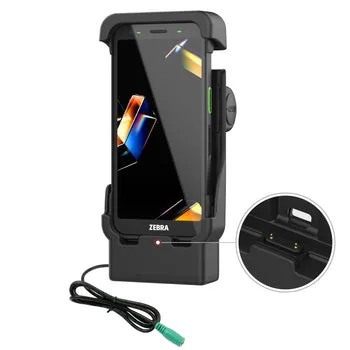
RAM Mounts offers powered docks designed for specific Zebra models. While the TC501 is a popular handheld, not all docks are universal. Look for docks that mention Zebra TC501 compatibility or those with pogo pins, which are common for these devices. The RAM Powered Dock with Pogo Pins for Zebra TC701 is a similar model, and understanding its features helps you know what to expect.
Always check the product specifications for your exact TC501 model. If a dock lists compatibility with the TC701 but not the TC501, contact the manufacturer or retailer to confirm. Using an incompatible dock can damage your device or fail to charge it properly.
- Verify the exact model number before purchasing a dock.
- Pogo pins provide a secure connection without fiddly cables.
- Consider locking docks for extra security in vehicles.
How Do I Install a RAM Dock for the Zebra TC501?
Installation typically involves mounting the dock to a RAM base or arm, then securing the base to your vehicle. RAM docks often come with a standard AMPS hole pattern, making them compatible with various RAM mounting arms. You'll need a screwdriver or hex key for most installations.
For vehicle mounts, choose a location that doesn't obstruct airbags or your view. The RAM Vent-Temp with Front Dock Connection is an option for rectangular vents, but for rugged handhelds, a more secure mount on a flat surface is often better. Follow the included instructions and use the provided hardware for a stable setup.
- Use the correct RAM ball or arm size for your dock.
- Ensure the dock is tightly secured to prevent vibration.
- Route cables safely away from moving parts.
How Do I Charge My Zebra TC501 with a RAM Dock?
Charging with a RAM powered dock is straightforward: place the device on the dock, and the pogo pins make contact. This eliminates the need to plug in a cable each time, which saves time and reduces wear on your device's charging port. The dock provides consistent power, so your TC501 stays charged during use.
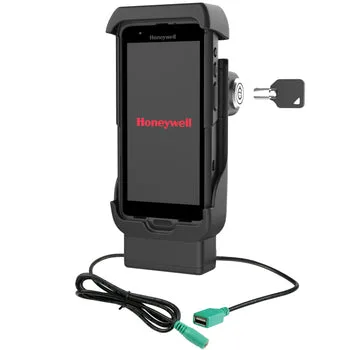
Some docks, like the RAM Locking Powered Dock, add a locking mechanism to hold the device securely. This is especially useful in vehicles, where bumps and vibrations could otherwise dislodge the device. For data sync, look for docks with USB connections, though not all powered docks support data transfer.
- Use the original power adapter for best charging performance.
- Keep the pogo pins clean to ensure a reliable connection.
- Check if your dock supports data sync if you need it.
What About Vehicle Mounts for the Zebra TC501?
RAM Mounts offers a variety of vehicle-specific mounts, including for trucks like the Chevy Silverado. While the RAM Laptop Mount for '19-26 Chevy Silverado is designed for laptops, similar mounting solutions exist for handheld devices. The key is to choose a mount that provides a stable base and keeps your device within easy reach.
For a rugged device like the TC501, a powered dock with a locking feature is often the best choice. This ensures your device stays put and charged, whether you're driving or working in the field. Consider the mounting location and how you'll access the device while driving.
- Pick a mount that allows easy access without distracting you.
- Ensure the mount doesn't interfere with vehicle controls.
- Test the mount with your device before finalizing installation.
FAQ Summary
Compatibility
Check the exact model number for your Zebra TC501. Docks for other Zebra models may not fit. Always confirm compatibility before buying.
Installation
Mount the dock to a RAM arm or base, then secure it to your vehicle. Use the provided hardware. A secure installation prevents vibration and device damage.
Charging
Use pogo pin docks for quick, cable-free charging. Keep pins clean and use the original adapter. Reliable charging extends your device's battery life.
Vehicle Mounting
Choose a mount that keeps the device accessible without obstructing your view or controls. Safety first: position the mount for easy, distraction-free use.
Product Facts and Why They Matter
- RAM® Powered Dock with Pogo Pins for Zebra TC701: The RAM® Powered Dock with Pogo Pins is designed specifically for the Zebra TC701 handheld computer, providing a secure and convenient charging and data sync solution. This powered dock integrates pogo pin connectivity, allowing for quick and reliable contact without the need for cable plugging. Pogo pin connectivity means you can quickly dock and undock your device without fumbling with cables, which is ideal for high-use environments. Even though this dock is for the TC701, it shows the design philosophy that applies to TC501-compatible docks.
- RAM® Locking Powered Dock + USB-A for Honeywell CT40/45/47: The RAM® Locking Powered Dock + USB-A for Honeywell CT40/45/47 provides a secure and convenient charging solution for your compatible Honeywell device. Locking design helps hold your Honeywell CT40, CT45, or CT47 device firmly in place. Locking powered docks are a great option if you need to secure your device in a vehicle or public area. While this dock is for Honeywell devices, the locking feature is a valuable consideration for any rugged handheld, including the Zebra TC501.
Finding the right RAM mount for your Zebra TC501 involves checking compatibility, choosing a secure mounting option, and ensuring reliable charging. Whether you need a simple dock or a locking vehicle mount, prioritize features that match your daily use. For the latest options, browse RAM Mounts' selection of powered docks and vehicle mounts.