Quick Answer
The RAM Powered Dock with Pogo Pins for Zebra TC701 is a dedicated charging and data sync station that uses spring-loaded pins instead of cables. Setup takes about a minute, and the locking variant adds security for vehicles or high-traffic areas. Below are the most common questions about installation, compatibility, and everyday use.
What the RAM Powered Dock Does for the Zebra TC701
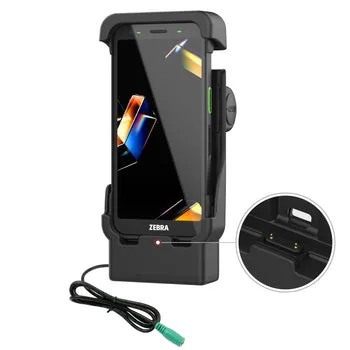
The dock is built specifically for the Zebra TC701 handheld computer. It uses pogo pins to make electrical contact with the device, so you don't have to plug in a cable every time. That saves wear on the device's charging port and makes drop-in charging faster. The dock also supports data sync, which is useful if you upload inventory or route updates at the end of a shift.
Because the dock is powered, it keeps the TC701 battery topped off whenever the device is seated. That means fewer interruptions during the workday. The standard model works well on a desk or counter, while the locking version adds a latch that holds the device in place—important if you mount the dock in a truck or warehouse cart.
Frequently Asked Questions
Is the RAM Powered Dock compatible with any Zebra TC701 model?
Yes. The dock is designed specifically for the Zebra TC701 handheld. It fits the standard TC701 body and the pogo pins align with the contacts on the device. It does not work with other Zebra models or with TC701 units that have a thick protective case installed. Check that your TC701 does not have a bulky case before buying.
How do I set up the dock in a vehicle?
Mount the dock to a RAM ball base or flat surface using the included hardware. Connect the power cable to a 12V or 24V vehicle power source (the dock uses a standard barrel connector). Run the cable so it doesn't interfere with driving controls. Seat the TC701 until you hear or feel the pogo pins engage. Use a RAM mount base for a secure vehicle install.
Does the locking dock work with the standard RAM mount system?
Yes. The Locking Powered Dock has the same mounting pattern as the standard powered dock. It attaches to any RAM ball base or flat mount plate. The only difference is the built-in latch that holds the TC701 in place. You can swap from standard to locking without changing your existing mount.
Can I sync data while charging?
Yes. The pogo pins carry both power and data. Connect the dock to a computer via USB, and your TC701 will appear as a connected device when seated. This is useful for transferring scan logs or updating software without removing the battery. One dock handles both charging and sync, reducing cable clutter.
Why isn't my TC701 charging on the dock?
First, check that the dock is receiving power (look for an LED indicator if present). Clean the pogo pins and the TC701 contacts with a dry cloth—dirt or moisture can interrupt the connection. Make sure the device is fully seated and not tilted. If the problem persists, inspect the power cable for damage. Most charging issues are caused by dirty contacts or an unseated device.
Product Facts at a Glance
- RAM® Powered Dock with Pogo Pins for Zebra TC701: The RAM® Powered Dock with Pogo Pins is designed specifically for the Zebra TC701 handheld computer, providing a secure and convenient charging and data sync solution. This powered dock integrates pogo pin connectivity, allowing for quick and reliable contact without the need for cable plugging. You never have to fiddle with a cable or worry about a worn-out charging port. Drop the TC701 onto the dock and it starts charging immediately.
- RAM® Locking Powered Dock with Pogo Pins for Zebra TC701: The RAM® Locking Powered Dock with Pogo Pins is designed specifically for the Zebra TC701 handheld computer. This dock provides a secure and convenient charging solution, featuring a locking mechanism to keep your device firmly in place during use or transport. If the dock is installed in a moving vehicle or a busy workstation, the lock prevents the TC701 from bouncing loose or being accidentally knocked off. That extra security is worth the price difference for mobile environments.