Quick answer
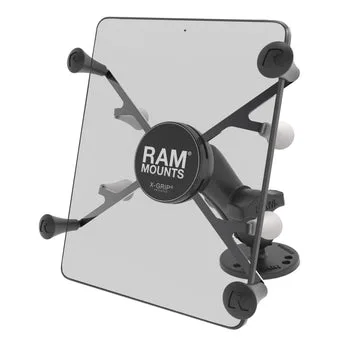
The RAM X-Grip Universal Drill-Down Mount for 7"-8" Tablets is a permanent-mount solution: you drill a base into a flat surface, attach the socket arm, then seat the tablet in the spring-loaded X-Grip cradle. Measure your tablet's screen size first, because the X-Grip cradle is sized for 7" to 8" screens and will not securely hold larger devices. If your tablet is outside that range, choose a holder built for its size instead of forcing the fit.
Before you drill: confirm the tablet and surface
The X-Grip cradle is a spring-loaded holder, not a form-fitting dock. It grips the tablet's edges, so it works with many 7"-8" tablets that have different bezel shapes. The tradeoff is that a very thick case or a tablet with unusually curved edges can reduce how much of the cradle actually contacts the device. If you use a rugged case, test the tablet in the holder before drilling anything.
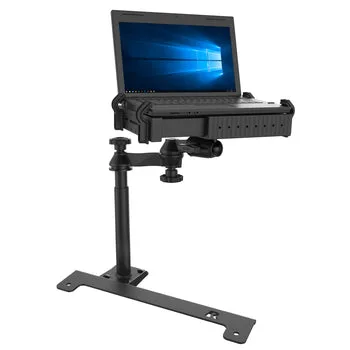
The drill-down base needs a flat, stable surface with enough material to accept screws. Thin plastic dashboards, hollow panels, and curved surfaces are poor candidates because the base can flex or pull loose. For those locations, a no-drill or vehicle-specific base is the better choice. Check underneath the surface too, so you do not drill into wiring, fuel lines, or airbag components.
What the 7-8 inch X-Grip mount includes and how it adjusts
The RAM X-Grip Universal Drill-Down Mount for 7"-8" Tablets combines a drill-down base, a socket arm, and the X-Grip cradle. The socket arm lets you set the viewing angle and then tighten it in place. Because the arm is a friction joint, you position the tablet first and tighten second; over-tightening does not add holding power and can stress the joint.
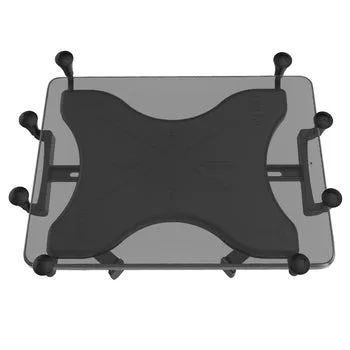
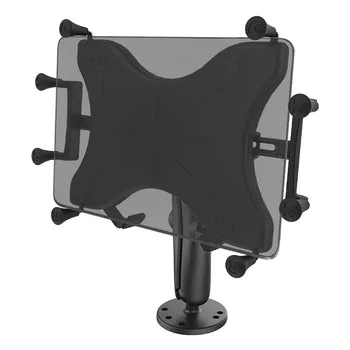
The X-Grip cradle itself is spring-loaded, so you pull the arms apart, seat the tablet, and let the springs close around it. Ports and buttons generally remain accessible because the grip contacts the edges rather than covering the face. If you need a different screen size, RAM offers the same drill-down approach for 9"-11" tablets and a 12"-13" holder, so match the holder to the device instead of stretching the 7"-8" version.
Tools and prep that prevent a crooked install
Gather a drill, drill bits matched to your screws and surface material, a pencil, a center punch or awl, a level, and the mounting hardware. Mark the base position with the tablet and arm temporarily assembled so you can confirm the screen will not block controls, vents, or your view of the road. A center punch keeps the bit from wandering on smooth plastic or metal.
If you are mounting to a vertical surface, hold the base in place and check it with a level before marking. A base that is a few degrees off is not a structural problem, but it limits how much of the arm's adjustment range you can use to correct the angle later.
Installation steps
- Measure the tablet screen: Confirm the screen measures 7" to 8" diagonally. The X-Grip cradle is sized for that range, so a 9" or larger tablet needs a different holder. Checkpoint: if the tablet is outside 7"-8", stop and pick the size-matched mount.
- Choose and inspect the mounting surface: Pick a flat, solid surface that can take screws, and look behind it for wiring or obstructions. Avoid thin or curved panels that will flex. Mistake to avoid: drilling into a hollow dashboard and having the base pull loose later.
- Test-fit the tablet in the X-Grip cradle: Pull the spring arms apart, seat the tablet, and release. Confirm the grip contacts the edges and that ports and buttons remain reachable. Test with your case on if you plan to use one. Checkpoint: if the cradle feels loose or covers a needed port, adjust the tablet position before mounting.
- Mark and drill the base holes: Assemble the base, arm, and cradle temporarily, position the assembly, and mark the screw holes. Use a center punch, then drill pilot holes sized to your hardware and surface. Mistake to avoid: drilling before checking that the arm can reach a usable viewing angle.
- Fasten the drill-down base: Attach the base with the supplied or appropriate hardware and tighten it evenly. The base should sit flat with no rocking. Checkpoint: a base that rocks means the surface or hardware is wrong; fix it before adding the arm.
- Attach the arm and set the angle: Connect the socket arm to the base and cradle, position the tablet at the desired angle, then tighten the joint. Re-check that the screen does not block controls or your view. Mistake to avoid: over-tightening the joint, which does not improve hold and can stress the arm.
- Load the tablet and do a road or use test: Seat the tablet in the X-Grip, then gently push and pull to confirm it stays put. If you are in a vehicle, test at low speed on a rough surface before relying on it. Next step: if the tablet shifts, re-check the cradle fit and the arm tension before driving.
Product facts
- RAM® X-Grip® Universal Drill-Down Mount for 7"-8" Tablets: The RAM X-Grip Universal Drill-Down Mount securely holds 7"-8" tablets using a spring-loaded X-Grip design and a drill-down base for permanent installation. This is the correct holder for a fixed 7"-8" tablet setup; the permanent base means you commit to a location, so choose it carefully.
- RAM® X-Grip® Drill-Down Double Ball Mount for 9"-11" Tablets: The RAM X-Grip Drill-Down Double Ball Mount fits 9"-11" tablets and adds a double ball socket system for enhanced adjustability. If your tablet is 9"-11", this is the size-matched alternative; the extra ball joint gives more positioning range than a single-arm setup.
- RAM® X-Grip® Universal Holder for 12"-13" Tablets: The RAM X-Grip Universal Holder is designed for 12"-13" tablets and allows access to ports and buttons. For larger tablets, the 12"-13" holder is the fit-correct choice; using the 7"-8" cradle on a bigger device would not be secure.