Why the mirror is a different kind of mounting spot
A rearview mirror mount sits in the one part of the cabin you use constantly to see behind you. That makes it convenient, but it also means placement matters more than it does on a vent or dash mount. Before you clip anything on, decide where the phone can sit without covering the mirror glass or drifting into your forward view.
The Rearview Mirror Clip on Phone Mount is designed to snap onto the back of the mirror and hold your phone at a consistent height, keeping the dash clear. The supplied information confirms it fits most rearview mirrors and fits all smartphones, with adjustable ball joints and grips plus 360-degree rotation. Those are the levers you have for getting a workable position.
A checkpoint-based install sequence
Work through these in order, and stop to reposition if any checkpoint fails rather than forcing the mount.
- Check the mirror housing first: The mount is stated to fit most rearview mirrors, not all of them. Look at the back of your mirror housing before clipping: if the shape or thickness gives the clip nothing secure to hold, this mount is not the right fit for your car.
- Clip it on before adding the phone: Attach the mount to the back of the mirror and give it a gentle tug. The supplied information does not include a tightening procedure or torque guidance, so treat a firm, stable hold with no rocking as your pass condition.
- Set rotation and angle with the phone off: Use the ball joints and 360-degree rotation to bring the cradle to a comfortable height and angle before you seat the phone. Adjusting an empty mount is easier than fighting a loaded one.
- Seat the phone and check the grips: The adjustable grips are meant to hold the phone securely. Confirm the phone sits fully seated in the cradle and that the grips contact the phone's sides rather than pressing on buttons.
- Do a stationary sightline check: From your normal driving position, confirm the mirror glass is still usable and the phone does not sit in your forward view. If either is compromised, rotate or reposition the mount before you drive.
What the mount confirms about fit and adjustment
-
Rearview Mirror Clip on Phone Mount: Snaps onto the back of the rearview mirror to hold the phone at a perfect height without dash clutter This is the core placement benefit: your phone rides at mirror height and your dash stays clear.
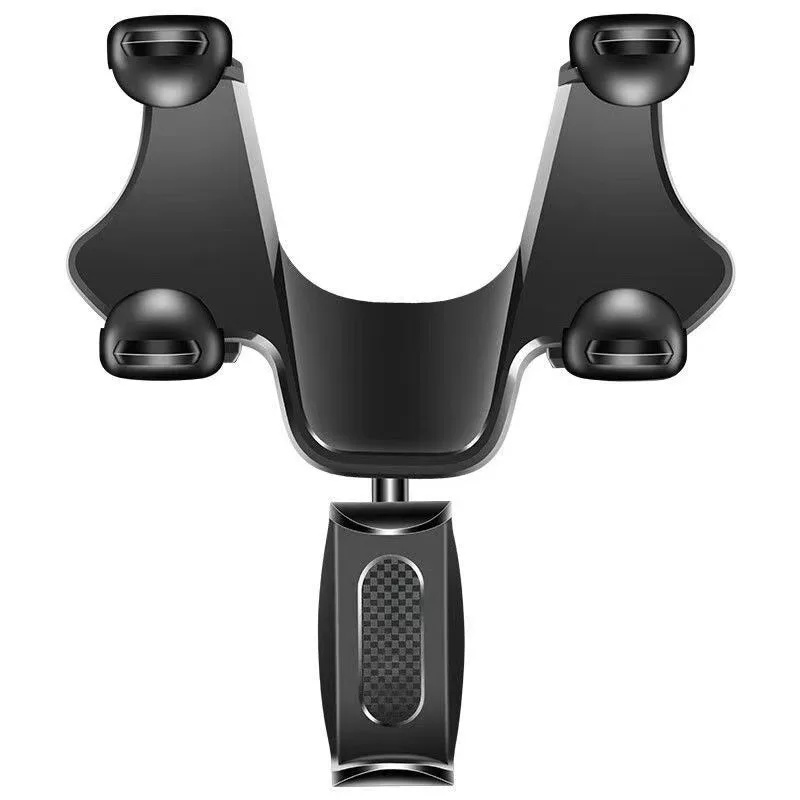
Rearview Mirror Clip on Phone Mount
-
Rearview Mirror Clip on Phone Mount: Fits all smartphones You do not need to match a phone size or model to this mount based on the supplied information.
-
Rearview Mirror Clip on Phone Mount: Fits most rearview mirrors Note the word most. Your mirror housing is the one compatibility variable you should verify physically.
-
Rearview Mirror Clip on Phone Mount: Adjustable ball joints and grips with 360-degree rotation These are the adjustments that let you tune height, angle, and portrait or landscape viewing.
Portrait or landscape: pick based on the drive, not habit
The mount supports both portrait and landscape viewing, and 360-degree rotation means switching between them is quick. Portrait generally suits navigation, where a taller map view shows more of the road ahead. Landscape can work better for a wide map or a media screen.
Whichever you choose, re-check the sightline after rotating. A phone that clears the mirror in portrait can swing wider in landscape and start to intrude on your view. Rotate, then look, every time.
Practical ways to calm vibration
The supplied information does not include anti-vibration specifications, so treat these as sensible habits rather than manufacturer instructions.
- Reduce leverage: A phone held far out from the mirror has more room to swing. Use the ball joints to keep the cradle close to the mirror housing rather than extended outward.
- Re-seat the phone: A phone that is not fully seated in the grips can rattle independently of the mount. Push it home and confirm the grips are making even contact.
- Recheck the clip: If the mount itself rocks on the mirror, vibration will feel worse. Re-seat the clip and confirm the hold before blaming the road.
- Match the viewing mode to the road: A loose grip is more noticeable in landscape because the phone's weight shifts sideways. If vibration is distracting, try portrait and compare.
What the supplied information leaves open
The catalog confirms the clip-on design, all-smartphone fit, most-mirror fit, adjustable ball joints and grips, and 360-degree rotation. It does not include a weight limit, a maximum phone thickness, a cleaning or care routine, or specific installation steps beyond snapping the mount onto the mirror.
That means two things for your setup. First, verify the physical fit on your own mirror before relying on the mount. Second, if your phone is unusually heavy or your mirror housing is unusually shaped, test the hold carefully at a standstill before you trust it on the road. The mount is priced at USD 25.59 against a catalog comparison price of USD 39.99, and it is a straightforward way to keep your phone at mirror height without adding dash clutter, provided the clip suits your mirror.