Quick answer
Buy the Retro-bit BIG6 if you want one wireless pad that mimics the SEGA Genesis six-button layout for original hardware, SEGA Mini, Switch, PC, or Mac, and you value a familiar d-pad over modern analog sticks. Skip it if you need analog input, rumble, or a controller built for competitive fighting-game precision.
Why the BIG6 exists: a six-button pad with modern buttons
The BIG6 is inspired by the original SEGA Genesis Control Pad but adds the six-button layout of the Arcade Pad plus shoulder and menu buttons. That combination matters if you play Genesis-era fighters, beat-'em-ups, or arcade collections where the extra face buttons are part of the design, but you also want to pause or navigate menus without reaching for another device.
The trade-off is that the BIG6 keeps a digital d-pad and face-button focus. It is not a modern dual-analog gamepad, so games that rely on stick movement or pressure-sensitive triggers will feel like a compromise. Check the specific game's control requirements before buying.
Wireless receivers: one pad, two connection paths
The BIG6 ships with receivers for gaming on a Genesis console or USB-enabled devices. In practice, that means you can use the same pad wirelessly on original SEGA hardware and on a Switch, PC, or Mac through the USB receiver. The catalog does not list Bluetooth, so treat the included receiver as the intended wireless method rather than assuming you can pair it directly to every device.
For Switch, PC, and Mac, the USB receiver path is the simplest rule: connect the receiver, turn on the pad, and confirm the system recognizes it as a controller. If your setup has limited USB ports, plan for an adapter or hub. The catalog also does not specify battery life or charging time, so keep a spare cable or batteries on hand until you know your own usage pattern.
Where the BIG6 fits best: original hardware and SEGA Mini
The BIG6 is most compelling when you already play SEGA Genesis or Mega Drive games and want a wireless pad that preserves the six-button layout. It also suits SEGA Mini owners who want a familiar controller without being tethered to the console. Because the catalog lists receivers for Genesis consoles and USB devices, the BIG6 is a reasonable single-pad solution across those two worlds.
The exception is if you mainly play modern 3D games on Switch or PC. The BIG6 has no analog sticks, so camera control and movement in those games will be awkward. In that case, a modern gamepad is the better primary controller, and the BIG6 becomes a secondary pad for retro titles.
Switch, PC, and Mac: what to check before you buy
On Switch, the BIG6's extra shoulder and menu buttons help with system navigation, but you should confirm that the games you play support a six-button layout or allow button remapping. On PC and Mac, the USB receiver is the most direct route, and the pad should appear as a standard controller. The catalog does not promise XInput, DirectInput, or macOS driver support, so test your intended games and launchers early.
If you need wireless on a device without USB-A ports, such as some Mac laptops, budget for a USB-C adapter. Also check whether your Switch dock or PC case has enough clearance for the receiver. These are small setup costs, but they decide whether the BIG6 is truly plug-and-play for you.
Decision rules for buying the BIG6
- You play original Genesis or Mega Drive games: Choose the BIG6 if you want wireless play on original hardware and the six-button layout matches the games you own. Confirm your console's controller port and receiver pairing before relying on it. Test the receiver on your console before a long session.
- You want one pad for SEGA Mini and Switch: Buy the BIG6 if you are comfortable switching the USB receiver between devices. It is a practical shared pad for retro collections, but it is not a direct Bluetooth controller, so each device needs the receiver connected. Keep the receiver with the device you use most.
- You mainly play modern 3D games on PC or Mac: Do not buy the BIG6 as your only controller. Its digital d-pad and face-button design suits retro and arcade titles, while modern games often expect analog sticks and triggers. Choose a dual-analog gamepad instead.
- You need competitive fighting-game precision: Treat the BIG6 as a casual retro pad, not a tournament-grade fight pad. The catalog does not list replaceable parts, input latency figures, or a competitive pedigree, so players who need those guarantees should look at dedicated fight sticks or pads with published specifications. Check return policy if you plan to test it for competitive play.
- You are unsure about battery and charging: The catalog does not state battery life or charging details. If you play long sessions, plan to use the pad near a power source or keep spare batteries if your unit requires them. Do not assume a specific runtime. Buy from a seller with a clear return window in case runtime disappoints.
Product facts
-
Retro-bit BIG6 2.4G Wireless Arcade Pad for SEGA Mega Drive / Mini, Switch PC / Mac - Black: Comes with receivers for gaming on a Genesis console or USB-enabled devices. This is the core reason to choose the BIG6 over a wired pad: one controller can serve original SEGA hardware and modern USB devices without a separate adapter for each.
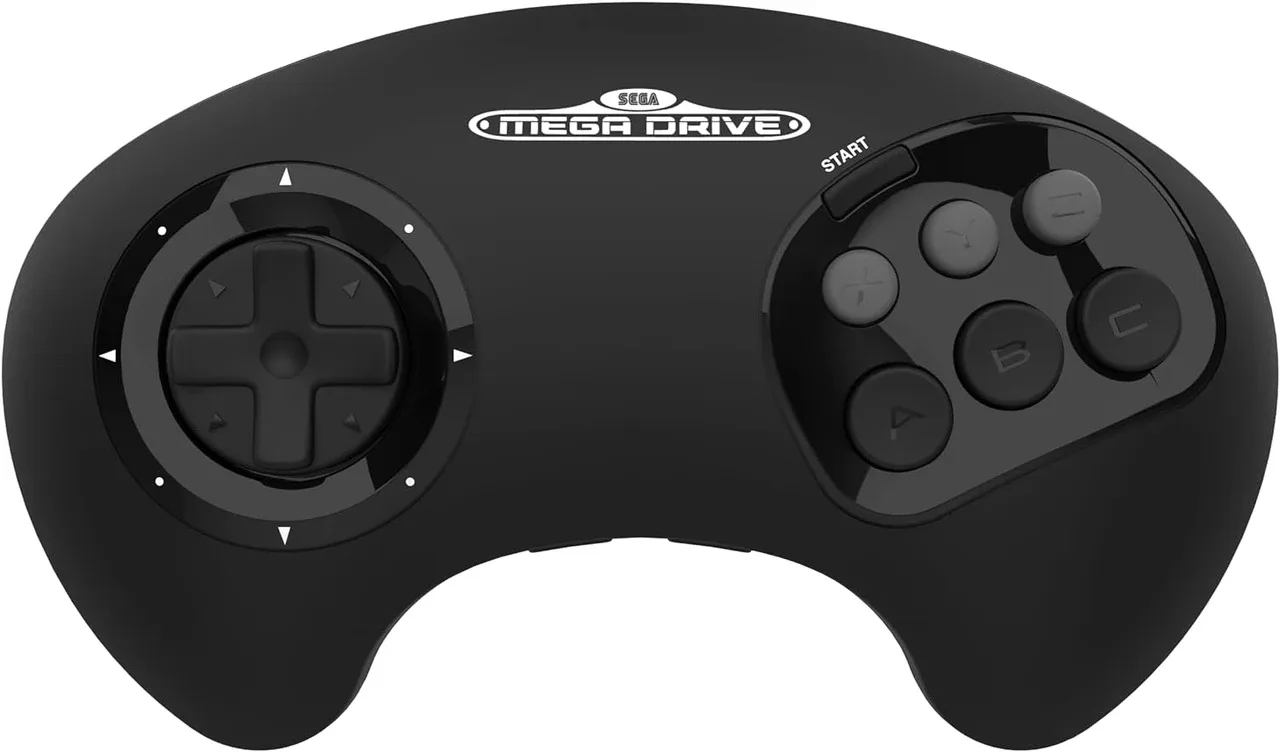
Retro-bit BIG6 2.4G Wireless Arcade Pad for SEGA Mega Drive / Mini, Switch PC / Mac - Black
Who should buy the Retro-bit BIG6?
Best for
- SEGA Genesis or Mega Drive owners who want a wireless six-button pad
- Players who split time between a SEGA Mini and a Switch, PC, or Mac
- Retro and arcade game fans who prefer a d-pad over analog sticks
Not for
- Players who need analog sticks for modern 3D games
- Competitive fighting-game players who require published latency or tournament-grade parts
- Anyone who expects direct Bluetooth pairing without the included receiver