What to expect from the RG35XX H
The Anbernic RG35XX H is a compact horizontal handheld with a 3.5-inch IPS full-view, OCA fully laminated 640×480 screen. It runs Linux, so you are not dealing with a full desktop OS—just a game-focused interface. The H700 quad-core CPU and dual-core GPU handle emulation, and the 1GB LPDDR4 RAM is enough for the supported systems.
First impressions matter: the horizontal grip feels natural for longer sessions, and the 3300mAh battery is rated for up to 8 hours. The device supports 2.4G wireless and wired controllers, Bluetooth 4.2, and HDMI output to a TV or monitor. It also has a vibration motor and high-fidelity speakers. These features make it a versatile starter handheld, but the setup is mostly about storage, controls, and charging.
Key specs that shape your setup
-
Anbernic RG35XX H Retro Portable Handheld Game Console: 3.5-inch IPS full-view, OCA fully laminated 640×480 screen The laminated screen reduces glare and improves clarity, which matters for portable play.
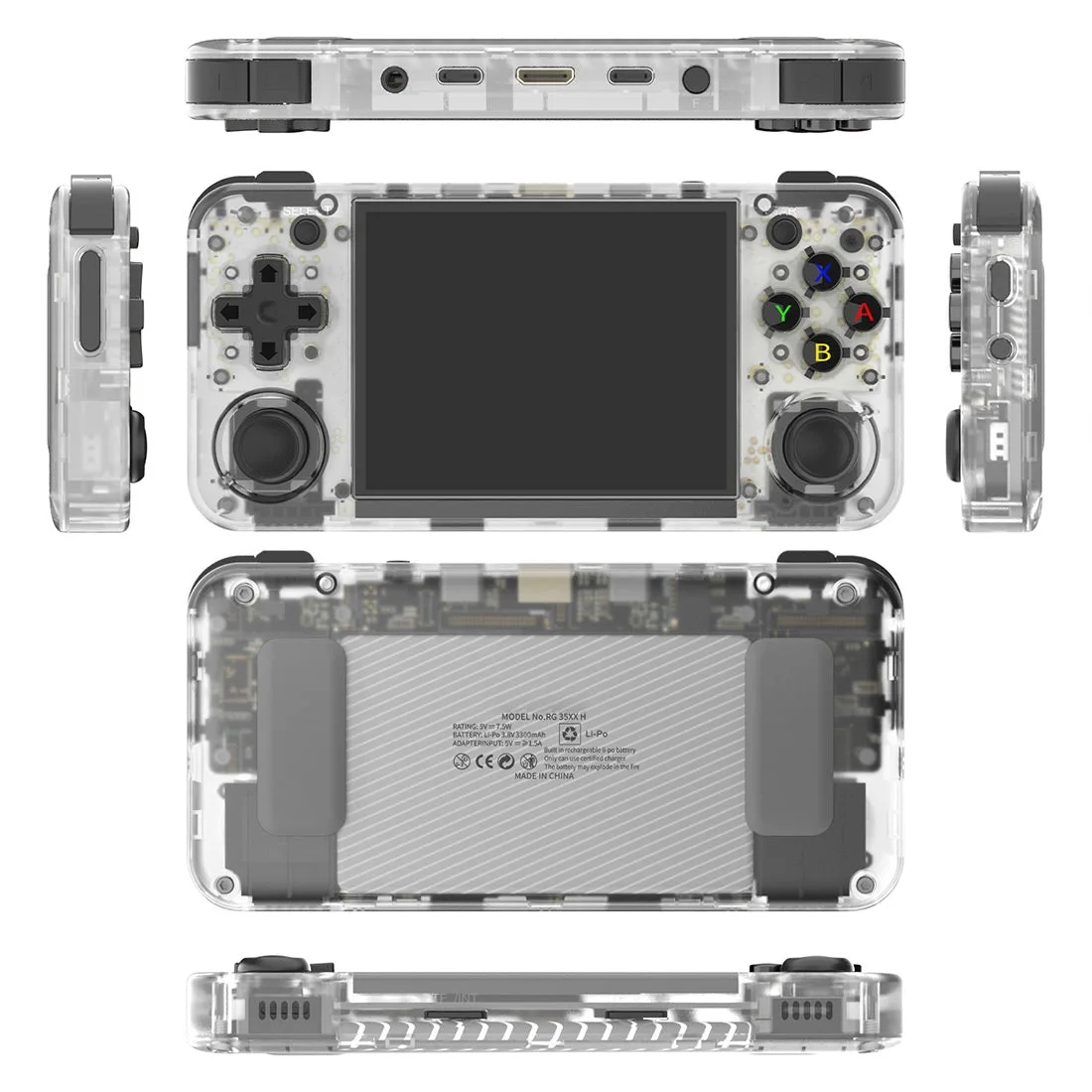
Anbernic RG35XX H Retro Portable Handheld Game Console
-
Anbernic RG35XX H Retro Portable Handheld Game Console: H700 quad-core ARM Cortex-A53 CPU at 1.5GHz with dual-core G31 MP2 GPU This hardware determines which emulators run smoothly; it is not a high-end chip, so manage expectations for demanding systems.
-
Anbernic RG35XX H Retro Portable Handheld Game Console: 1GB LPDDR4 RAM Enough for basic emulation, but not for multitasking or heavier operating systems.
-
Anbernic RG35XX H Retro Portable Handheld Game Console: 3300mAh battery, rated for 8 hours of battery life Sets a realistic expectation for playtime between charges.
-
Anbernic RG35XX H Retro Portable Handheld Game Console: Charging at 5V/1.5A, supports C2C charger Use a compatible charger to avoid slow charging or potential issues.
First boot and initial checks
When you first power on the RG35XX H, you will see the Linux-based interface. The supplied information does not include a step-by-step first-boot wizard, so we cannot confirm exact prompts. However, you can expect to set language (supported languages include Chinese, English, Japanese, Korean, and Spanish) and possibly connect to Wi-Fi. The device supports 2.4/5G Wi-Fi 802.11a/b/g/n/ac, so you can connect to most home networks.
Before diving into games, check that the screen is clean and free of smudges. The laminated display is easy to wipe with a soft cloth. Also, ensure the device is charged—the battery may be partially charged for shipping, but a full charge is recommended before extended play.
Setting up storage and games
The RG35XX H comes with a 64GB TF/MicroSD card and has dual card slots, supporting expansion up to 512GB. The available variants include 32GB+64GB and 32GB+128GB storage configurations. Here is how to approach storage:
- Understand the dual-card setup: The device has two TF card slots. Typically, one card holds the operating system and the other holds games. The supplied information does not specify which slot is which, so check the labeling or the manual (if included).
- Choose your storage variant: Options include 32GB+64GB or 32GB+128GB. The 128GB option gives more room for a larger game library. Both include a 64GB card as part of the base, but the second card size varies.
- Add games in supported formats: The console supports various emulators; users can download games in relevant formats. You will need to source your own game files, as the supplied information does not list preinstalled titles. Transfer files via a card reader or over Wi-Fi if the system supports it.
- Expand later if needed: Both slots support TF cards up to 512GB, so you can upgrade storage as your library grows.
Getting comfortable with the controls
The RG35XX H has a standard horizontal layout with a D-pad, face buttons, shoulder buttons, and start/select. The exact button mapping varies by emulator, but most systems follow a common layout. The device also includes a vibration motor for feedback in supported games.
The supplied information does not include a button map diagram, so we cannot confirm specific assignments. However, you can usually configure controls within each emulator's settings. Take a few minutes to test buttons in a simple game to ensure everything feels right. The high-fidelity speakers are loud enough for casual play, but you may want headphones for privacy.
Battery and charging tips
The 3300mAh battery is rated for up to 8 hours, but actual playtime depends on screen brightness, volume, and emulator load. Here are practical tips based on the supplied specs:
- Use a 5V/1.5A charger: The device charges at 5V/1.5A and supports C2C chargers. Avoid fast chargers that exceed these ratings unless they are compatible.
- Charge before long sessions: A full charge takes a few hours; plan ahead for road trips or flights.
- Adjust brightness and volume: Lowering screen brightness and using headphones can extend battery life.
- Close games when not playing: Leaving a game paused still drains battery; exit to the menu or power off.
Connecting to a TV or controller
The RG35XX H can output to a TV or monitor via HDMI, turning it into a makeshift console. It also supports 2.4G wireless and wired controllers, as well as Bluetooth 4.2 for compatible gamepads. This is handy for multiplayer or when you want a bigger screen. The supplied information does not specify which controllers are officially supported, so test pairing with your existing gear. Wi-Fi multiplayer and Moonlight streaming are also listed, but we cannot confirm setup steps beyond that.
Connectivity and extra features
- Anbernic RG35XX H Retro Portable Handheld Game Console: 2.4/5G Wi-Fi 802.11a/b/g/n/ac and Bluetooth 4.2 Enables wireless multiplayer, streaming, and controller connections.
- Anbernic RG35XX H Retro Portable Handheld Game Console: HDMI output to computers, TVs, monitors, projectors Lets you play on a larger screen without extra hardware.
- Anbernic RG35XX H Retro Portable Handheld Game Console: Supports 2.4G wireless and wired controllers, Bluetooth controller connection Gives you flexibility for multiplayer or preferred controllers.
- Anbernic RG35XX H Retro Portable Handheld Game Console: Game save and load functions Essential for making progress in longer games.
What the supplied information does not confirm
The catalog does not list a specific age range, safety warnings, or included accessories beyond the console and storage cards. It also does not provide a detailed button map or step-by-step setup instructions. For these details, refer to the manufacturer's documentation or the device's on-screen help. The absence of this information here is not a product limitation—it simply means we cannot confirm it from the supplied data.