Why the plate, not the razor, is your adjustment
If you already own a Rockwell Chrome Series razor, you do not need a second razor to change how it shaves. The Rockwell 1/3 Plate in Gunmetal is a replacement base plate that gives you two settings in one part: flip it one way for the R1 setting and the other way for the R3 setting. That makes it a practical way to move between a milder and a more aggressive shave without adding another handle to your shelf.
This guide covers the swap itself: checking compatibility, flipping the plate correctly, and knowing when a change is worth making. It is not a shaving technique tutorial, and it does not replace the instructions that came with your razor.
The part you are swapping in
-
Rockwell 1/3 Plate - Gunmetal: Rockwell 1/3 Plate in Gunmetal is a replacement base plate designed specifically for Rockwell Chrome Series razors. This is the first thing to confirm before you buy or swap: the plate is intended for Chrome Series razors only, not every Rockwell razor.
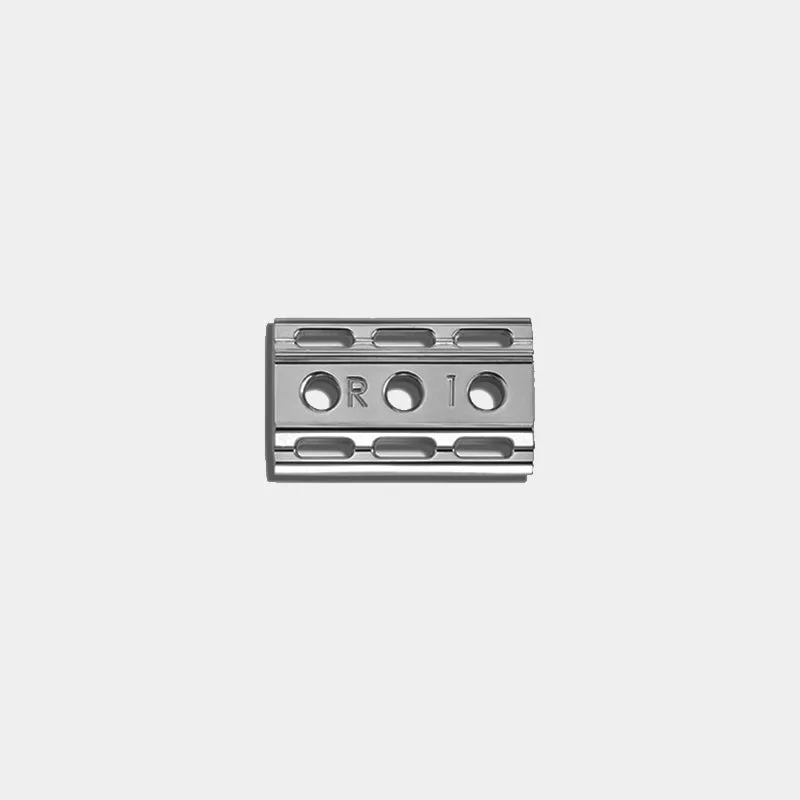
Rockwell 1/3 Plate - Gunmetal
-
Rockwell 1/3 Plate - Gunmetal: The flippable design provides both R1 and R3 settings. One plate covers two levels of aggression, so the swap is about orientation rather than owning two separate plates.
-
Rockwell 1/3 Plate - Gunmetal: Gunmetal chrome finish for a sleek, durable look. The finish is a visual and care consideration; it does not change the shave setting, but it is part of what you are handling and maintaining.
How to swap to the 1/3 Plate on a Chrome Series razor
The supplied information confirms compatibility and the two settings but does not include a step-by-step disassembly procedure. The steps below are a general, careful routine for handling razor parts; always defer to the manufacturer’s instructions for your specific razor if they differ.
- Confirm your razor is a Chrome Series model: The 1/3 Plate is compatible with Rockwell Chrome Series razors only. If your razor is not a Chrome Series model, do not force the fit.
- Work over a closed surface: Base plates, caps, and blades are small. Swap over a towel or a contained area so a dropped part does not bounce away.
- Remove the blade before changing plates: Handle the blade by its edges or use a blade-safe method, and set it aside where it cannot be knocked. The supplied information does not describe blade handling, so follow your usual safe practice.
- Orient the 1/3 Plate for R1 or R3: The plate is flippable: one orientation gives the R1 setting and the other gives the R3 setting. Decide which setting you want before you reassemble, and check that the plate sits flat and aligned.
- Reassemble and check the fit: Once the plate is in place, confirm the cap and handle seat correctly and the blade is held as intended. If anything sits unevenly, stop and recheck the orientation and alignment.
When a plate swap is worth it
The 1/3 Plate is most useful when you want to change the character of a shave you already know. If your Chrome Series razor feels too mild on one setting and you want a more aggressive option without buying a different razor, flipping to the other setting is the adjustment. If you are already satisfied with your current plate, swapping adds a variable rather than solving a problem.
It is also a sensible replacement part if your current base plate is damaged or you want the gunmetal finish on a Chrome Series razor. The plate is a genuine Rockwell replacement part, so it is intended to work with the razor rather than be adapted to it.
R1 vs. R3 on the same plate
The supplied information names the two settings but does not describe the blade gap, exposure, or angle of either. Use the descriptions below as a way to think about the choice, not as measured specifications.
- R1 setting: The milder of the two settings on this plate. Choose this orientation when you want the gentler option the plate offers.
- R3 setting: The more aggressive of the two settings on this plate. Choose this orientation when you want the plate’s more assertive option.
- Same plate, different orientation: You are not swapping parts between shaves; you are flipping the same plate. That keeps the routine simple and the storage minimal.
Checkpoints before and after the swap
These checkpoints are limited to what the supplied information supports. They are not a shaving protocol.
- Compatibility check: The plate is for Rockwell Chrome Series razors only. Confirm your model before installing.
- Orientation check: Confirm you have the plate flipped to the setting you intend—R1 or R3—before you tighten everything down.
- Fit check: The plate should sit aligned with the cap and handle. If it does not, do not force it; recheck the orientation and that you are using the correct razor model.
- Finish check: The gunmetal chrome finish is part of the part’s durable look. Keep an eye on it during cleaning, and avoid abrasive methods that could dull the finish.
What the supplied information does not cover
The supplied product record does not include blade gap measurements, angle recommendations, shave-time instructions, or a detailed disassembly sequence. It also does not state care instructions beyond the finish description. If you need those details, check the manufacturer’s documentation for your specific razor rather than assuming them from this guide.
The plate is listed as a genuine Rockwell replacement part for optimal performance, and it is compatible with Chrome Series razors only. Those two points are the firm boundaries: use it with the intended razor, and treat the flip as the adjustment.