Why an MG kit like the GP03S can develop loose joints
Loose joints on a Master Grade kit are usually a fit or wear issue, not a sign that the kit is defective. Polycaps and ball joints can loosen after repeated posing, and a joint that was tight out of the box may feel softer once the model has been displayed and handled. The RX-78 GP03S MG is a detailed Master Grade representation of the mobile suit, and like any articulated model kit it relies on friction at the joints to hold a pose.
The supplied listing for the RX-78 GP03S MG confirms it is a Master Grade model kit from the Gundam franchise, suitable for hobbyists and collectors, and that the listing includes the standard edition. It does not include joint specifications, materials, or assembly instructions, so any fix below should be treated as general modeling practice rather than a manufacturer procedure for this specific kit.
What the RX-78 GP03S MG listing actually confirms
-
RX-78 GP03S MG: Model kit type: Master Grade (MG) MG kits use articulated inner frames, which is why joint tension matters for posing and display.
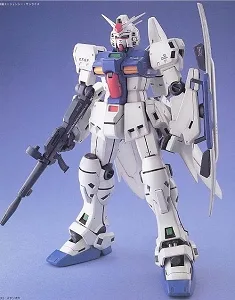
RX-78 GP03S MG
-
RX-78 GP03S MG: Listing includes the standard edition of this item Confirms you are working with the standard release, not a special edition with different parts.
-
RX-78 GP03S MG: Detailed representation of the mobile suit, suitable for hobbyists and collectors Sets the expectation that this is a display-oriented kit where pose stability is part of the experience.
Common causes of loose joints on the GP03S MG
- Polycap wear: Repeated posing can compress or wear the soft plastic caps that create friction at the joints.
- Ball joint seating: A ball joint that is not fully seated in its socket can feel loose even when the parts are correct.
- Paint or topcoat buildup: Paint or clear coat applied to joint surfaces can change fit and reduce friction.
- Weight and leverage: Large backpacks or weapons can pull a joint out of position, making it seem looser than it is.
How to tighten a loose joint without damaging the kit
These are general modeling techniques. The supplied listing does not include repair instructions, so work slowly and test fit before committing.
- Disassemble the joint: Separate the parts carefully so you can inspect the ball or peg and its socket.
- Clean the contact surfaces: Remove dust, paint, or residue that may be reducing friction.
- Add friction material: A thin layer of clear nail polish or a small piece of plastic wrap on the peg can restore grip. Let it dry fully before reassembly.
- Reassemble and test: Push the joint together until it seats, then move it through its range. If it is still loose, repeat with one more thin layer.
- Avoid over-tightening: A joint that is too tight can stress the plastic. Aim for smooth resistance, not a locked joint.
Posing tips that reduce stress on the GP03S MG joints
Support the weight of heavy accessories with a stand or by bracing the model at the torso rather than the limbs. When you change a pose, move the joint at the point of articulation instead of pulling the whole limb. Store the kit in a stable pose rather than leaving it in an extreme action pose for long periods, which can gradually stretch polycaps. These habits help any Master Grade kit, including the RX-78 GP03S MG, hold its pose longer between adjustments.
What the listing does not confirm
The supplied information for the RX-78 GP03S MG does not include a listed age range, component count, specific joint materials, or care instructions. It also does not confirm whether replacement polycaps or joint parts are available. If you need those details, check the official model kit documentation or contact the retailer before relying on any repair method. Absence from the listing is not proof that the kit lacks a feature; it simply means the supplied record does not cover it.