Start with the payload, not the knobs
The Sachtler System Ace M MS is built around a 0 to 4 kg (0 to 8.8 lbs) payload range, so the first balancing decision is whether your camera and lens fit inside that window. The system pairs the Ace M fluid head with the Ace 75/2 D aluminium tripod, a mid-level spreader, and an Ace tripod bag. Before you touch the counterbalance or drag, confirm your camera setup sits within that range. A rig that is too light or too heavy will not balance properly no matter how you adjust the head.
Key system numbers for balancing
-
Sachtler System Ace M MS: Payload range: 0 to 4 kg (0 to 8.8 lbs). This is the window your camera and lens must fit into for the counterbalance to work effectively.
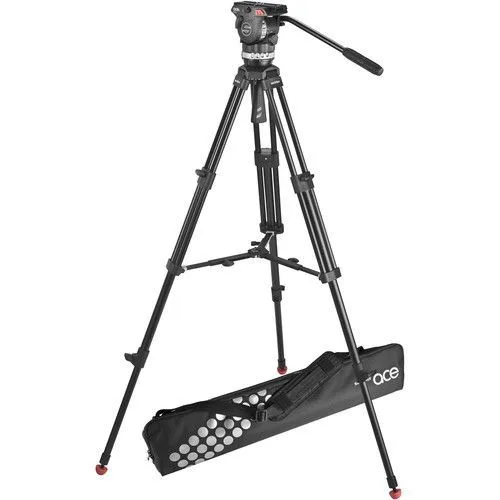
Sachtler System Ace M MS
-
Sachtler System Ace M MS: 5-step counterbalance (+0). You can dial in repeatable spring tension across five steps, plus a zero setting, to match your rig's weight.
-
Sachtler System Ace M MS: 3 grades of vertical and 3 grades of horizontal drag (+0). Drag controls how freely the head pans and tilts; the zero setting gives you free movement when you need it.
-
Sachtler System Ace M MS: Balance plate with 4.1" sliding range. Sliding the plate lets you fine-tune the camera's center of gravity forward or back without changing the counterbalance step.
-
Sachtler System Ace M MS: Maximum system height: 66.5"; minimum height: 30.7"; transport length: 33.5". These numbers help you plan your shooting stance and check whether the system fits your bag or travel case.
Balance the Ace M head in four steps
- Mount the camera and set counterbalance to zero: Attach your camera to the Ace plate using the supplied 1/4" screw and pin. Set the 5-step counterbalance to its +0 (zero) position so the head is not fighting you while you find the balance point.
- Slide the balance plate to find the center of gravity: With the tilt brake off, slide the plate forward or backward through its 4.1" range until the camera stays roughly level when you let go. This is the quickest way to see whether your rig is front- or back-heavy.
- Increase counterbalance until the camera holds: Step up the 5-step counterbalance one grade at a time until the camera remains steady at the tilt angle you use most. If you reach the highest step and the camera still drops, your rig is likely above the 8.8 lb payload limit.
- Set drag for the shot: Choose one of the 3 vertical and 3 horizontal drag grades to match the smoothness you want for pans and tilts. Use the +0 setting for free movement, or add drag for more controlled, deliberate moves.
Fine-tune with the plate and spare screws
The Ace plate includes a 1/4" screw and pin, and spare 1/4" and 3/8" camera screws are stored in the balance plate. If your camera body uses a 3/8" thread, you can swap the screw without hunting for parts. The 4.1" sliding range is generous enough for most HDSLR and compact camcorder setups, but it is not unlimited: if you cannot center the camera even at the end of the slide, recheck that your lens and accessories are within the payload range.
Height and spreader choices that affect balance
The Ace 75/2 D tripod extends from 30.7" to 66.5" and packs down to 33.5". The mid-level spreader adds stability, especially on uneven ground, but it also limits how low you can go. For low-angle work, you may need to adjust the spreader or remove it, but check your manual for the approved configuration. The system weighs 9.7 lbs without the bag, so it is manageable for solo shoots but not a ultralight travel tripod.
What the supplied information does not confirm
- Sachtler System Ace M MS: The supplied record does not include step-by-step instructions for removing or adjusting the mid-level spreader, nor does it specify a quick-release plate system beyond the included Ace plate. If you need to reconfigure the spreader or use a different plate, consult the manufacturer's documentation rather than guessing.