Quick Answer
To set up the AJA 3GDA, connect your SDI source to the input, distribute to up to six outputs, and power the unit. Ensure proper termination and signal integrity for reliable reclocked output.
Why Reclocking Matters
The AJA 3GDA not only distributes a single SDI input to six outputs but also reclocks the signal, which helps clean up jitter and timing errors that can accumulate over long cable runs. This is especially important when feeding multiple devices from one source, as a weak or degraded signal can cause dropouts or artifacts.
For most production and broadcast environments, a reclocking distribution amplifier like the 3GDA is a reliable way to maintain signal quality. However, note that reclocking does not restore missing video information or correct gross signal errors; it only cleans timing. If your source signal is severely corrupted, the output will still reflect those issues.
AJA 3GDA Setup Steps
- Mount the unit: Secure the AJA 3GDA in a well-ventilated location using its mounting holes or place it on a flat surface. Ensure the unit is not exposed to excessive heat or moisture. Check that the mounting surface is stable and does not block airflow.
- Connect the SDI input: Using a high-quality BNC cable, connect your SDI source (3G, HD, or SD) to the input connector on the 3GDA. Verify the source is outputting a valid signal before proceeding. Confirm the source signal format is supported (3G/HD/SD-SDI) to avoid no-signal issues.
- Connect the outputs: Attach BNC cables from the six output connectors to your destination devices (monitors, switchers, recorders). Use cables that are long enough but not excessively long, as signal degradation increases with distance. Label each output cable to avoid confusion during troubleshooting.
- Power on the unit: Connect the supplied power adapter to the 3GDA and plug it into a power outlet. The unit should power on immediately; there is no power switch on some models, so verify the LED indicator is lit. If the LED is off, check the power connection and outlet.
- Verify signal distribution: Check each connected device to confirm it receives a clean signal. If any output is missing, swap the cable with a known-good one to isolate the issue. Test all six outputs, not just one, to ensure full functionality.
- Test with a long cable run: If you are using long BNC cables (e.g., over 100 meters), test the signal at the far end to ensure reclocking is adequate. If you see dropouts, consider using a higher-grade cable or an additional amplifier. Document the maximum cable length that works reliably in your setup for future reference.
Product Facts
-
AJA 3GDA – Amplificateur de distribution et de reclockage (1×6 3G/HD/SDI): The AJA 3GDA is a 1x6 reclocking distribution amplifier for 3G/HD/SD-SDI signals. It lets you feed a single SDI source to up to six destinations while cleaning the signal timing, which is essential for reliable multi-device workflows.
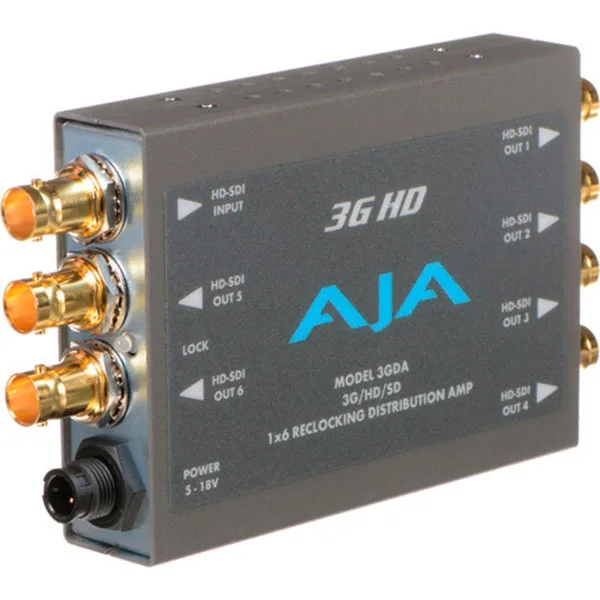
AJA 3GDA – Amplificateur de distribution et de reclockage (1×6 3G/HD/SDI)