Quick answer
Set up the Shanling EH90 by connecting your digital source, choosing the balanced headphone output for demanding headphones, and using the dual power supply to keep digital and analog stages isolated. Expect an R2R sound that favors natural timbre and smoothness over the hyper-detailed edge some delta-sigma DACs add.
What R2R sound character actually means at your headphones
R2R DACs convert digital samples using a resistor ladder rather than the high-rate modulation used in delta-sigma designs. In practice, that often translates to a slightly warmer, more continuous presentation where vocal and acoustic timbres feel less etched. The Shanling EH90 pairs its R2R DAC section with a fully discrete MOSFET headphone amplifier, so the amp is not an afterthought; it is matched to the DAC to preserve that natural character.
The trade-off is that R2R sound is not automatically more accurate or more detailed than a good delta-sigma DAC. It is a different voicing. If you want the sharpest leading edges and the most explicit separation of instruments, a delta-sigma design may suit you better. If you want a desktop system that makes long listening sessions feel relaxed without softening the music into mush, R2R is worth trying.
Where the EH90 fits and where it does not
The EH90 is a desktop DAC and headphone amplifier, not a portable dongle or a network streamer with built-in streaming apps. It expects a digital source such as a computer, CD transport, or streamer feeding it. Its balanced output is rated up to 5.2W at 32Ω, which is enough for many full-size headphones that struggle on weaker amps, but the catalog does not list supported sample rates, input types, or gain settings, so check those details before buying if you need a specific format or input.
Because the dual power supply separates the digital and Hi-Fi sections, the EH90 is designed to sit on a desk rather than be moved around. Plan for space and ventilation, and treat it as the center of a headphone listening station rather than a portable accessory.
Step-by-step EH90 setup
- Place the unit and connect power: Set the EH90 on a stable, ventilated surface and connect its power supply before any audio cables. Common mistake: stacking it directly on another heat-producing component or blocking ventilation, which can affect long-term reliability. Leave clearance around the chassis before you listen.
- Connect your digital source: Connect your computer, CD transport, or streamer to the EH90's digital input. The catalog does not specify which input types are included, so confirm the input you need on the unit before assuming compatibility. Match the cable to the input actually present on your unit.
- Choose the headphone output: Use the balanced output for demanding full-size headphones, since the EH90 is rated up to 5.2W at 32Ω from the balanced output. Use the single-ended output for easier-to-drive headphones or IEMs. Common mistake: forcing a balanced cable into a single-ended jack or using an adapter that shorts the balanced pins. Never adapt a balanced headphone cable to a single-ended output.
- Set volume before playing music: Start with the volume low, begin playback, then raise it gradually. Because the balanced output is powerful, a high volume setting can be dangerously loud with sensitive headphones. Checkpoint: if you hear channel imbalance or distortion at low volume, stop and recheck the connection. Reset volume to zero whenever you change headphones.
- Evaluate the R2R sound against your reference: Listen to a few familiar tracks and compare the EH90's R2R presentation with a delta-sigma DAC you know. Focus on timbre, vocal texture, and whether leading edges feel softened or natural. If the sound feels dull rather than smooth, give yourself a few listening sessions before deciding; R2R character is often a matter of adjustment. Judge R2R character over several sessions, not one track.
Product facts
-
Shanling EH90 R2R Desktop DAC and Headphone Amplifier Silver: Fully discrete MOSFET headphone amplifier matched to the R2R DAC section, with up to 5.2W at 32Ω from the balanced output. The matched amp section means you can drive demanding full-size headphones from the balanced output without adding a separate amplifier.
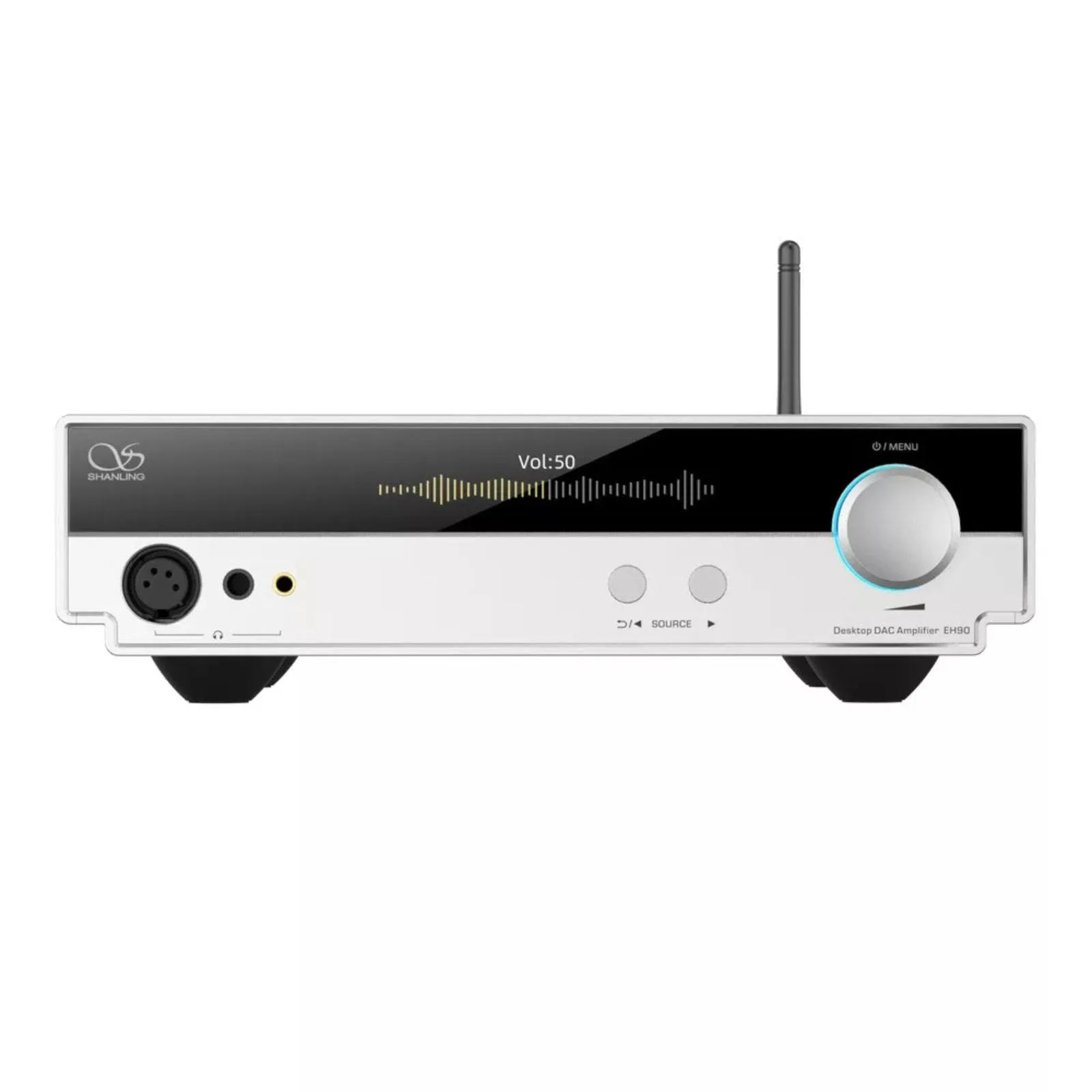
Shanling EH90 R2R Desktop DAC and Headphone Amplifier Silver
-
Shanling EH90 R2R Desktop DAC and Headphone Amplifier Silver: Dual power supply design separates the digital and Hi-Fi sections. Keeping digital and analog power isolated helps preserve the R2R DAC's natural sound character rather than introducing digital noise into the analog stage.