Start with the clamp, not the accessories
The Shoulderpod G2 is a mobile video grip and mount designed to add external microphones, lights, and other gear to your smartphone. Before you attach anything to its cold shoes, get the phone itself seated correctly. The G2 uses a universal phone clamp that fits most devices with or without a case. That flexibility is the point, but it also means you need to check the fit yourself rather than assume your phone will lock in the same way as someone else's.
The supplied product information does not include step-by-step installation instructions, specific phone size limits, or a torque or clamping-force figure. Treat the clamp as a spring-loaded holder: open it, seat the phone, and confirm it is held firmly before you lift the rig. If your phone or case feels loose, do not rely on the clamp alone for a shoot. The catalog does not confirm a maximum case thickness or phone width, so a physical fit check is the only reliable test.
A first-use sequence for the G2
Use this order to avoid mounting accessories before the phone is secure. Each step is based on the features the catalog confirms: the universal clamp, two tripod mounts, and six cold shoe mounts.
- Seat the phone in the clamp: Open the universal clamp and position your phone so the camera lens is not blocked. The G2 fits most devices with or without a case, but the catalog does not list exact dimensions. Check that the phone cannot slide or twist when you gently move the grip.
- Choose horizontal or vertical orientation: The G2 has two tripod mounts, one for vertical shooting and one for horizontal shooting. Decide your framing before you add accessories, because changing orientation later may mean rebalancing the rig.
- Attach a tripod if you need one: Use the tripod mount that matches your orientation. The catalog confirms the mounts exist but does not specify the thread size or supported tripod types. Verify the connection on your own tripod before relying on it.
- Add microphones or lights to the cold shoes: The six cold shoe mounts are there to hold accessories such as microphones and lights. Distribute weight sensibly and keep cables clear of the clamp. The catalog does not state a maximum accessory weight, so use your judgment and test the balance before a take.
- Check the grip position before recording: Hold the G2 by its grip and confirm the phone stays steady when you move. The catalog describes the G2 as a solid, reliable, and easy-to-use platform, but it does not prescribe a specific hand position. Find a hold that lets you reach your phone's controls without covering the lens or microphones.
What the G2 record confirms
-
Shoulderpod G2 - The Bold One: Universal phone clamp fits most devices with or without a case. This is the main compatibility statement. It tells you the clamp is flexible, but it does not guarantee a fit for every phone and case combination, so test yours.
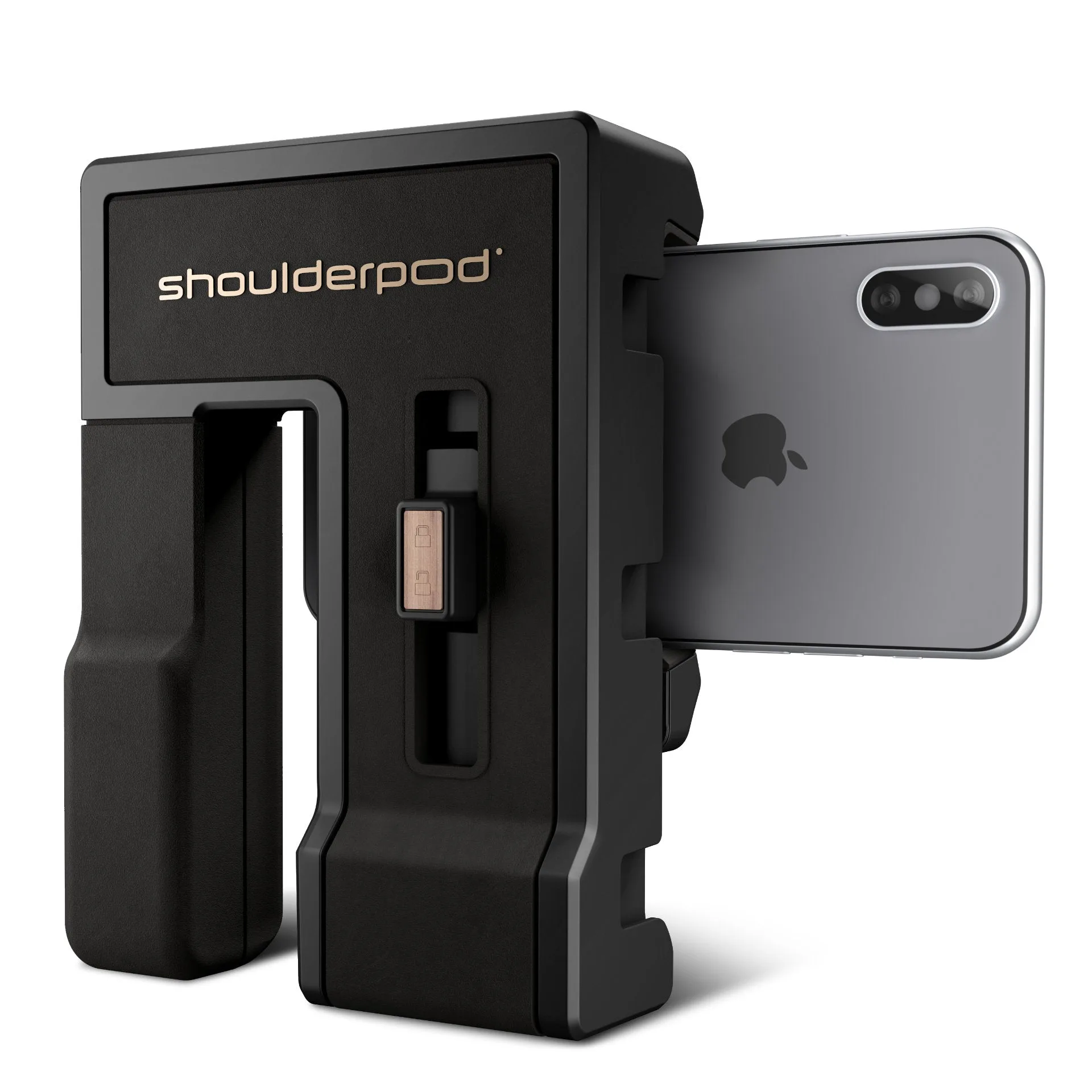
Shoulderpod G2 - The Bold One
-
Shoulderpod G2 - The Bold One: Two tripod mounts for vertical and horizontal shooting. You can mount the G2 on a tripod in either orientation. The catalog does not list the thread size, so confirm the match with your tripod before use.
-
Shoulderpod G2 - The Bold One: Six cold shoe mounts hold microphones, lights, and more. The cold shoes are the expansion points for audio and lighting. They are not powered shoes, so accessories that require power need their own supply.
Grip position and handling for video
The G2 is aimed at journalists, filmmakers, and digital content creators, and its value is in giving you a stable platform for a phone plus accessories. The catalog does not define a single correct grip position, so start with a two-handed hold: one hand on the grip, the other steadying the phone or accessory arm. Keep your fingers away from the cold shoes if you have a microphone or light mounted there, and check that the phone's microphone and lens are unobstructed.
For handheld shooting, the main risk is accessory sway. The cold shoes hold gear, but the catalog does not specify a locking mechanism or a maximum load. If a microphone or light feels loose, tighten whatever adjustment your accessory provides and test with a short recording. If the rig feels front-heavy, move your hand closer to the phone clamp or use a tripod mount instead of holding it freehand.
Checkpoints before you trust the setup
These checks are based on what the catalog confirms and what it leaves open. They are not manufacturer instructions.
- Phone security: With the phone in the clamp, gently push and pull the phone in several directions. It should not shift. If it does, remove the case or try a different seating position. The catalog does not promise a fit for every case.
- Tripod connection: If you are using a tripod, confirm the mount is fully engaged before letting go. The catalog does not specify the thread type, so check your tripod's compatibility yourself.
- Accessory clearance: With microphones or lights in the cold shoes, check that they do not block the phone's lens, screen, or ports. The catalog does not provide a clearance diagram, so this is a visual check.
- Cable and control access: Make sure any cables run clear of the clamp and that you can reach your phone's recording controls without disturbing the mount.
What the catalog does not tell you
The supplied information for the Shoulderpod G2 does not include care instructions, safety warnings, a list of supported phone models, tripod thread specifications, or a maximum accessory weight. It also does not confirm whether the cold shoes are standard dimensions or whether the clamp has a locking mechanism. These are not flaws in the product; they are simply details the catalog does not cover. When a detail is missing, rely on a physical check with your own phone and accessories rather than assuming a specification.
If you need a mount that is explicitly rated for a particular phone size or accessory weight, ask the store before ordering. The G2's strength is its flexibility, but that flexibility means the final fit check is yours.